Problem/Motivation
There was a discussion to add a JS based collape, or always display the individual edit / preview / close buttons.
#2650306: Always offer Collapse/Preview/Edit
#2721941: Add a JS based collapse / expand
On our paragraphs sprint, we realised that the close button is currently simply too much limited and we should further iterate on the 3 states before adding new complexity.
Proposed resolution
Instead of per-item control, we need a way to bulk close / open / preview all paragraphs.
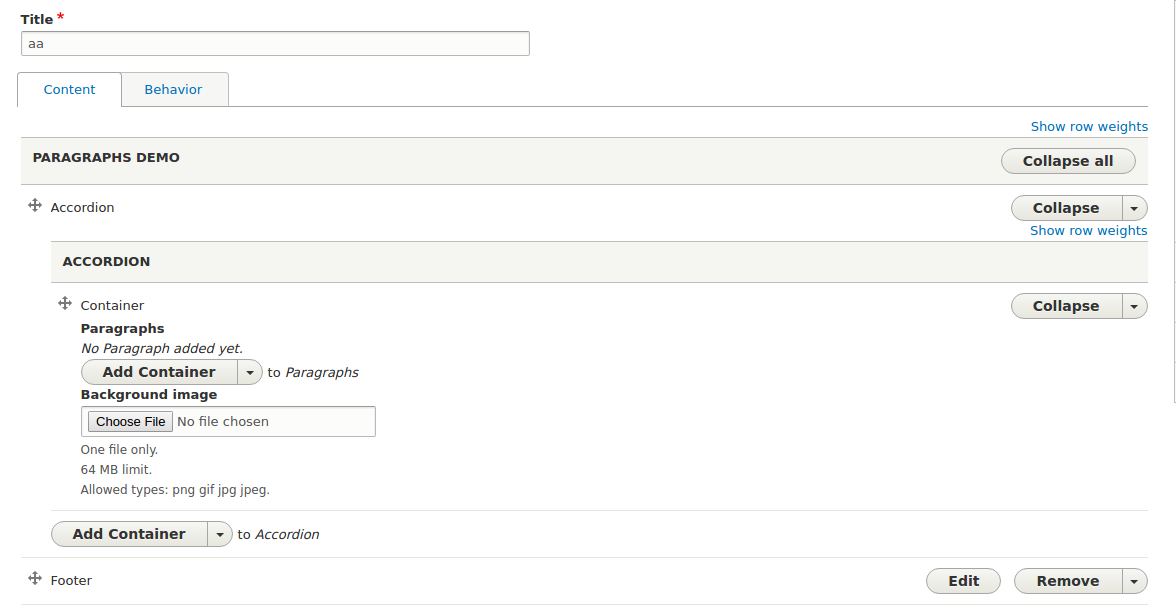
On each paragraphs widget, a new button is added that will offer the actions. A drop down button seems to fit best.
Initially, the close all can ignore nesting. Later we might still want to display the children, also to allow easy drag and drop.
#2658694: Move a nested Paragraph across fields and nesting
To complete the experience and make the user aware of what's inside a collapsed paragraph, the closed type should receive some one line summary.
Remaining tasks
User interface changes
An added button "close / open / preview all" per widget.



Comments
Comment #2
miro_dietikerComment #3
miro_dietikerPromoting for better visibility, because we think this is a severe UI improvement.
Unsure how we are going to handle configurability, combined with the "always show close / edit / preview buttons" issue.
We might decide that the setting only defined the initial state of the widget.
Except we see that the buttons totally clutter the UI.
But again, we want to find a way that the UI is always nice and it should not be needed to disable UX functions because you need better UX. ;-)
Comment #4
johnchqueI think this is a good step to start with.
Comment #5
miro_dietikerYeah, great to move forward here!
Would be great to discuss styling on a visual basis with @tassilogroeper and others.
The button will add weight to the UI and we need to find a way to keep it light. I fear the right side will be button cluttered. We should not just add the button and try to optimise UX later. :-)
Comment #6
johnchqueCreated an early patch, just for "Collapse all" It also work inside nested Paragraphs. Still needs test and I'm not sure how to continue with adding support for "Open all".
Comment #7
miro_dietikerSince this is a visual element, please provide a screenshot.
Comment #11
johnchqueAdded small changes, now it also collapse/open all.
Comment #15
johnchqueActually the button is not well placed. Still need to work on it.
Comment #16
miro_dietikerUnfortunate naming... It's paragraphs anyway, and multipleSubmit is meaningless.
It's a toggle now, right? Button label is also always Collapse.
Also tests... ;-)
Comment #17
ada hernandez commentedHi everyone, I tested the #11 patch and when I add a new paragraph content, it is not saved.
Comment #18
cleverhoods commentedStarted working on this
Comment #19
johnchqueNot sure when I will find time for working on this.
Comment #20
miro_dietikerPromoting this issue. With our deep nested content and issues of paragraphs that sometimes mixes behavior plugin settings, ... we would love to be able to collapse all children with a single click.
Comment #21
toncic commentedMade some progress, Collapse all button works fine for nested paragraph and when we have more than one filed, but still there is a problem from #17.
Also added tests.
Comment #22
miro_dietikerAny ui screenshot update?
Please also for a nested situation.
What is remaining here?
Comment #23
miro_dietikerOh it still looks the same. :-)
The button should be right aligned as all other such buttons.
And it should play well with the Content / Behavior tabs if present. They should be on the same line.
I think we should only display the button if we have multiple children. Otherwise it's a full duplicate.
Also the button is still only collapse all. The issue title is proposing a drop down with both expand=edit and collapse all actions.
We should not care about "preview" though as we likely define that closed==previe (with a setting to define if closed shows the summary or preview).
Comment #24
berdir> And it should play well with the Content / Behavior tabs if present. They
should be on the same line.
That's easier said than those because those are just put in #prefix and are plain HTML.
That approach is not possible here as we have actual form elements.
I have the same problem in the reorder issue, where I started to add stuff to the template/preprocess to handle that. The problem is that field API assumes that all children are field item deltas except the add more button and that stuff is all pretty hardcoded.
So, not sure if we want to fix that here, but I know it looks very bad right now if we don't.
I think we need to create a design of how the header should look like with all the switches and buttons and thingies combined. And likely completely replace the default field ui template and introduce regions where we can put stuff and so on, including all our ugly prefix/suffix html markup.
Comment #25
miro_dietikerI think we should avoid floats wherever possible.
Not sure about this. Why pass down the show warning thing? However i realize i don't fully understand what the purpose of this is and it's undocumented. We should at least create a follow-up to document all these magic properties.
I doubt that you should overwrite the original delta ever.
Comment #26
toncic commentedFixed problem with saving, moved collapse all button into header.
Also fixed:
Collapse all works fine with nested and also with multi fields.
Need to fix tests for Collapse all and add Expand all button.
Comment #27
toncic commentedOops, something went wrong with previous patch and diff. :)
Comment #28
berdirunrelated.
went.. is strange, describe what you *do*, not what you *did*.
i'm not sure what the show warning has to do with this and the code is quite hard to read. it oesn't really hurt if we set the value again if it was the same.
I know the place you copied this from also didn't have comments but lets add some here.
Builds
why is the delta relevant here, this button only exists once and is not delta specific?
Comment #29
toncic commentedAddressed #28.
Added "Edit all" button.
Fixed test for "Collapse all" and added for "Edit all".
Here is the new screenshot:
One more stuff here, do we want to show only one button "Collapse all/ Edit all" depend of current state of paragraphs on page or we want to make dropdown menu like we have for Collapse,Remove ... actions? If we want dropdown menu what will be default action?
Comment #30
miro_dietikerIt should be a dropbutton, not two buttons.
We could do it as simple as this:
If the first paragraph is open, make collapse the default action. It the first is closed, make edit the default.
Is this a temporary solution and you plan to move the button later? The new button should be on the line where the tabs are.
I try to search some nockup previously done. The goal should be that the tabs are next to the button, because the left area on that line will be extended with contextual / parent hierarchy information.. and then the line gets sticky while scrolling.
Comment #31
primsi commentedNot sure, but it from what I see in the rest of the file, this should be - not _.
Is this comment a leftover?
Doesn't the container already produce a div element? Maybe I am missing something, but do we still need another level via the prefix/suffix? Or you could just apply the class to the container? If it's because of the if check above, can we use something else for that check?
I would suggest "Loops through all paragraphs and changes"...
Should we change the name of this submit method to something related to the logic it does?
We introduce two new properties in this array, which are not required by the type submit. Maybe it should be a good idea just to mention a bit why we need them and where we use them.
Same as above, document a bit?
Comment #32
toncic commentedImplemented #31.
Fixed.
Fixed.
New version:

Need to fix test failing.
Comment #33
berdircan't we combine those two methods into one, including the logic to define the default. We have a huge amount of methods already on this class and very long main form methods.
We could even move all of it, including the dropbutton building into that method and call it buildHeaderActions(). Once this is committed, I will refactor my reorder patch to add another button here.
lets include submit in the method name so it is clear that it is a submit callback. And we call it edit mode usually, not paragraphs mode. changeAllEditModeSubmit() ?
I was thinking about method name and so on for this, but I would actually prefer to keep this inline. This is a small method, we will never need that logic anywhere else. keep it inlined.
this is our widget, so we know it is always multiple and can skip that if.
either we just unconditinally call unset() ( it doesn't care if the key doens't exist) or we move the set calls below also inside the if, as we don't need them unless we actually remove it.
Comment #34
steniya commentedComment #35
toncic commentedImplemented #33, refactoring, fixing test failing.
Comment #36
berdirNow you're doing the logic here twice. try $header_actions = $this->buildHeaderActions(); if ($header_actions) { ... set it }
lets merge the two test together into one class.
Comment #37
miro_dietikerComment #38
toncic commentedAddressed #36.
Comment #39
miro_dietikerThis needs a re-roll now.
Comment #40
didebruI have rerolled the patch but it does not seem to work properly.
Comment #41
toncic commentedFixing test failing from #38.
@Insasse, just tested this and for me works pretty fine, can you give as more information about what is not working properly in your case?
Comment #42
toncic commentedComment #43
didebru@tonic works pretty well thanks :) had tested it on an old ~8.0 setup my fault sry.
Comment #44
miro_dietiker@Insasse it seems you are not using the experimental widget.
Works pretty well for me.
But if i "collapse all" children, they do not indicate anymore if they have been changed.
That said, i realize that if we collapse a parent container that contains changed children, we should bubble up the changed annotation - but only for collapsed ones. Otherwise it looks like nothing changed. I guess should be a follow-up, more related to the other changed issue..
#2886686: Collapsable paragraphs always show "You have unsaved changes on this Paragraph item." message on collapsing..
Comment #45
toncic commentedCreated follow-up.
Comment #46
miro_dietikerRenamed the follow-up. IMHO the original issue should make sure that the regular changed messages display after a collapse-all. No regressions.
Comment #47
toncic commentedAdded warning message on collapse all button.
As @miro_dietiker mentioned in #44
.
So it's working fine if you change top level container, but not when you change the children.
After discussion with @Berdir:
That part we will do in follow-up.
Comment #48
miro_dietikerWarnings now work for me.
Nitpick: The button labels are centered now. The other drop buttons are left aligned. Plz check style.
I'm confused, we remove the whole row here. Where do we put that helper row?
There is no more simple way to bring in those buttons than via a pseudo row?
Other than that, it looks ready to commit. Also tested no-js behavior.
Comment #49
miro_dietikerCommitted.
Plz create a follow-up about using a field template and care about the alignment as proposed in #48 and close.
Comment #51
toncic commentedAdded follow-up.