Closed (works as designed)
Project:
Announcements
Version:
6.x-1.0-beta
Component:
Miscellaneous
Priority:
Normal
Category:
Bug report
Assigned:
Unassigned
Reporter:
Created:
20 May 2008 at 22:58 UTC
Updated:
2 Jun 2008 at 02:49 UTC


Looks like this will be a useful module. I installed it and gave it a quick "going over" and these are the comments from that review, grouped but in no particular order. I hope this helps.
Theme
---
- the block's theming should not add any space around the block or it won't fit into existing themes (e.g., see Picture 1.png versus Picture 2.png ... with spacing removed it fits into the theme just like other modules' blocks)
- it's not really necessary to change the background or add a border on /announcements abstract listing ... but, if you do, you should probably use a more "neutral" color (white/gray) so as not to clash with existing themes, by default
- when promoted to the front page, the teaser follows directly after the starting-ending date (should start on a new line with some intervening space) ... this could be more than just a theming issue
Fundamentals
---
- node type should be announcement (not announcements), to be consistent with other Drupal node definitions -- bulletin or news would even be shorter/better and it'd take up less screen real estate on the /admin/content/types page ('though I'd agree that "news", in general, is a somewhat different abstraction, but the idea of "site news" is similar)
- the "abstract" field in the announcements table is unnecessary/redundant ... the "abstract" field/concept is the same as the node_revision table's "teaser" field/concept and I'd recommend that it be removed from the announcements table and moved into the node_revision's "teaser" field so those fields are used in the manner in which they were intended, thus allowing other modules -- e.g., Views -- to use them to their benefit
- the normal default is to show only "teaser" when promoted to front page (and show more... link instead of "Add new comment" link) ... actually, the norm is to obey the (poorly abstracted and poorly explained) summary/body (aka teaser/body) "rules"/behavior to allow teaser-only, or full teaser+body OR teaser-only then body-only on "full-page" view
- I'd think that the announcements should be put on the bottom of front page when promoted to it (or, even better yet, have an option to allow either before or after placement or even a weighting, 'though all that's likely possible by using a block)
- I have no idea what "Display additional announcement classification" option means or does ... as far as I can tell from the DB entries that are created, currently there's no difference, but maybe you have something planned #;-)
Features
---
The following features would be desirable:
- separate options for including/excluding the announcement's title and/or its teaser in a block
- an option to include/exclude start-end date info (both page & block, for when a block is used on a page)
- an option to include/exclude the "Submitted by ..." line
- the block & page should both have a "more..." link to a page that shows the full list of non-expired announcements (and itself is run through the pager and obeys a setting for the number of entries on a page)
- ultimately, it'd be nice to allow different input filters on both the abstract/teaser/summary and the body (including allowing a php filter for even more customized content)
| Comment | File | Size | Author |
|---|---|---|---|
| Picture 2.png | 25.31 KB | aMakUzr | |
| Picture 1.png | 27.42 KB | aMakUzr |


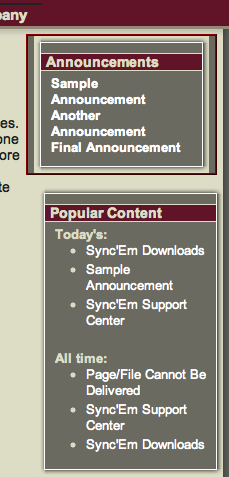
Comments
Comment #1
nancydruAnd this is why the general rule is to put one issue at a time. This is going to be hard to even begin to address.
1) I don't see where I add any spacing. There are plenty of div's for individual styling. If you can figure out where this "extra spacing" is coming from, please open an issue.
2) I consider any module's CSS to be merely a starting point - feel free to override it in your site's style.css, as I do. As you can see, some of the classes are actually left empty for you.
3) The abstract is run through check_markup, which causes filters to be applied according to your specified input format. On my system, one of those filters is the line-break-converter, which inserts a paragraph tag. Other than that, perhaps one might add a "display: block" or "clear: left;" to the CSS.
4) "Announcement" was already taken by the module of that name.
5) "Abstract" provides a small, easy-to-read summary of the announcement and not necessarily just a shortened version. In 6.x it would be easier to do as you suggest and use the teaser column; however, in 5.x sometimes the teaser will be rebuilt automatically whether it is desirable or not. However, I will entertain a new issue suggesting that this be further researched and potentially implemented.
6) The view on the front page is supplied by "node_view" so it should follow "standard rules." Actually it is providing "teaser view" (plus abstract) on my system. Node_view should create all the normal links that you have set up. When you submit an issue for #5, this should be even more "standard."
7) So now you want the "standards" thrown out? The announcements are shown in "standard" front page order. And, Frankly, IMO, they should be higher, not lower -- these are "noteworthy items" after all, why bury them at the bottom? If you want them weighted, try the Weight module.
8)
Actually, I have no idea what that does either. It was there in the example, but I have no idea what it does, other than maybe suppress the links (#6). I would also entertain an issue to remove it.Fixed.9) Open an issue for a "promoted to block" option (similar to what we have in the Quotes module).
10) Change your CSS to
.announcement-dates: display: none;11) This is controlled by your site's theme settings.
12)
There is already pager code in the module, I just didn't document it because I was planning to make it the only way. I agree there should be a "more" link in the block, but from this comment I apparently haven't added it yet. Please open an issue for it.Fixed.13) Interesting idea. I've never seen it done, and I'd have to do some checking on how it might be done. Open an issue, please.
Okay, so let's see. You're going to submit individual issues for 1, 5,
8, 9,12, and 13.