Several time have I started down the path of supporting conditionals for grid questions -- both as source rules and as target actions. It is very involved and results in complicated, ugly code. Then I am upon the idea of using a grid as a container for the questions which are just Select Options components.
The attached patch implements "Grid (advanced)", machine name grid2, which has this functionality. Because the D7 component API is not object oriented, it was a bit difficult since much of grid2 is the same as grid. I have attempted to write it in such a way that the D8 version can use inheritance to so that grid2 extends grid.
Pros:
- The nested Select Options components may accept multiple options (checkboxes).
- Checkboxes and radios may be mixed in the same grid2.
- Some checkboxes / radios may be missing some options, or have extra options. grid2 will consolidate the options from all nested Select Options components.
- Conditionals can operate with the nested Select Options components as if they weren't within a grid.
- Individual questions can be required and others not.
- Components other than Select Options may be nested in a grid and are rendered within the grid, with a colspan that appears where the radios would otherwise be.
Cons:
- Harder to configure. 10 questions will require 11 components -- a grid2 and 10 select's.
I offer this for comment, especially on any implementation details, and of course for testing. I did enhance the grid component in places to handle some of the features of grid2. This avoided have two very-similar functions (one in grid and the other in grid2). I could be convinced that the duplication of code is better so that grid is changed as little as possible.
I have not tested with the option element module. Formbuilder will presumably need an update.



Comments
Comment #2
danchadwick commentedComment #3
danchadwick commentedHaving further thoughts. I tried an implementation where grid has two variants (advanced and basic). It was awkward because a) you couldn't change your mind after creating it and b) all the static component info (e.g. webform_component_feature(), _invoke, _info) functions had to be modified to take a component rather than a component type, and to allow callbacks to return the information based upon the component. I abandoned it because it got too messy.
But now I'm thinking it should be AND rather than OR. A grid can have its own questions AND it can have nested components. I think this is promising. We will still have to tweak some features, such as suppressing analysis if there are not internal (basic) questions.
Comment #4
quicksketchHi Dan, thanks for writing this up (and the notification by e-mail).
I read over the code and it took me quite a while to figure out how this worked, because I couldn't find how the child-components were selected. I expected from the description that they would be selected on the component configuration form. After poking around a bit, I realized that the
'group'property inhook_component_info()had been set toTRUEfor the new grid2 component. Woah. That wasn't what I was expecting at all! This doesn't seem like what what would be expected by either developers (speaking for myself) or end-users. I just wouldn't expect to be able to drag a component within another component like this.Using this approach, does this mean that other elements like textfields or even fieldsets could be dragged within a grid2 component? As the "group" property was intended for things like fieldsets, it doesn't have the ability to restrict to only certain types of sub-components.
This component seems interesting and clever, but I don't think it fits with the existing patterns and expectations around how webforms work. I'd be pretty nervous about building it into the main Webform module.
Comment #5
danchadwick commentedHi Nate. Thanks for the feedback. I think your confusion over the grid children derives from your extensive knowledge of the "old" codebase more than an inherent oddity of the feature. I think users and future maintainers will understand and expect this. I'd go so far as to say that I think it is confusing to have the questions within the old-style grid, and it certainly complicates the code base and table schema. I think we should consider dropping old-style questions in the D8 version.
Also, implementing both checkboxes and conditionals in the existing grid architecture is very, very difficult. I have a patch which I posted in the related issue with a partial implementation. I stopped when the code just got too complicated.
In the longer term, I also plan to roll other grouping-type components into core. One would be a simple div container, which will allow components to be grouped for CSS and conditional show/hide. Another would be the Webform Layout module, which lets you put components into a table.
I have reworked the code, combining grid and grid2. In this way, you don't have to decide which type of grid you want. A grid can contain either or both types of questions.
It is possible and desirable to nest components under than Select under the grid. These are displayed in a colspan, with the title in the first (and last if using left/right titles) column. This enables very power new forms. For example, if you need to add comments or additional information after one of the grid questions, you can put it right there in the grid. And you can use conditionals to show it only when needed.
It is also very powerful to have non-homogeneous options. Sometimes an option doesn't apply to a question. Consider a table of fruits by fruit color. With checkboxes!
I'll post a revised patch later today.
Comment #6
danchadwick commentedHere's the patch. This version has only one grid component, but it is capable of displaying both its own questions, merging in any additional nested (indented) Select components, and any other nested components of other types.
To help the user understand the features and possibilities, I added this collapsible help table. It is initially expanded when creating the grid, but collapsed when editing it:

I also have the Options Element some love in it's help. It had fallen a bit behind (e.g. was missing the token browser and some informative text).
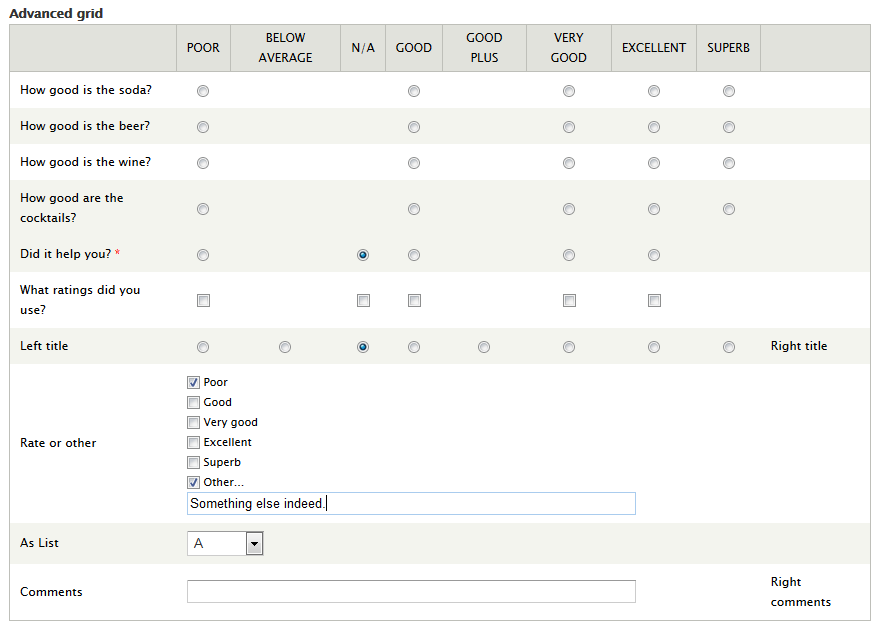
To show a variety of features, (but not a realistic use case), here's a quick screenshot:

It is remarkable to me how small the changes are for such a huge leap in functionality.
Comment #8
danchadwick commentedThis patch implements #6 above, plus:
Committed to 7.x-4.x.
Comment #9
danchadwick commentedComment #10
joelpittetNot sure how this happened but the 7.x branch got a zero-width space added.
<U+FEFF>Comment #12
danchadwick commented@joelpittet -- thanks. That's a BOM (byte order mark, not bill of materials). I had some trouble merging, so maybe my external diff tool added this. I believe it's harmless, but also not desired.
I saw that line in the diff but couldn't see it in the editor, so I figured it was removing an extra space. Next time I see the first line as a diff, I'll look for a BOM!
Committed to 7.x-4.x. D8 folks should check to ensure this doesn't creep into that branch. I'm not changing the issue status for this trivial commit.
Comment #13
joelpittetThanks @DanChadwick
Comment #14
liam morlandThis is interesting and it think it will be useful. It is not clear to me why it is helpful to have components inside the grid if they do not relate to the options across the top. Semantically, this doesn't make sense to me.
An easy way to make a grid with checkboxes would be useful.
Comment #15
danchadwick commented@Liam -
Consider a grid that asks a series of ratings. If a particular one is, say, less than "good" then a conditional displays (right after the question) a reason for the poor rating.
This is exactly the use case I need. In my situation, I want to provide a "Do you really mean this?" checkbox.
Sometimes the order in which you would like to ask information from the user doesn't fall neatly into the rigid semantics of the original grid component.
Comment #16
liam morlandYes, I see that is a good use case.
Comment #17
quicksketchThanks Dan for rewriting this to be a single component. That's definitely preferable in my mind to having two different grid components. I still haven't had a chance to test this out.
Does the randomization of questions and options still work after these changes?
Comment #18
danchadwick commentedYes.
Comment #19
vako commentedDan, wow, what you have done is ingenious. I don't think any other CMS will have such complex and intricate functionality!
But it needs a good documentation. Out-of-the-box people will not know how to make this work.
Here's a quick explanation of how to create checkboxes under a Grid:
Similarly you can add any other component under the Grid to make a more complex grid.
Now, let's hope this will work seamlessly with the Webform Report module and the Email option.
Thank you!
Comment #21
fenstratCommitted and pushed both #7 and #11 to 8.x-4.x. Thanks!
Nice feature Dan, like Nate I've still not had a chance to test it, but it is great functionality for relatively little code addition.
Comment #23
liam morlandThis removed the ability to display the component label inside the grid, which was added in #1463364: Provide option to move grid title to first row header.. This ability will be restored in #2726789: Return inside labels to grid components.
Comment #24
Elifas commentedHow can one do this in Drupal 8 or 9 .. there seem to be no Grid.
Comment #25
miguelbraga commentedDear all,
I'm sorry for reopening this but I'm confused.
(I'm on D7 and latest webform) I'm trying to give set a condition based on a webform grid component value, eg:
Color usage
Never Almost NeveR Sometimes Fairly Often Very Often
Do you use red?
Other color?
With the "other color" question I want to show a textfield if the user selects all options rather than never (to specify color).
It's a basic example but translates what I want to achieve with medical jargon.
Is this possible? the field doesn't appears listed in the first conditional field!
Comment #26
miguelbraga commentedComment #27
liam morlandThis sounds like a support request. Please open a new ticket. Support requests are always normal priority.