Problem/Motivation
We currently have a special filter that handles the alignment of images via a data-attribute. If this filter is disabled, alignment of images is not possible through the Image dialog form.
However, if you insert an image into CKEditor, it still displays allows the image to be aligned via the alignment buttons. But when you save this content, it is not actually aligned as it appears in the editor.
Image aligned right via the alignment button:

But is displayed with no alignment on saving:

Proposed resolution
Make sure the alignment buttons are disabled when an image is selected for text formats that don't have the align filter enabled.
Remaining tasks
None.
User interface changes
- Before
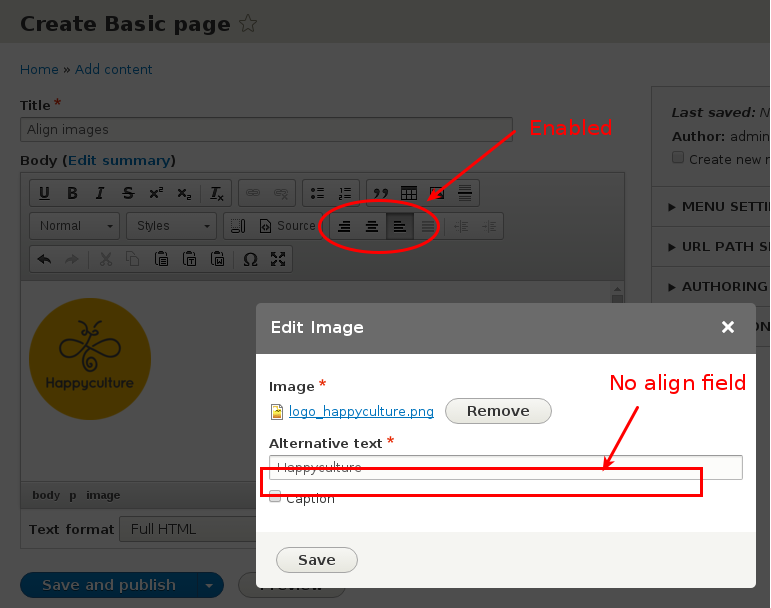
- After

API changes
None.
Data model changes
None.
Why this should be an RC target
No APIs touched. Zero disruption. Just a simple, isolated fix for sites that enable the alignment buttons.
OTOH, because this is fixing something for an optional set of buttons (the alignment buttons are not enabled for Basic HTML
nor Full HTML
by default), this could easily be postponed to a patch release for 8.0.





Comments
Comment #2
quicksketchThis patch was what we applied to Backdrop from https://github.com/backdrop/backdrop-issues/issues/1204.
It should be able to be adjusted fairly easily for Drupal 8.
Comment #3
wim leersThanks, @quicksketch, great find, and thank you so much for contributing it back upstream :)
Comment #4
wim leersComment #5
wim leersThis is not a big bug, so could conceivably go into 8.0.x. Hence not tagging , because there are much more important CKEditor issues that are RC targets. I want to maximize the probability of those fixes going in.
The code was pretty specific to Backdrop's CKEditor integration — it seems Backdrop's integration has diverged a fair bit from Drupal 8's, but it's still generally the same, and I was able to easily morph #2 into a Drupal 8 patch. It works great :)
@quicksketch++ :)
Comment #6
duaelfrI did the manual testing for this issue and the patch works perfectly well.
The fun thing I've seen while testing is that, without that patch, when the image align filter is disabled, we can left or right align the image using the alignment buttons but we cannot center the image this way (with the align filter enabled there is no problem).
It makes me think that, even if this is quite minor according to all the other ckeditor issues, it introduces a really weird behavior to the user that could think that Drupal's CKEditor integration is totally broken.
The disruption of this fix is so low than it could totally be a RC target. I'd prioritize the issue as minor and tag it for triage but I let you judge what's the best thing to do.
Before:

After:

Comment #7
wim leersI'd also like a +1 from the CKEditor team.
Comment #8
reinmar commented+1 from the CKEditor team :)
Comment #9
wim leersThanks!
Comment #10
alexpottThanks for tagging this for rc target triage! To have committers consider it for inclusion in RC, we should add a statement to the issue summary of why we need to make this change during RC, including what happens if we do not make the change and what any disruptions from it are. We can add a section
<h3>Why this should be an RC target</h3>to the summary.Comment #11
wim leersDone.
Comment #12
wim leersBetter title.
Comment #13
alexpottDiscussed with @webchick and we agreed that this is not really necessary to get in to the RC for the reasons @Wim Leers outlined in the issue summary but it'll make a good patch version target to fix once 8.0.0 is out.
Comment #14
wim leersAgreed; thanks!
Comment #15
wim leersReflecting #13.
Will re-RTBC after 8.0.0 is out :)
Comment #16
wim leersPer #15.
Comment #17
xjmI tested this patch manually, but either I am not testing it correctly or the patch does not work. My steps to reproduce:
/admin/config/content/formats/manage/basic_html, drag the left and right alignment buttons into the toolbar.classas an allowed attribute for thePtag. (Question: I thought configuring the editor toolbar was supposed to automatically configure the allowed HTML tags as well? But if I do not do this step, the buttons do not appear in the editor.)/node/add/article, use the body's image upload button to upload an image with right alignment./admin/config/content/formats/manage/basic_html, uncheck "Align images" and save the form.Can someone confirm if these are the steps or if this is another aspect of the bug?
Comment #18
duaelfr@xjm I just followed your steps and I can confirm that the patch works.
I had to empty my browser's cache after applying the patch, though.
To answer your 3: you are right, the required attributes declared by ckeditor plugins are automagically added to the allowed elements list. I think the problem comes from the fact that these two plugins are those from CKEditor by default. These plugins usually does not declare class as required attributes. We should open a follow-up to address this issue because we cannot suppose that users are going to understand that they have to add the p.class attribute in the allowed tags field.
Comment #19
alexpottSo I've followed @xjm's steps to reproduce the patch appears to work mostly as I would expect and as described in #6 - I tested on chrome.
However one thing that I found odd was that after disabling "Align images" and resaving the node the
data-align="right"was not removed the image. Shouldn't it be removed?Comment #20
duaelfr@alexpott I think it's the normal behavior as text filters are always applied when showing content, not when saving it.
CKEditor could eventually filter it but, given its plugins are written in JS, we have no mecanism to affect their definition according to filter settings yet.
That could be an interesting new feature but I think it's out of the scope of this issue. I let you judge.
Comment #21
wim leers#17:
It is supposed to, and does. But it was only ever designed for automatically whitelisting tags. Just before release, we changed
FilterHtmlto also do attribute whitelisting. Hence it works only partially for attributes. See #2567801: Deprecate core/modules/editor/js/editor.admin.js JS APIs in Drupal 10, for removal in Drupal 11 for fixing that.#19:
Like @DuaelFr already says in #20, we never ever change the original data. That's a key design point of the filter system. This is just another symptom of that design choice. And in fact, this is part of why Drupal 8 — after lots of careful deliberation — went with
data-attributes (data-caption,data-align,data-entity-uuid…): because it means the metadata in those attributes can either be acted upon (i.e. the corresponding filters are enabled) or ignored (the case you are talking about). Which is super important for content reuse/multichannel content. When a (native or web) app renders e.g. a news article retrieved from Drupal, it could choose to ignore the alignment metadata.If you don't want any
data-attributes to be sent, then you'd have to add a to your text format, to run as the very last filter.Comment #22
alexpottOkay the arguments in #20 and #21 make sense to me. I've manually tested this patch and it fixes the bug. Committed 8eb7154 and pushed to 8.0.x and 8.1.x. Thanks!
Comment #25
wim leersYay! :)
Fixed the embedded screenshots in the IS.