Problem/Motivation
The problem was originally described in #2508830: Various UI problem with autocomplete select control.
How to reproduce (from the original report)
Have a clean Drupal core installation with entity_embed button enabled for full html format and bunch of nodes generated with devel generate. Tested in Chrome and FF and it both browsers problems are the same.
Click on the first entity embed button.
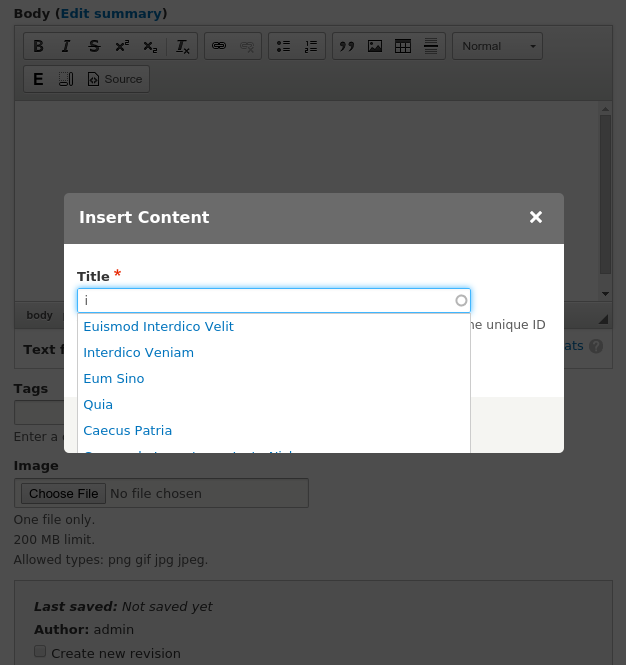
Expected behavior
Obviously the suggestions container should flow out of the modal container and all suggestions should be visible.
Actual behavior
The suggestions of the autocomplete field are clipped by the modal container as it has a CSS definition containing "overflow: hidden" and users can not see all suggestions nor can they scroll them.
Further information
This is not an entity_embed specific issue, but it happens in all modals that contain an autocomplete widget.
JQuery UI had this problem too but it was fixed:
Dialog: Selectmenu/autocomplete in dialog window is cut off. So jQuery 1.12.0 release removed overflow hidden from dialog control because of the same problem we have now.
But then #2423781: Firefox crash using a modal: Firefox crash using a modal reintroduced overflow hidden in seven because of some weird FF problem on OS X when using modals.
Proposed resolution
Remove "overflow: hidden" from seven's CSS. I'm aware that this will re-introduce the problem, which was fixed #2423781: Firefox crash using a modal. But the problem with the autocomplete suggestions is sure more severe than that OS X and FF specific bug as it happens in multiple browsers and multiple Os'.
Remaining tasks


Comments
Comment #1
davidhernandezThat overflow problem caused a complete browser crash. That is a significantly worse problem than the sixth+ results of autocomplete getting clipped.
What is needed is a solution, not trading one problem for another.
Comment #2
nod_is the crash still happening on mac? don't have one, can't test.
Comment #3
droplet commentedI revert #2423781: Firefox crash using a modal and test in both Mac & Windows Firefox 39 and can't see any problems.
Comment #4
nod_All right, let's revert it then.
Comment #5
droplet commentedNo responses from #2423781: Firefox crash using a modal report and reviewers. Let's revert it. Let it break if it will crash the browsers and collect more meaningful debug logs during development stage.
Comment #6
yannickooLooks fine :)
Comment #7
alexpottI can confirm that I don't see the problem anymore. I hope everyone is updating firefox :)
Committed 6b4e86d and pushed to 8.0.x. Thanks!
Comment #10
mradcliffeThis patch reverting #2423781: Firefox crash using a modal still freezes Firefox 38 Extended Support Release (ESR), which has an end of life of March, 2016.
It probably is not worth it to revert this patch as that pain will end early next year. But it does render the Views interface unusable for enterprise/corporate Firefox users who use ESR. Most likely a small portion of the community.
If that is the resolution for this freeze, then the minimum requirement for using the Drupal interface should note that Firefox 38 ESR is not supported.
Comment #11
droplet commentedCan you show me the exactly version and platform you used, I will test and provide a fix if i can.
https://ftp.mozilla.org/pub/mozilla.org/firefox/releases/
And the steps to reproduce this problem.
Thanks.
Comment #12
mradcliffeI tried the following to reproduce on simplytest.me:
My results:
Comment #13
droplet commentedConfirmed.
- It's fixed in Firefox 39 from my testing.
- Only affected Mac OS.
- Turn off hardware acceleration in Firefox reduce the freeze time.
- Only freeze on FIRST click. For example, click checkbox -> freeze -> check another checkbox -> not freeze.
I will do further testing.