

 The 2026 Drupal Business Survey is open. Your response will help shape the future of the Drupal business ecosystem.
can somebody tell me what is going on with my migration, did i set up my settings.php correctly?
Here is my complete settings.php file.When i press start, nothing happens, no errors, nothing.
<?php

/**
 * @file
 * Drupal site-specific configuration file.
 *
 * IMPORTANT NOTE:
 * This file may have been set to read-only by the Drupal installation program.
 * If you make changes to this file, be sure to protect it again after making
 * your modifications. Failure to remove write permissions to this file is a
 * security risk.
 *
 * The configuration file to be loaded is based upon the rules below. However
 * if the multisite aliasing file named sites/sites.php is present, it will be
 * loaded, and the aliases in the array $sites will override the default
 * directory rules below. See sites/example.sites.php for more information about
 * aliases.
 *
 * The configuration directory will be discovered by stripping the website's
 * hostname from left to right and pathname from right to left. The first
 * configuration file found will be used and any others will be ignored. If no
 * other configuration file is found then the default configuration file at
 * 'sites/default' will be used.
 *
 * For example, for a fictitious site installed at
 * http://www.drupal.org:8080/mysite/test/, the 'settings.php' file is searched
 * for in the following directories:
 *
 * - sites/8080.www.drupal.org.mysite.test
 * - sites/www.drupal.org.mysite.test
 * - sites/drupal.org.mysite.test
 * - sites/org.mysite.test
 *
 * - sites/8080.www.drupal.org.mysite
 * - sites/www.drupal.org.mysite
 * - sites/drupal.org.mysite
 * - sites/org.mysite
 *
 * - sites/8080.www.drupal.org
 * - sites/www.drupal.org
 * - sites/drupal.org
 * - sites/org
 *
 * - sites/default
 *
 * Note that if you are installing on a non-standard port number, prefix the
 * hostname with that number. For example,
 * http://www.drupal.org:8080/mysite/test/ could be loaded from
 * sites/8080.www.drupal.org.mysite.test/.
 *
 * @see example.sites.php
 * @see conf_path()
 */

/**
 * Database settings:
 *
 * The $databases array specifies the database connection or
 * connections that Drupal may use.  Drupal is able to connect
 * to multiple databases, including multiple types of databases,
 * during the same request.
 *
 * Each database connection is specified as an array of settings,
 * similar to the following:
 * @code
 * array(
 *   'driver' => 'mysql',
 *   'database' => 'databasename',
 *   'username' => 'username',
 *   'password' => 'password',
 *   'host' => 'localhost',
 *   'port' => 3306,
 *   'prefix' => 'myprefix_',
 *   'collation' => 'utf8_general_ci',
 * );
 * @endcode
 *
 * The "driver" property indicates what Drupal database driver the
 * connection should use.  This is usually the same as the name of the
 * database type, such as mysql or sqlite, but not always.  The other
 * properties will vary depending on the driver.  For SQLite, you must
 * specify a database file name in a directory that is writable by the
 * webserver.  For most other drivers, you must specify a
 * username, password, host, and database name.
 *
 * Transaction support is enabled by default for all drivers that support it,
 * including MySQL. To explicitly disable it, set the 'transactions' key to
 * FALSE.
 * Note that some configurations of MySQL, such as the MyISAM engine, don't
 * support it and will proceed silently even if enabled. If you experience
 * transaction related crashes with such configuration, set the 'transactions'
 * key to FALSE.
 *
 * For each database, you may optionally specify multiple "target" databases.
 * A target database allows Drupal to try to send certain queries to a
 * different database if it can but fall back to the default connection if not.
 * That is useful for master/slave replication, as Drupal may try to connect
 * to a slave server when appropriate and if one is not available will simply
 * fall back to the single master server.
 *
 * The general format for the $databases array is as follows:
 * @code
 * $databases['default']['default'] = $info_array;
 * $databases['default']['slave'][] = $info_array;
 * $databases['default']['slave'][] = $info_array;
 * $databases['extra']['default'] = $info_array;
 * @endcode
 *
 * In the above example, $info_array is an array of settings described above.
 * The first line sets a "default" database that has one master database
 * (the second level default).  The second and third lines create an array
 * of potential slave databases.  Drupal will select one at random for a given
 * request as needed.  The fourth line creates a new database with a name of
 * "extra".
 *
 * For a single database configuration, the following is sufficient:
 * @code
 * $databases['default']['default'] = array(
 *   'driver' => 'mysql',
 *   'database' => 'databasename',
 *   'username' => 'username',
 *   'password' => 'password',
 *   'host' => 'localhost',
 *   'prefix' => 'main_',
 *   'collation' => 'utf8_general_ci',
 * );
 * @endcode
 *
 * You can optionally set prefixes for some or all database table names
 * by using the 'prefix' setting. If a prefix is specified, the table
 * name will be prepended with its value. Be sure to use valid database
 * characters only, usually alphanumeric and underscore. If no prefixes
 * are desired, leave it as an empty string ''.
 *
 * To have all database names prefixed, set 'prefix' as a string:
 * @code
 *   'prefix' => 'main_',
 * @endcode
 * To provide prefixes for specific tables, set 'prefix' as an array.
 * The array's keys are the table names and the values are the prefixes.
 * The 'default' element is mandatory and holds the prefix for any tables
 * not specified elsewhere in the array. Example:
 * @code
 *   'prefix' => array(
 *     'default'   => 'main_',
 *     'users'     => 'shared_',
 *     'sessions'  => 'shared_',
 *     'role'      => 'shared_',
 *     'authmap'   => 'shared_',
 *   ),
 * @endcode
 * You can also use a reference to a schema/database as a prefix. This may be
 * useful if your Drupal installation exists in a schema that is not the default
 * or you want to access several databases from the same code base at the same
 * time.
 * Example:
 * @code
 *   'prefix' => array(
 *     'default'   => 'main.',
 *     'users'     => 'shared.',
 *     'sessions'  => 'shared.',
 *     'role'      => 'shared.',
 *     'authmap'   => 'shared.',
 *   );
 * @endcode
 * NOTE: MySQL and SQLite's definition of a schema is a database.
 *
 * Advanced users can add or override initial commands to execute when
 * connecting to the database server, as well as PDO connection settings. For
 * example, to enable MySQL SELECT queries to exceed the max_join_size system
 * variable, and to reduce the database connection timeout to 5 seconds:
 *
 * @code
 * $databases['default']['default'] = array(
 *   'init_commands' => array(
 *     'big_selects' => 'SET SQL_BIG_SELECTS=1',
 *   ),
 *   'pdo' => array(
 *     PDO::ATTR_TIMEOUT => 5,
 *   ),
 * );
 * @endcode
 *
 * WARNING: These defaults are designed for database portability. Changing them
 * may cause unexpected behavior, including potential data loss.
 *
 * @see DatabaseConnection_mysql::__construct
 * @see DatabaseConnection_pgsql::__construct
 * @see DatabaseConnection_sqlite::__construct
 *
 * Database configuration format:
 * @code
 *   $databases['default']['default'] = array(
 *     'driver' => 'mysql',
 *     'database' => 'databasename',
 *     'username' => 'username',
 *     'password' => 'password',
 *     'host' => 'localhost',
 *     'prefix' => '',
 *   );
 *   $databases['default']['default'] = array(
 *     'driver' => 'pgsql',
 *     'database' => 'databasename',
 *     'username' => 'username',
 *     'password' => 'password',
 *     'host' => 'localhost',
 *     'prefix' => '',
 *   );
 *   $databases['default']['default'] = array(
 *     'driver' => 'sqlite',
 *     'database' => '/path/to/databasefilename',
 *   );
 * @endcode
 */
$databases = array (
  'default' =>
  array (
    'default' =>
    array (
      'database' => 'veve_commercevw',
      'username' => 'veve_jackson',
      'password' => 'veve19',
      'host' => 'localhost',
      'port' => '',
      'driver' => 'mysql',
      'prefix' => '',
    ),
  ),
 'ubercart' =>
  array (
    'default' =>
    array (
      'database' => 'veve_vevecomimport',
      'username' => 'veve_jackson',
      'password' => 'veve19',
      'host' => 'localhost',
      'port' => '',
      'driver' => 'mysql',
      'prefix' => '',
    ),
  ),
);

/**
 * Access control for update.php script.
 *
 * If you are updating your Drupal installation using the update.php script but
 * are not logged in using either an account with the "Administer software
 * updates" permission or the site maintenance account (the account that was
 * created during installation), you will need to modify the access check
 * statement below. Change the FALSE to a TRUE to disable the access check.
 * After finishing the upgrade, be sure to open this file again and change the
 * TRUE back to a FALSE!
 */
$update_free_access = FALSE;

/**
 * Salt for one-time login links and cancel links, form tokens, etc.
 *
 * This variable will be set to a random value by the installer. All one-time
 * login links will be invalidated if the value is changed. Note that if your
 * site is deployed on a cluster of web servers, you must ensure that this
 * variable has the same value on each server. If this variable is empty, a hash
 * of the serialized database credentials will be used as a fallback salt.
 *
 * For enhanced security, you may set this variable to a value using the
 * contents of a file outside your docroot that is never saved together
 * with any backups of your Drupal files and database.
 *
 * Example:
 *   $drupal_hash_salt = file_get_contents('/home/example/salt.txt');
 *
 */
$drupal_hash_salt = 'slNV6Yf9PU11cdyDxlZEKTsNujUF_15yI4MOOkZiWBo';

/**
 * Base URL (optional).
 *
 * If Drupal is generating incorrect URLs on your site, which could
 * be in HTML headers (links to CSS and JS files) or visible links on pages
 * (such as in menus), uncomment the Base URL statement below (remove the
 * leading hash sign) and fill in the absolute URL to your Drupal installation.
 *
 * You might also want to force users to use a given domain.
 * See the .htaccess file for more information.
 *
 * Examples:
 *   $base_url = 'http://www.example.com';
 *   $base_url = 'http://www.example.com:8888';
 *   $base_url = 'http://www.example.com/drupal';
 *   $base_url = 'https://www.example.com:8888/drupal';
 *
 * It is not allowed to have a trailing slash; Drupal will add it
 * for you.
 */
# $base_url = 'http://www.example.com';  // NO trailing slash!

/**
 * PHP settings:
 *
 * To see what PHP settings are possible, including whether they can be set at
 * runtime (by using ini_set()), read the PHP documentation:
 * http://www.php.net/manual/ini.list.php
 * See drupal_environment_initialize() in includes/bootstrap.inc for required
 * runtime settings and the .htaccess file for non-runtime settings. Settings
 * defined there should not be duplicated here so as to avoid conflict issues.
 */

/**
 * Some distributions of Linux (most notably Debian) ship their PHP
 * installations with garbage collection (gc) disabled. Since Drupal depends on
 * PHP's garbage collection for clearing sessions, ensure that garbage
 * collection occurs by using the most common settings.
 */
ini_set('session.gc_probability', 1);
ini_set('session.gc_divisor', 100);

/**
 * Set session lifetime (in seconds), i.e. the time from the user's last visit
 * to the active session may
should I stop using dev code? is that the problem?
I am not using WAMP, I am on server
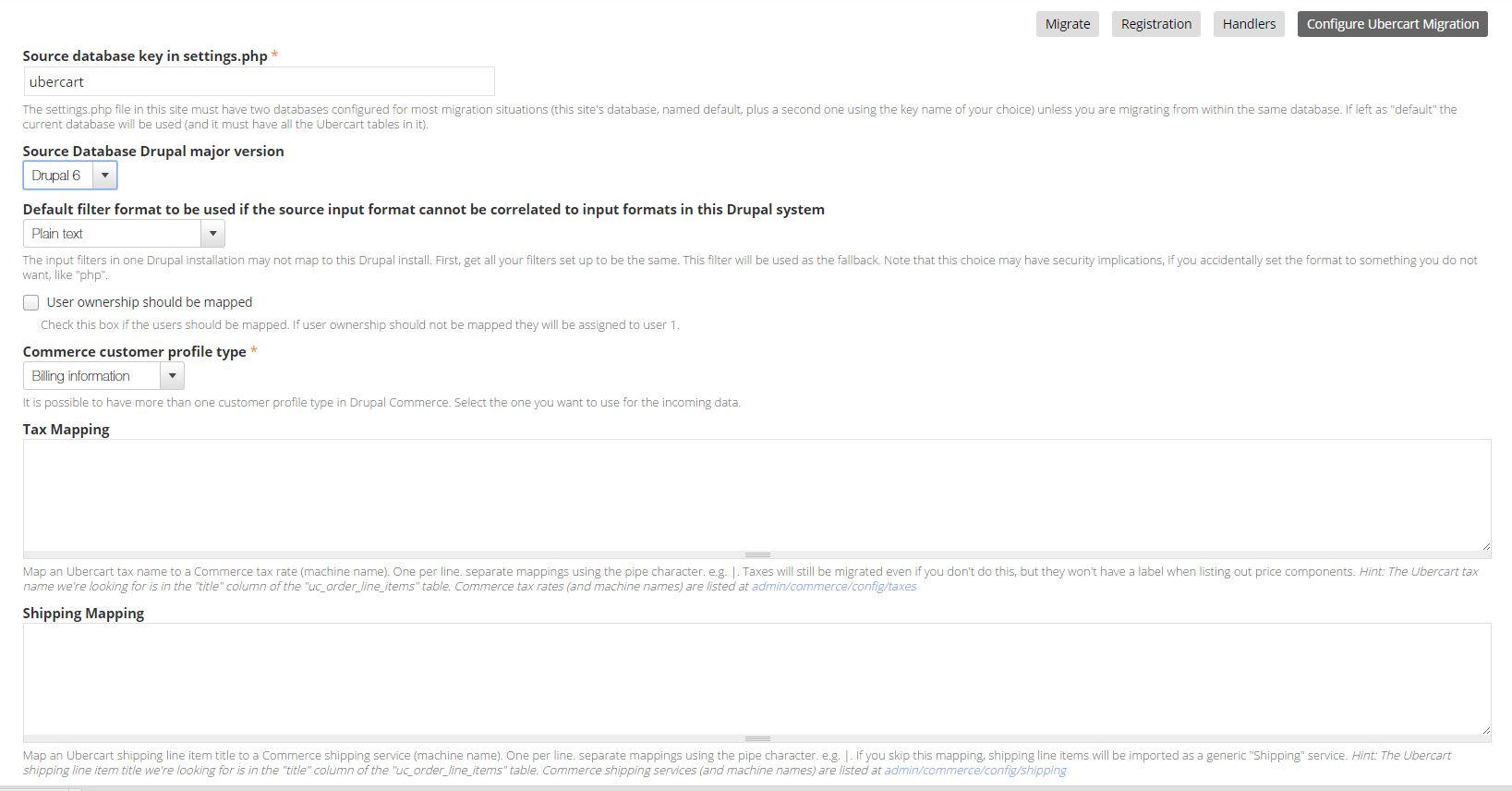
also I am attaching migrate screen, the image file path box is not there, it does not work at all. Help
I get these errors
I get these errors, any idea why?
commerce_kickstart_blog_migrate_api supports Migrate API version , Migrate module API version is 2 - migration support not loaded.
commerce_kickstart_merchandising_migrate_api supports Migrate API version , Migrate module API version is 2 - migration support not loaded.
commerce_migrate_ubercart_migrate_api supports Migrate API version , Migrate module API version is 2 - migration support not loaded.
commerce_kickstart_blog_migrate_api supports Migrate API version , Migrate module API version is 2 - migration support not loaded.
commerce_kickstart_merchandising_migrate_api supports Migrate API version , Migrate module API version is 2 - migration support not loaded.
commerce_migrate_ubercart_migrate_api supports Migrate API version , Migrate module API version is 2 - migration support not loaded.
Does it mean I need migrate version 1 ?
| Comment | File | Size | Author |
|---|---|---|---|
| #2 | Capture.JPG | 125.38 KB | thaistore |

Comments
Comment #1
thaistore commentedComment #2
thaistore commentedComment #3
thaistore commentedComment #4
shaneonabike commentedFirstly you should never post passwords on online forms unless you want folks to hack your stuff.
Secondly, it indicates the version of Migrate that you need to use. What version are you using as being hte issue?
I'm changing the priority since I'm not sure Critical means that this issue is a show-stopper for others to use the module.
Comment #5
thaistore commentedso basically we should use migrate 1 instead of migrate 2?
Yes it is really urgent because nobody answers here for days....you guys have paid support that costs like 4000 to migrate
and passwords are fake one, so no worries
and where to get version 1, it is not even compatible with latest drupal version anymore
do you guys really work on this or not? Did you gave up?
Migrate version 2 has been out for long time, now you are saying I need to install 2 years old version?
Are you joking me?
UPDATE¨!!!!!
I saw version 1 was active 4 years ago, you must be kidding, me this commerce module is a complete farse!
Comment #6
thaistore commentedComment #7
hazaSupport request is never critical.
We are all here doing volunteer work, we are not paid to help you. So, please be kind with people and wait for answers.
If you need urgent work and guaranteed response time, there are a lot of company that sells those kind of services.
Comment #8
thaistore commentedso write on the front page, keep away from this module, it does not work, it is not maintained.
You guys are clueless I think and you gave up. I demand to write on the front page that it is not maintained anymore.
So do that, and save peoples time
Comment #9
hazaYou are using Commerce Kickstart. We can not guarantee that everything works with Kickstart.
Please install a vanilla drupal commerce site, and test you migration with this site. Then if something is broken, we can start investigate.
Comment #10
thaistore commentedand where to get vanilla commerce? I have never heard about vanilla commerce?
Comment #11
mrconnerton commented@Thaistore I sent you an email with my phone number through drupal.org. if you wanna hop on a quick call I can talk to you through some of the problems you're having and hopefully point you in the right direction.
Comment #12
hazaVanilla = Non modified software.
Commerce Kickstart is a highly modified Drupal Commerce install profile.
It uses Drupal Commerce (the "vanilla software") as a base.
Comment #13
shaneonabike commentedBob you have to be more patient so that you get the support from people. I realize this stuff can be hard at times to solve but we all need to be patient. You get what you give :)
@Haza is right we are all just volunteers that work on other projects but if you want I can have a look later (paid work) if you are super stuck.
I asked what version of Migrate you were using, which you did not respond to.
You need:
* Greater than Migrate 2.5
* Drupal Commerce (not) Drupal Kickstarter
** Why not Kickstarter? Because this is a bundled kit that has a lot of modifications to the Drupal core and this module works directly with Drupal Commerce's standalone module.
* You followed all the steps on the frontpage -- INCLUDING installing migrate before this module
* You followed the steps in the ReadME http://cgit.drupalcode.org/commerce_migrate_ubercart/tree/README.txt
Comment #14
thaistore commented@ mrconnerton I did not get any email. Did you send it through PM?
Ok I will try with vanilla now
Comment #15
thaistore commentedok I did fresh install drupal 7 with vanilla and migrate ubercart, all modules enabled
THis is what shows on migrate page
commerce_migrate_ubercart_migrate_api supports Migrate API version , Migrate module API version is 2 - migration support not loaded.
Same error and I did not use kickstart, ust pure commerce
And when I go to settings for ubercart migration I get this horrible error
this is the only error I get when using my site now, everything else works, so what I am doing wrong I dont know
Comment #16
thaistore commentedComment #17
hazaJust made a test from an fresh ubercart (d6) and commerce site and this module.
It worked (screenshot http://dl.dropbox.com/u/3454118/capture_8b6a82a.png)
Please make sure you followed all the steps on the module page
Especially :
Do not forget to clear caches on step 2, even if you think that you might have installer migrate before.
Comment #18
thaistore commentedyes sure you cant install ubercart migrate before migrate right?
But just in case I did it again, uninstall every migrate module and enabled it again, same exact problem
so I dont know what is going on here, I use standard WAMP
and only your module is creating chaos, everything else works, I have been using drupal for 7 years now so I know how to use it but only your module is not working, the module that I really need
What does these errors mean? I am loosing my mind, trying to import this for 5 days already, nothing works, drupal modules should work like a cake, I never had any problem with drupal, only with your module.....
Comment #19
thaistore commentedComment #20
hazaComment #21
mrconnerton commented@thaistore if you reach out to me at matthew@aspiringweb.com I will see if I can point you in the right direction after asking a few more questions.
Things you need to keep in mind is that Commerce is not an out of the box solution. It's a framework to build exactly what you need in an ecommerce shop. Even Kickstart is only an out of the box solution if you need exactly what they are creating for you. Regardless Kickstart is not much of a support distribution anymore.
I don't even consider Commerce Migrate Ubercart module an out of the box solution. I've migrated a few ubercart 6/7 to commerce 7 sites now and every single time I have had to customize the classes because every commerce site is different.
Comment #22
thaistore commentedok guys, small update. I got the migration working.
It was the kickstart problem, yes you wer right.
And I did not update migrate to 2.7, for some reason i had 2.5, left from kickstart module folder.
But.......so many errors importing.
So many fields unmapped. It is a big mess.
Too bad this does not work with kickstart.
I dont even know what line items are......
Only SKU and title were imported.
For users, only basic stuff, no role, no complete address.....
I thought that this will be a complete migration from ubercart, it is far from that.
Line items were not imported. Product have only few fiellds, most of the fields are unmapped....
Very confusing.
Comment #23
shaneonabike commentedGlad to hear that you got this working! I had suspected that Kickstarter was the issue.
Furthermore, you can use some of the CCK module migrations to help you shift some of this stuff over before you run the migrate. Or modify the code which I believe I had to do to get my part working.
Good luck!
Comment #24
thaistore commentedI think I will go with feeds and I will import via CSV, much easier, I thought this module will work out of the box, becauase I did not change any stuff, it is basically default ubercart 6. But many things are missing.
And some stuff had like 1000 items pending and nothing was imported....
Comment #25
thaistore commentedit is a mess
I get this when I try to edit product after migrate import
Notice: Undefined index: product_display_node_form in drupal_retrieve_form() (line 806 of D:\wamp\www\commerceimportdemo\includes\form.inc).
Warning: call_user_func_array() expects parameter 1 to be a valid callback, function 'product_display_node_form' not found or invalid function name in drupal_retrieve_form() (line 841 of D:\wamp\www\commerceimportdemo\includes\form.inc).
I cant even look inside of it