

Closed (fixed)
Project:
Webform
Version:
7.x-4.x-dev
Component:
Code
Priority:
Normal
Category:
Feature request
Assigned:
Unassigned
Reporter:
Created:
20 Apr 2015 at 11:25 UTC
Updated:
13 May 2015 at 08:34 UTC
Jump to comment: Most recent, Most recent file



Comments
Comment #1
pcambraPatch applies both for 7.3 and 7.4
Comment #2
danchadwick commentedI'm not super enthusiastic about this because it might be confusing to the user. But if this is to go forward, it needs to do a better job.
Consider 12/15/2015 to 1/7/2016
Years: 2015, 2016
Months: 1, 12
Days: 15-31, 1-7
Or 2/15/2016 to 3/1/2016
Years: 2016 -- hide entirely? Default to 2016 and disable?
Months: 2-3
Days 1, 15-29 (leap year, remember?)
It would probably be better to disable unavailable months and days, rather than remove them. FAPI doesn't support this though, so some extra work would be needed.
Comment #3
pcambraThanks for getting back so quickly.
IMHO is more confusing to allow them to select those dates and then raise a validation error, specially when the popup calendar is restricting the selection or if it's a looong form.
Happy to provide a more complete patch (this is just fitting my current needs at the moment), but only if you think it should go in :)
Agreed, the only way I know how to do this is by using hook_theme_registry_alter and override the theme_options function, it's either that or js. It is more "practical" to remove unwanted options, but I agree it's can be confusing when the numbers are not in order, i.e. 12/15/2015 to 1/7/2016 and then display 15-31 and 1-7.
Comment #4
danchadwick commentedComment #5
Nick Denry commentedHi again! I've made little patch for hours range as I described in duplicate issue.
Thanks for your attention.
Comment #6
Nick Denry commentedChange priority and status for automated patch testing.
Comment #7
danchadwick commented@pcambra -- I am willing to commit a viable patch.
@Nick Denry -- Your patch doesn't deal with 12-hour.
In thinking about these individually, I was in favor of disabling the date choices that aren't within the date range and removing the time options that aren't in the range. But taking these together, that seems inconsistent. Another factor is that 12-hour times have the same problem the +1 months and years have -- the range of selectable choices may not be contiguous. For example 10am-2pm means that 10-12 and 1-2 are allowed.
Accordingly, I now favor removing the illegal choices rather than disabling them. For times, it might be best to remove the am/pm choice when using a start/end time and instead put am/pm in the menu, making it effectively the same as 24 hour, but with different labels. Or not. I think we want to see it in action to see how it looks. I suppose we could start with non-contiguous and if that doesn't seem too strange, just stay with that. Still, it seems like if you want 9-5, it would be nicer to have 9am, 10am, ... 12pm ... 5pm, rather than 1-5 and 9-12. Difficult to know what's best.
Comment #8
danchadwick commentedThis patch takes the work of @pcambra and expand on it:
Committed to 7.x-4.x for 4.8.
Patch needs porting to 8.x.
Corresponding patch for time components to follow.
Comment #11
danchadwick commentedThis patch augments the work of @Nick Denry for time fields:
I welcome testing of both time and date components -- component definition, submission form interface, and validation.
Committed to 7.x-4.x for 4.8.
Patch to be ported to 8.x
Comment #12
danchadwick commentedComment #13
danchadwick commentedComment #15
danchadwick commentedFixes a regression with 12-hour
- Reduces range when no start and end are specified
- Wrong select values in hour options array (index and hour name aren't properly paired)
- Conversion to 12 hour before converting to ISO, rather than after.
Comment #16
danchadwick commented#15 needs porting to D8 as well.
Comment #17
danchadwick commented7.x-4.x tests are now all passing again. :)
Comment #18
Nick Denry commented@DanChadwick Thank you for your work and fast replies.
You're quite right, my bad. According to your comment #7 I've made another patch while trying to deal with 12-hour and non-contiguous hours as you point in your comment.
And didn't know at that moment that you already made another one.
This patch realises hours sets, so user able to choose every hour in range to show in dropdown list. Maybe it's not for production, because admin interface a bit overloaded. Also, this is my second patch at all, so I know a little about validators in Drupal.
But maybe you could find it interesting.
Comment #19
Nick Denry commentedChange status for automated patch testing.
Comment #20
Nick Denry commentedComment #21
danchadwick commented@Nick Denry -- with the advent (moments ago) of #15, the current branch does deal with 12 hour restricted ranges. It works by adding am and pm to the pop-up list and removing the am/pm radio buttons. In this way if you have a range from, say, 10am to 3pm, the hour popup will have 10am, 11am, 12pm, 1pm, 2pm, 3pm.
I made this decision because it makes the range contiguous and avoids a lot of weird menu options. For example, with the "classic" hour menu, the above example would have 1, 2, 3, 10, 11, 12. How is the use to know what hours go with what am/pm choices?
#18 should not be necessary or desirable.
Comment #22
Nick Denry commented@DanChadwick
You are superfast maintainer :)
Well, I would be happy for any changes that makes user possible at least to limit range for hours. So, you did the good job anyway.
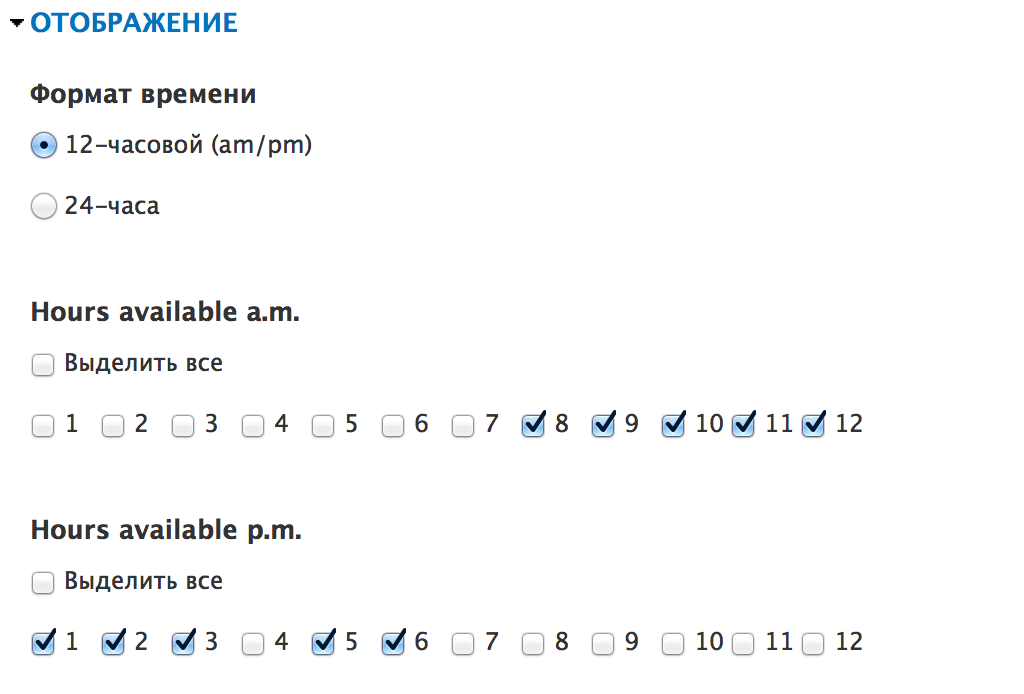
But another idea in #18 is to store three independent sets (one for 24-hour format and two other for 12-hour format) for allow user to select any hours that should be displayed. As far as I understand #15 doesn't support multiple hour intervals, correct me if it does.
So, I mean that you are able to show some hour intervals like from 8:00 till 12:00 then from 14:00 till 18:00 in dropdown list (include solution for a.m./p.m). The usecase of this would be useful if some organisation has a break in visiting hours or you could wait for delivery, for example at some hours.
In user-side solution for a.m./p.m. I just show or hide options in dropdown select for a.m. hours or p.m. hours depens on what radio is checked. I guess this is not really good idea, but it's also possible to show 'a.m.' or 'p.m' suffix in dropdown and remove radios.
In summarizing all above I have just one question: should we care about "breaks in visiting hours" and so on or just set time range to avoid interface overloading and keep component simple?
Comment #23
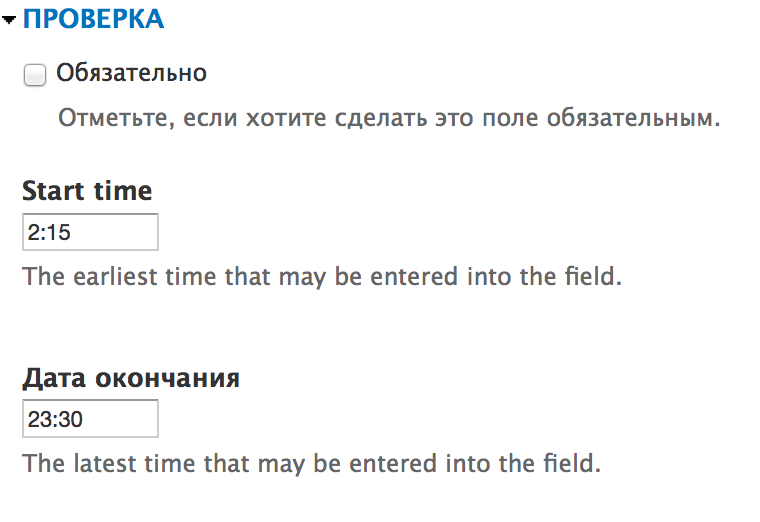
Nick Denry commentedAdd some screenshots to provide additional info for #22.
Comment #24
Nick Denry commentedForgot 24 hours dropdown with time-break.
Comment #25
danchadwick commented@Nick Denry -- As the guardians of Webform, we look to balance the power of webform with complexity and ease of use. I don't think discontinuous time blocks are a compelling enough use cause to justify the complexity. We added validation and as a side benefit, limit the options in the menu.
That's not to say that you can't do what you want. You can implement a custom module which installs its own theme function with hook_registry_alter (or in a theme function), or by using hook_webform_client_form_alter to install your own process function for dates. If you think your use case is of general use, you can make this a custom module.
Comment #26
Nick Denry commented@DanChadwick
Ok I see. Thank you. I'll watch if usecase "breaks in visiting hours" will get feature requests fom different sources (own supported sites and webform issue tracker after this issue will be port to production). Then I can think about own custom module. At moment "hours range" is completely satisfying for my own needs.
Now I want to test time component with #15. Should I apply #10 and #11 before?
Comment #27
danchadwick commentedYes, all three patches need to be applied in order. Or simply download the latest -dev from d.o, which will already have these patches in it (I think -- you can check the build time).
Comment #28
Nick Denry commented@DanChadwick
Offtopic.
I'm sorry, what is "d.o" ?
I guess I do.
Comment #29
danchadwick commentedd.o = drupal.org.
Here's the dev branch page. You can see the build time and version:
https://www.drupal.org/node/1589878
Comment #30
Nick Denry commented@DanChadwick
Thanks.
So, I have some test results for time component.
1. Title for the "End time" field set as '#title' => t('End date'), I guess this is the typeerror.
2. For 24-hour format if "Start time" is empty, but "End time" value is set we still have range from 0 to 23 instead of from 0 to "End time".
3. For 24-hour format if we leave "End time" field blank we have 0 value at the end of hour select dropdown
@see webform_start_time_end_time_24_blank_2474455_30.png
@see webform_start_time_end_time_unexpected_zero_value_2474455_30.png
4. We could use 24-hour format of "Start time" and "End time" with minutes like 2:15 and 16:45. But minutes values doesn't affect any real changes for minuts display nor limit, I guess we need some help information under fields input.
@see webform_start_time_end_time_minutes_values_2474455_30.png
5. For 12-hour format if we leave "Start time" field blank, but "End time" is set displaying range is 1-12.
If "Start time" is set, but "End time" is not - displaying range is OK, from "Start time" to 12.
6. For 12-hour format if "Start time" is blank or both start and end time fields are blank we have radios to switch a.m./p.m. but not suffix in dropdown list. I guess this is by design, but it's a bit confusing.
7. I didn't found any trouble with form submission values for both time formats.
Comment #32
danchadwick commentedRe #30: Thank you very much @Nick Denry.
1. Fixed the "End time" typo.
2, 3, 5. Fixed a problem with specifying the end hour and a different problem with defaulting the end hour (when the start hour is specified).
4. It's up to the webform author to tell the submitter what times are valid.
6. This is intentional. If you use time validation, you get spell-out am/pm hours. If not, you get the "classic" interface.
7. Phew!
Committed to 7.x-4.x
Patch needs port to 8.x.
Comment #33
Nick Denry commented@DanChadwick Not at all. We all want webform to be bugfree.
I've test time component again, can confrirm all described in #30 issues fixed.
Now I'll test date component.
Comment #34
danchadwick commented@Nick Denry -- yes, please do test the date component. I think the moral of the time component is to avoid commits made at 22:57.
Comment #35
Nick Denry commentedWell, now I have some test result for the date component.
1. Test with dates set from 05 Feb 2015 to 20 May 2015.
Months are displayed correctly - Feb, Mar, Apr, May. - OK
2. Test with earlier date than start date - form validation raises error - OK.
3. Test with later date than end date - form validation raises error - OK.
4. Popup calendar range is OK.
5. Test with dates set from 05 Feb 2015 to 20 May 2016.
Popup calendar range is OK.
6. Test with earlier start date 12 Jan 2015 - form validation raises error - OK.
Test with 12 Jan 2016 - in range, form sent correctly - OK.
7. Test with later date 27 May 2016 - form validation raises error - OK.
Test with 27 May 2015 - in range, form sent correctly - OK.
8. Do the same tests with unset start and end dates - no unexpected behaviour found. OK
9. Default value for the date component could be set out of range, for example 27 May 2015, when end date is 20 May 2015. - a bit unexpected.
10. Trying to set "start date" later than the "end date" - get error "The End date must be on or after the Start date." - OK.
Well, thats it. Maybe this is not a complete test but I have no idea what I could test else.
Btw, how could I change order in user-side date component for month and day fields? When expecdet format is dd.mm.YYYY instead of mm.dd.YYYY? Well I could swap month and day fileds with CSS and [submission:date:custom:?] token on form send, but is this ok?
Yep! The code quality depends on how is your mind clear/ready :) But we are not always have the choise.
Comment #36
danchadwick commentedRe #35:
Intentional. The default value can't be validated at form time because it could be a relative date or a token.
This is done by core by using the short date format and extracting the order of the components. Just set your short order to something that has then fields in the order you want
EDIT: And thanks again for the testing.
Comment #37
fenstratCommitted and pushed to 8.x-4.x. Thanks.
Applied #9, #10, #14, and #31 together.
Comment #39
pcambraThat was amazingly fast @DanChadwick and @Nick!! Thanks a lot!