

 The 2026 Drupal Business Survey is open. Your response will help shape the future of the Drupal business ecosystem.
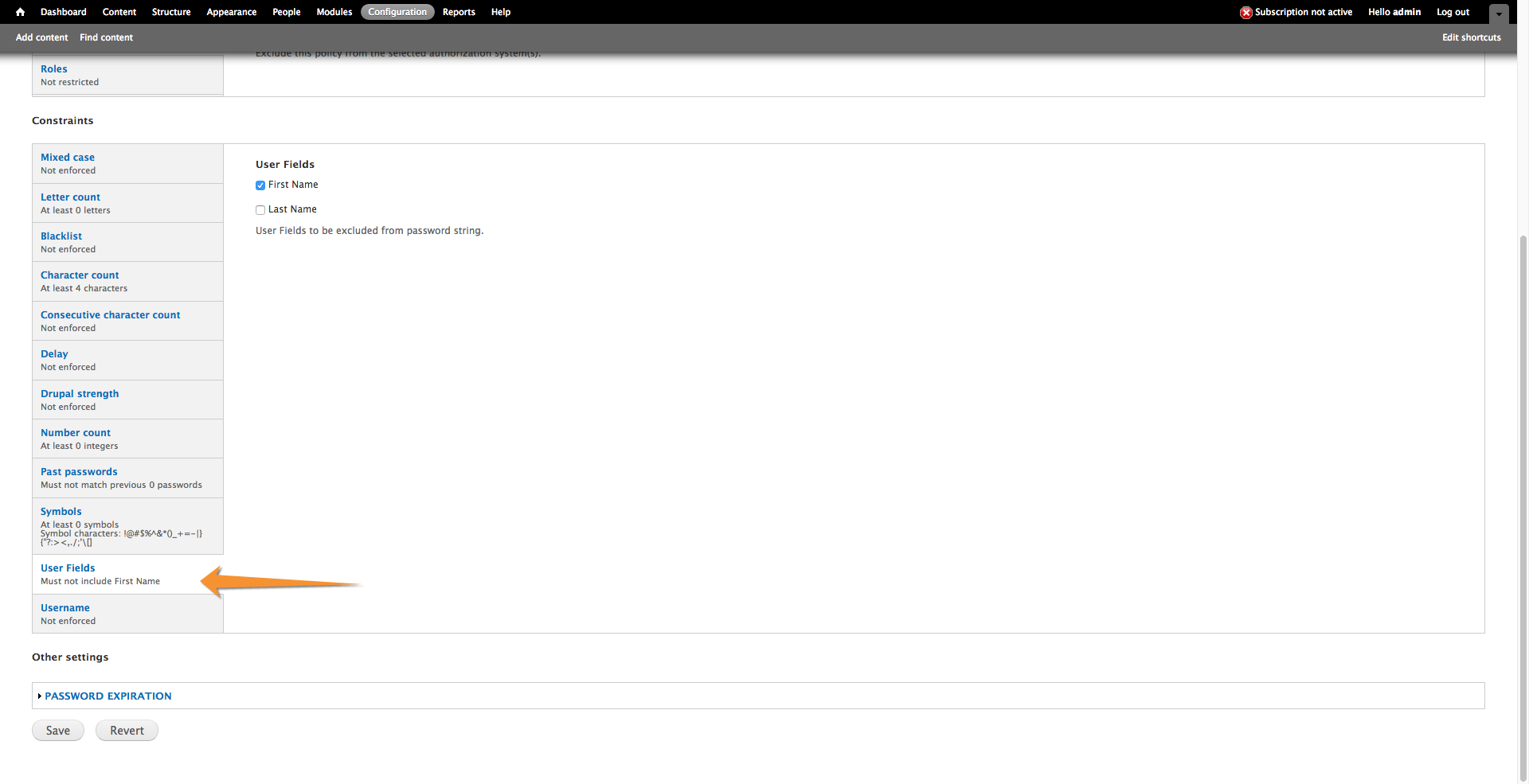
I work at a federal agency that has recently implemented a strong password policy requiring that users First or Last Names can not be included as a substring of the password. To implement this, we have added First Name and Last Name as fields in our D7 sites. We also use Password Policy. To extend the functionality of Password Policy, it would be great to add Custom User Fields as a checkbox list that includes any Text fields available from the User entity and to exclude these from the Password using strpos comparison similar to the current constraint_username. This would provide flexibility for users to assign this on a Policy by Policy basis, though for the moment First and Last name are the most likely use case.
| Comment | File | Size | Author |
|---|---|---|---|
| #21 | add-constraint-custom-user-fields-2472491-21.patch | 312 KB | brooke_heaton |
| #17 | user_fields_admin_nav.png | 130.88 KB | brooke_heaton |
| #8 | pp_tab.png | 21.49 KB | nancydru |
| #1 | password_policy-7.x-1.x-real_name_constraint-2472491-1.patch | 3.88 KB | aohrvetpv |



Comments
Comment #1
aohrvetpv commentedHello, we also needed to disallow first name and last name within the password for a website I work on, so we implemented a custom constraint for 7.x-1.x just for first and last name fields. In this comment I will share the code for that constraint in case it might be of use to you or anyone else. In the next comment I will address your general feature request.
Maybe you have already implemented this constraint too. I am not sure whether your screenshot is a mock-up or an implementation.
Installation:
1. Apply patch.
2. Edit
constraints/constraint_real_name.incand change instances of field names as needed. (Our field names are simplyfield_first_nameandfield_last_name.)3. Set positive number in policy for the constraint.
Warnings:
- This has been minimally tested and has no automated tests. It should not be used in production without review/testing.
- It is a bit dangerous to add custom constraints by copying them into the
constraintsdirectory, because whenever the Password Policy module is updated they may be removed. That is, you may need to copy the constraint file back into theconstraintsdirectory after every update.Comment #2
aohrvetpv commentedGood suggestion. I think this should actually be possible using tokens with the patch in #1603210: Add token support to blacklist constraint, but I have not tested it. I believe there are tokens available for each field, so you could blacklist passwords containing the first and last name field tokens. Tokens seem like they may be an even more general way to implement this than providing a list of all fields from which to select. Do you think this approach might work?
A potential problem is the token values may not be available until after the fields are saved, which may be a problem if the user sets the password and the field values on the same page (i.e., in the same request).
It would be very helpful to get some testing of the patch in that issue, if you or anyone has the opportunity. I hope to eventually get the blacklist constraint with tokens support ported from 7.x-2.x to 7.x-1.x.
Comment #3
nancydruI have some sites where the first/last names fields are part of the User object, and others where they are in the Profile2 object. These are government sites, so I need to be able to access those fields in either object.
Comment #4
nancydruI am working on a 7.x-2.x version of this.
Two quick questions:
Comment #5
aohrvetpv commentedHave you looked at #1603210: Add token support to blacklist constraint? Using user fields as password constraints should be possible using that patch, by using User module tokens. I don't know about Profile2.
JavaScript in
password_policy.jsrepeatedly POSTs the candidate password topassword_policy/checkas it is typed. That path invokes the PHP callbackpassword_policy_ajax_check().(The
$_POSTvariable values are automatically set by PHP when it receives the POST request.)Comment #6
nancydruI'll take a look at that other issue.
Comment #7
aohrvetpv commentedCan you give an example of what is meant by vertical tab "comment"?
I think the answer is probably by editing
password_policy.js, but I'm not completely sure to what text you're referring.Comment #8
nancydruSee image.
Comment #9
nancydruYes, #1603210: Add token support to blacklist constraint seems to handle this request. I would suggest closing it as a duplicate.
I am adding a bit to that issue.
Comment #10
aohrvetpv commentedComment #11
brooke_heaton commentedBlacklist won't work for my situation. Users need to be able to read the message pertaining to user fields so that they are aware of the policy. Blacklist + tokens is a workaround but not a very good one for this use case. Users should see a warning that they cannot, for instance, use their 'First Name' or 'Last Name'. A blanket message that certain unknown words are blacklisted is not helpful.
Comment #12
brooke_heaton commentedThis patch adds support for any instances of user fields added via /admin/config/people/accounts/fields (e.g. 'field_first_name', 'field_last_name'). The patch allows textfields that are user fields to be validated via substring position function (if result, password fails). This patch will warn users if they attempt to include the user field string in their password with an explicit message.
Installation:
1. Apply patch.
2. Add a user field at /admin/config/people/accounts/fields (must be a textfield)
3. Select the fields to compare to password at /admin/config/people/password_policy/list/[policy]
Warnings:
- This has been minimally tested and has no automated tests. It should not be used in production without review/testing.
Comment #13
brooke_heaton commentedPatch created for user fields.
Comment #14
brooke_heaton commentedComment #15
brooke_heaton commentedUpdated patch as #12 did not correctly handle multiple user fields.
Comment #16
brooke_heaton commentedComment #17
brooke_heaton commentedThese are targeted in password_policy.js via the id of the subform for the fieldset from the .inc file.
e.g:
In patch #15 I do this via the following - this is modeled after the Roles configuration, which also uses a checkbox list:
}
Comment #18
brooke_heaton commentedUpdated patch add-constraint-custom-user-fields-2472491-18.patch - previous patch was created with PHP Storm - my bad.
Comment #19
brooke_heaton commentedComment #20
brooke_heaton commentedUploading latest patch for testing against 7.x-2.x-dev add-constraint-custom-user-fields-2472491-19.patch
Comment #21
brooke_heaton commentedUpdating patch to account or error message when no user fields are selected -this prevents an odd message with blank translatable fields like 'Password must not contain user @user_fields' which was happening when no user fields were selected.
Comment #22
aohrvetpv commentedBrooke, I think something went haywire with that last patch.