Hi friend:
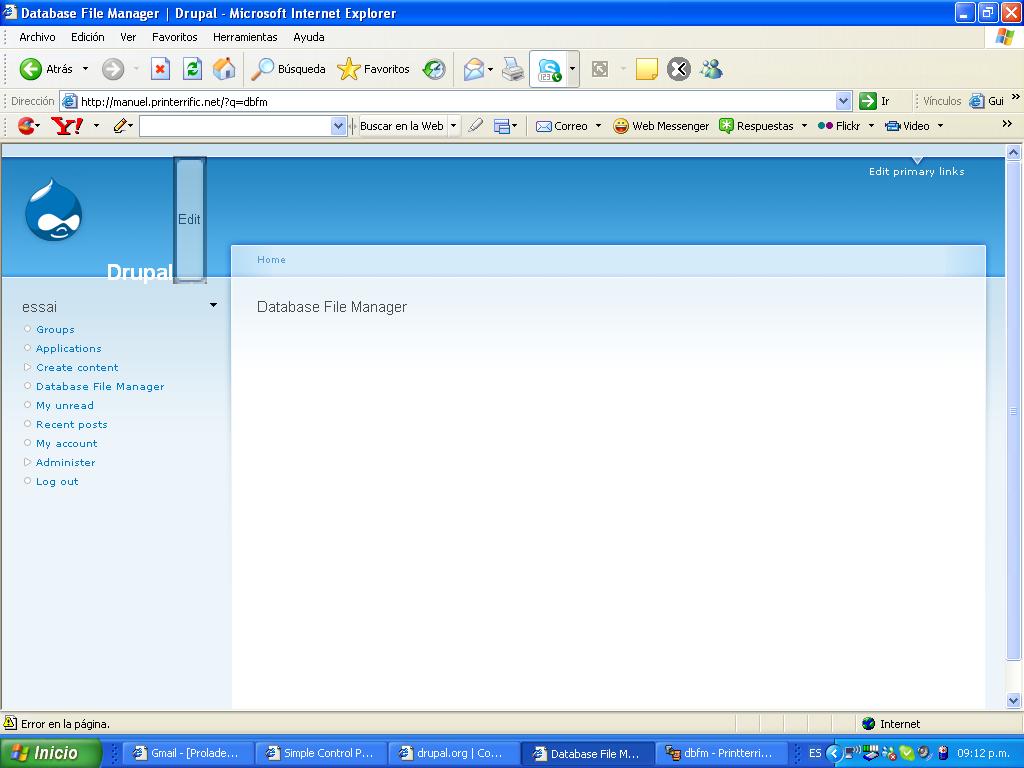
I've follow the following steps to configures DBFM but I don't sees the DBFM like an WYSIWYG environment :
1.- Upload the tinymce module (following the instruction from this site https://drupal.org/node/228270).
2.- Uploading the following modules and activiting :
dapi, dbfmgreybox, formfilter, jstools (jstools-5.x-0.6.tar.gz), and pagearray,
3.- Modifying the instruction create dbfm_file with dbfm_data in the dbfm.install before uploading and activiting module.
4.- Uploading and activiting the dbfm module (dbfm-5.x-3.0.tar.gz).
5.- Copying the drupaldbfm folder into modules/tinymce/tinymce/jscripts/tiny_mce/plugins
6.- Modifying modules/tinymce/tinymce/jscripts/tiny_mce/plugins/drupaldbfm/editor_plugin.js to put 'site' for 'modules' and modifying the plugin_reg.php
7.- Modifying the instruccions :
- $ret_val = dbfm_perm_recur($fkid, &$err_str);
+ $ret_val = dbfm_perm_recur($fkid, $err_str);
- function dbfm_perm_recur($frec, &$err_str) {
+ function dbfm_perm_recur($frec, $err_str) {
because it shows an error.
Could you help me to finish the DBFM's configuration ? What steps fehlt to finally end this configuration ?
Thanks a lot.
Manuel.


Comments
Comment #1
rooey commentedEnsure that you have entered and saved the settings for both DBFM and DBFMgreybox - this should clear up your problem.
Comment #2
manuel_mra commentedHi Michael:
I'm sending you the image I have for the DBFM . I doesn't show the icons it should. I've verified if the DBFM and DBFMgreybox were saved and I've save them again, but it doesn' t solve the problem.
I've installed the OG module too, but I don't see the workgroup Option at the left side.
As you see I followed all the steps with care, perhaps there is something that I've missed.
Thanks,
Manuel.
P.D. In the project page the database file manager looks the same as my page. Could you tell me what are the steps necesary to show the icons in the project to have an idea how it works. Should I create first a group and what are the next steps ?
Comment #3
rooey commentedWorkgroups are listed as "groups".
It appears you're not using clean URLS.
Please turn them on and see if that helps.
Comment #4
manuel_mra commentedHi Mickey:
I've turn on clear URLs, but it doesn't solve the problem.
Please, would you guide me to show the database file manager in the project page ? or where can I find the steps to show the DBFM with the icons to upload files, create directories, rename files, etc. the same way like it shows in the snapshots from the page.
I only see an empty page like I have in the web site I'm building but I don't find no guide inside the project page.
I know this is time for you and excuse me to ask questions to build a DBFM site.
Thanks,
Manuel.
Comment #5
rooey commentedWe have a site here: http://dbfmdemo.lineageone.com/ which contains a demo and some install tips and an FAQ.
There are some known problems with 5.x.3.0 - there's a lot involved in getting it running - we should be releasing 5.x.3.1 tomorrow, that should make life easier.
Comment #6
rooey commentedActually - try installing the organic groups module, see if that kicks it into life. It's supposed to be optional, but we might have missed something!
Comment #7
manuel_mra commentedHi Mickey:
I would you thank you a lot and only a suggestion: I have read all the tips in the project page and I've followed all, but I think it would be better if there are all the steps necesary to get the goal because when there are troubles the users are gonna ask you and you're gonna dedicate time to answer all the questions.
Thanks for all,
Manuel.
Comment #8
geoff_eagles commentedThere were problems with the install script until recently. I tried doing installs from scratch without success!
An install with the latest code should help.
Comment #9
geoff_eagles commented