

Closed (fixed)
Project:
Bootstrap
Version:
8.x-3.x-dev
Component:
Code
Priority:
Major
Category:
Bug report
Assigned:
Unassigned
Reporter:
Created:
29 Mar 2015 at 12:30 UTC
Updated:
5 Aug 2022 at 16:13 UTC
Jump to comment: Most recent, Most recent file
 Show commands
 compare
Comments
Comment #1
AlexKirienko commentedComment #2
AlexKirienko commentedDirty quick-fix. But it have to be a better way to solve this issue.
Comment #3
AlexKirienko commentedComment #4
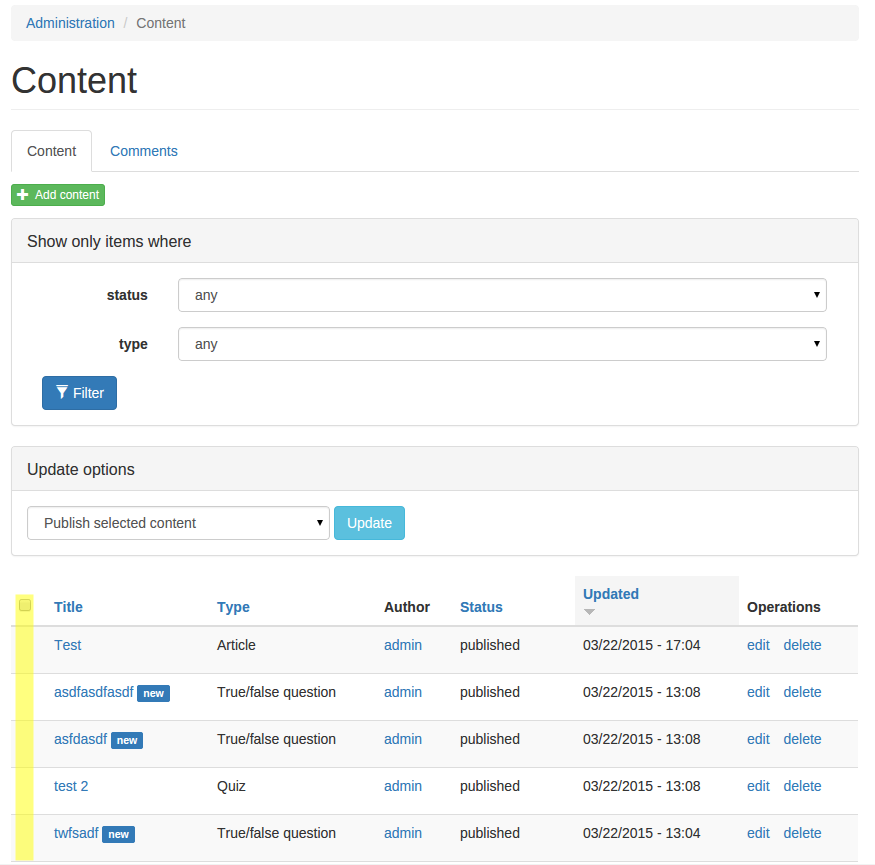
AlexKirienko commentedSource of problem - different checkbox html in Drupal.
Bootstrap HTML:
Drupal HTML
Comment #5
AlexKirienko commentedVBO checkboxes also have same problem with visibility.
Comment #6
AlexKirienko commentedComment #7
AlexKirienko commentedUpdated dirty fix for table-select and VBO
Comment #8
markhalliwellI thought this had been fixed by the related issue, however after taking a look at this in more detail there is quite a bit of refactoring that needs to happen with this.
I will commit a (non-css hack) fix shortly.
Comment #9
markhalliwellOops, forgot to bump the severity of the issue.
Comment #11
markhalliwell@neardark, could you port this so it's as close to possible on 7.x-3.x? I was just going to copy & paste the relevant bits, but the entire form element and label theme implementations are very different on 8.x-3.x. Thanks!
Comment #14
neardark commentedPorted as part of #2474771: Clean up Bootstrap Settings code
Comment #16
pringlz commentedHere solution)
https://www.drupal.org/node/2644016#comment-11114017
Comment #17
W.M. commented@AlexKirienko .. Thank you for pointing to the template difference between Bootstrap and Drupal's default when it comes to checkboxes. I was trying to understand why my checkboxes rendered the way the did, I needed to have input and label tags on the same DOM level. The fix was simply to copy theme_form_element and theme_form_element_label to my custom Bootsrap's theme template.php (and renaming them to my custom theme's name) and that's it: now checkboxes behave the Drupal's way.
Comment #18
ericjenkins commentedThe approach suggested by @W.M. worked for me, as well. Thank you! I copied the entire contents of the theme_form_element() and theme_form_element_label() functions into my custom theme's template.php file, and even though I lost some styling, I was able to fix that with CSS and restore the radio input/label hierarchy I was seeking - the original Drupal-based hierarchy.
Comment #19
nithinkolekar commentedI think by default label text should be wrapped inside span other wise its difficult to theme.
Ref: https://ux.stackexchange.com/a/104517 https://stackoverflow.com/a/13317256
Comment #20
nithinkolekar commentedActually porting my sandbox module to d8 which requires input-radio to have disabled and checked which worked until I tested it with bootstrap theme. So I ended up with https://drupal.stackexchange.com/questions/228989/within-bootstrap-theme...
while searching for the solution I found https://stackoverflow.com/questions/774054/should-i-put-input-tags-insid... which explains more technically about this issue.