
Archiving an abandoned project in a sandbox
This documentation is deprecated.
Archiving an obsolete project in a sandbox isn't anymore required when a project is taken over to re-use the project namespace. What reported here is the procedure that was followed in that case.
Code that exists in a full project are never deleted on Drupal.org. However, there exists obsolete projects in the Drupal.org git repo that have no users and contain obsolete code that are no longer useful, and whose namespace is wanted for a new, unrelated project. In such (rare) cases, it is possible to demote the full project to a sandbox in order to archive it and then repurpose its namespace for a new project, as part of the process of dealing with unsupported projects.
If you want to do this, you should request ownership of the obsolete project whose namespace you want in the project ownership issue queue, stating clearly that you want the to use namespace, but you want to use it for a different purpose than the old one.
In that case, you should preserve the code of the old project in a sandbox before you request that the repo is deleted to make place for your new project. This page explains how you archive a project in a sandbox.
In this example, the project named “Oldproject” is going to be archived in a sandbox.
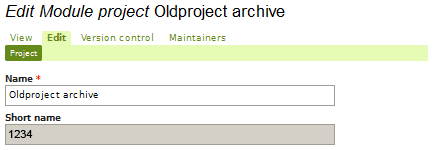
First, you need to create an empty sandbox. Sandboxes have numbers instead of characters in their short name. In this example, we will use “1234” for the short name, but you will need to use the actual number that is automatically assigned to your sandbox when you create it.
The screenshot below shows a typical sandbox that is prepared to hold an obsolete project archive. You should set its Maintenance status to Unsupported and its Development status to Obsolete.
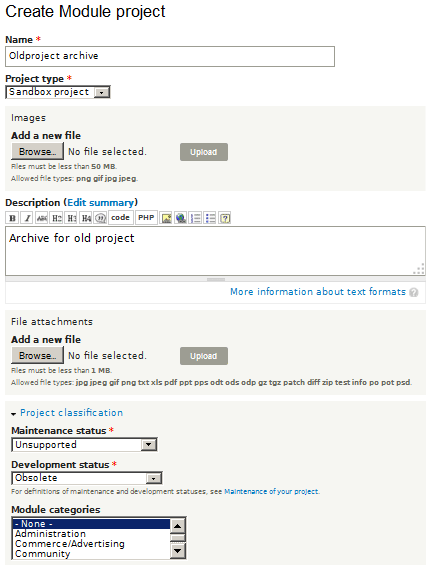
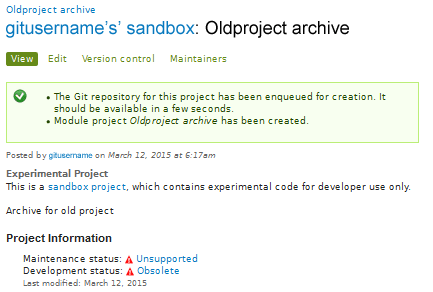
After completing the form to create a sandbox project, you must press Save to have the sandbox created, you should get something like the screenshot below that confirms that the sandbox has been created.
Press the Edit tab to learn the numeric short name of your project.
You can now go ahead and clone the old project to your local system, followed by a git push of the complete repository to the newly created sandbox. Provided the short name of the old project is “oldproject”, your git user name is “gitusername”, and the short name of the newly created sandbox is “1234”, the following four commands in the Gnu/Linux CLI should do it:
git clone http://git.drupal.org/project/oldproject.git oldproject
cd oldproject
git remote set-url origin gitusername@git.drupal.org:sandbox/gitusername/1234.git
git push --all origin
It is now possible to delete “oldproject” on Drupal.org. Deleting a full project will free its namespace so that it may be repurposed. The --all argument to push ensures that commit history is preserved, and that all branches and tags of the old project is pushed.
After taking over the namespace and having created a new project in its place, you should put up a note on the project's project page (e.g. in the "Credits" section), stating that the project that previous populated the namespace has been archived in a sandbox, with a link to the sandbox.
Help improve this page
You can:
- Log in, click Edit, and edit this page
- Log in, click Discuss, update the Page status value, and suggest an improvement
- Log in and create a Documentation issue with your suggestion
