

 The 2026 Drupal Business Survey is open. Your response will help shape the future of the Drupal business ecosystem.


The WOW JS module seamlessly integrates the powerful WOW.js library with Drupal, enabling dynamic animations triggered as users scroll through your site. This enhances site interactivity with eye-catching, CSS3-based animations, making your content more engaging.
Overview
WOW JS module, Reveal Animations When You Scroll. Very Animate.css Drupal Friend :-)
The WOW JS module allows you to reveal animations as you scroll, working hand-in-hand with the popular Animate.css library to deliver smooth, cross-browser animations on your Drupal site. It provides fine-grained control over animations, including repetition, duration, and delay, ensuring animations trigger at the right time as users interact with your site.
By default, CSS animations might complete before users scroll to them. With WOW.js, these animations are triggered precisely when elements come into view, ensuring a more polished and user-friendly experience.
Dependencies
New Features
This new version introduces a sub-module, WOW JS UI, catering to different user needs:
- WOW JS (Core): Ideal for developers, this core module allows integration of the WOW.js library via CDN or locally. It’s perfect for those who prefer to utilize the library within custom code or modules.
- WOW JS UI: Designed for non-coders, this sub-module offers a user-friendly interface to apply WOW.js animations to your site with just a few clicks, no coding required.
Features:
- Quick Integration: Load the WOW.js library via CDN or locally.
- Animate CSS Module Integration: Leverage the Animate CSS library directly within the WOW JS module.
- Global Settings: Configure global animation settings via the Animate CSS module’s settings page.
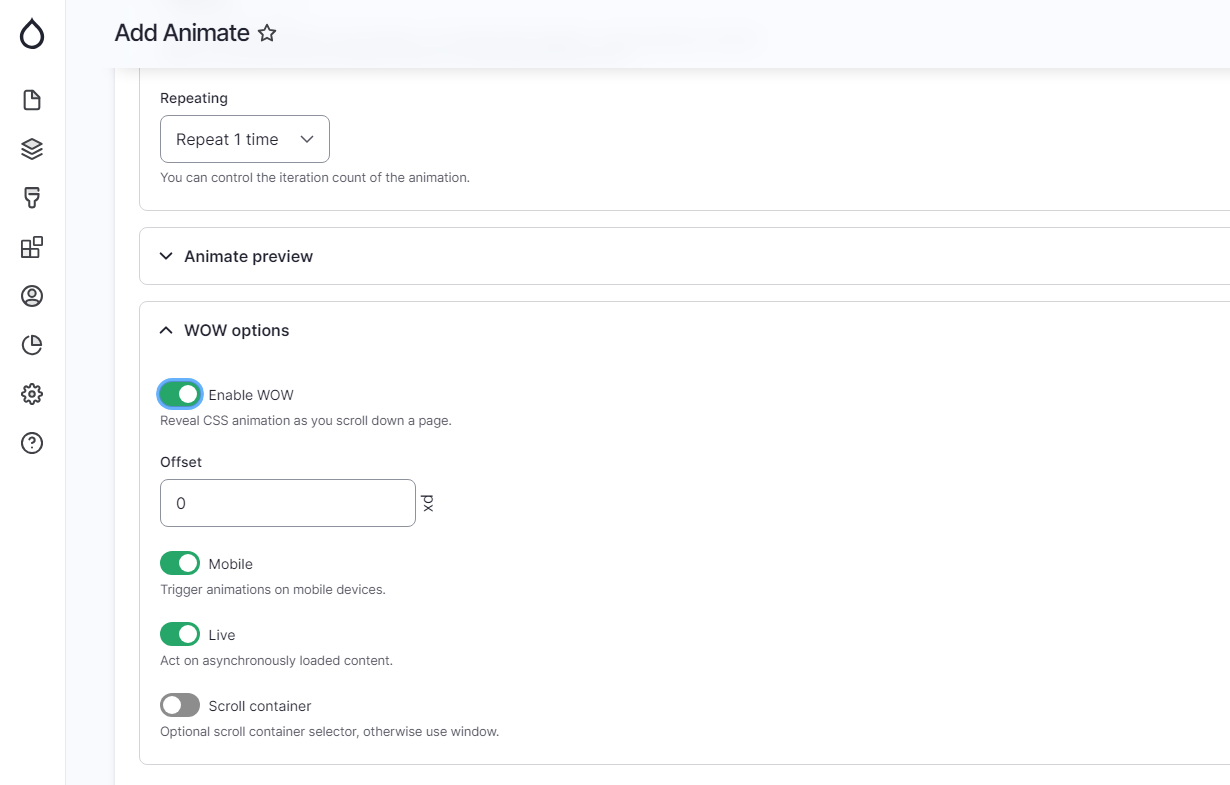
- Option to enable animations with just one click in the animation addition form.
- Extended features provided by this module to the library:
- Once: Enable to run the animation only once when the element is scrolled into view.
- Mirror: Enable to mirror the animation when the element is scrolled into view from the top or bottom.
Installation & Configuration
- Download the WOW.js library: Download here.
- Extract and rename: Unzip the file and rename the extracted folder to wow.
- Place the library: Move the wow folder to the libraries directory in your Drupal installation.
- Verify installation: Ensure that
wow.min.jsis located inlibraries/wow/dist/wow.min.js. - Install the module: Enable the WOW JS module via Drupal's module management interface.
- Check installation status: Navigate to "Reports > Status Report" in Drupal's admin interface to verify that the WOW.js library is correctly installed.
For Drush users, you can simplify the process with the following steps:
- Install the module.
- Clear Drush cache:
drush cc drush. - Execute the WOW.js command:
drush wowjs. - Verify installation: As above, check the "Reports > Status Report" page.
After installation, remember to clear all Drupal caches by going to "Configuration > Development > Performance".
Resources
Recommended Modules
- Anime
The Anime module integrates the Anime.js library with Drupal, providing advanced JavaScript animation capabilities. - Textimate ( Text + Animate )
Provides captivating text animations, enhancing site interactivity. - Splitting.js
Unlocks creative text, grid, and image animations with CSS Variables.
Similar Projects
- AOS JS
A small and lightweight JavaScript library for animating elements as you scroll up or down the page. - AnimateCSS On Scroll ( Animate CSS + AOS JS )
Combines Animate CSS with AOS JS to animate elements on scroll.
Support
If you need a new feature or encounter any issues, please let me know. You can report it in the WOW JS Issues section.
WOW JS 1.1.1 has been released! Explore the new features now!
The first major release of WOW JS is here, offering enhanced functionality and a modern interface. Dive into the new features, report any issues, and contribute to future updates. Be a part of the growing community!
Note: While animations can significantly enhance the user experience, use them thoughtfully to avoid disrupting user interaction.
Supporting organizations:
Scheduling time to create this module.
Project information
- Project categories: Developer tools, Integrations
 1,342 sites report using this module
- Created by GoddamnNoise on , updated
 Stable releases for this project are covered by the security advisory policy.
Look for the shield icon below.
Releases
1.1.1
released 9 August 2024
released 9 August 2024
Works with Drupal: ^8.8 || ^9 || ^10 || ^11
AnimateCSS 1.1.x compatibility; Enhance your site with WOW.js animations! New once and mirror options, AOS-style, and support for the latest AnimateCSS. Enjoy simultaneous WOW.js and AOS.js animations on the same page.
Install:
Development version: 1.1.x-dev updated 9 Aug 2024 at 15:40 UTC


