

 Come together with the global Drupal community in Rotterdam, 28 Sept – 1 Oct 2026. Sessions, contribution, connection, and Early Bird savings until 8 June.
Just this: Is there any way to show 2 rows of items?
| Comment | File | Size | Author |
|---|---|---|---|
| #15 | slick-export.txt | 40.73 KB | gausarts |
| #14 | views-style-settings-2.jpg | 100.63 KB | chefnelone |
| #13 | slick-grid-setup-2.png | 50.4 KB | gausarts |
| #13 | slick-grid-setup.png | 52.9 KB | gausarts |
| #13 | Edit optionset grid.png | 75.08 KB | gausarts |







Comments
Comment #1
gausarts commented"slidesToShow" > 1 is to show more rows/ slide items.
Otherwise no idea what you meant, please clarify.
Comment #2
chefnelone commentedI mean 2 rows of items, please take a look a the picture I uploaded.
Comment #3
gausarts commentedPerhaps, you may want to use Slick carousel views plugin, say:
You have multi-value images/ media, choose to display 2 of them under Multivalue settings. Style it too look like grid. And Slick will pickup whatever the content of each slide, no matter how many items they will be in it.
Comment #4
gausarts commentedComment #5
chefnelone commentedok, I'll try it. I will not affect the responsives features, Didn't it?
Comment #6
chefnelone commentedI re-read your post and it will not work, since it is not a multivalue field, each slide is a node.
Comment #7
chefnelone commentedComment #9
gausarts commentedI haven't had a chance to test it thoroughly, please give it a whirl, and provide review.
Attached is what it looks to me with Bartik.
Comment #10
chefnelone commentedThanks, I will try, It looks just to what I need.
Just one question: each image (in the attached) belong to a different node?
Comment #11
gausarts commentedYes, nodes, or any entity, will do.
I just increased the visible slides to 32. Maybe too less last time ;)
Comment #12
chefnelone commentedsorry but I'm afraid I need more help.
Could you please make a capture of the views Format Options and also a capture of the option of the Defalult Slick style or the style you used.
I uploaded my captures:
Comment #13
gausarts commentedOh, my, they look different at yours. Looks like no good for another admin theme ;) Is that Shiny admin?
To create grid:
1. Create a new Slick optionset, say Grid, other than Default. CHoose slidesToShow = 1 for now, later play around.
2. Choose optionset Grid, and skin Grid (later you can change and use own grid)
3. Play with settings, only avoid variableWidth and adaptiveHeight by now.
Comment #14
chefnelone commentedI can't get it working. I think that the problem is in the Views Style Setting. I see different things to your capture, see my last capture.
Could you please export your view and grid style and share the code here: http://pastebin.com/
Yes, I was using Shiny, but I changed to Seven now to make sure the problem is not the theme.
Also mention that I set jquery 1.7 with jquery update.
Comment #15
gausarts commentedTwo possible issues I suspect you have:
1. Please use jQuery 1.8, I noticed issue with jQuery 1.7 last time, that's why recommended ">", not ">=".
2. Make sure your views total rows are more than 6 items. Create some 20 or so dummy contents. Less than 6 is ignored. Perhaps later we should make it configurable.
Attached is the export. I am not sure if it will work on your setup.
But please create an image field named "Images" to a Basic page (so Drupal names it "field_images") for just in case.
Also most of them have different optionsets. But you can adjust/create optionsets as you go.
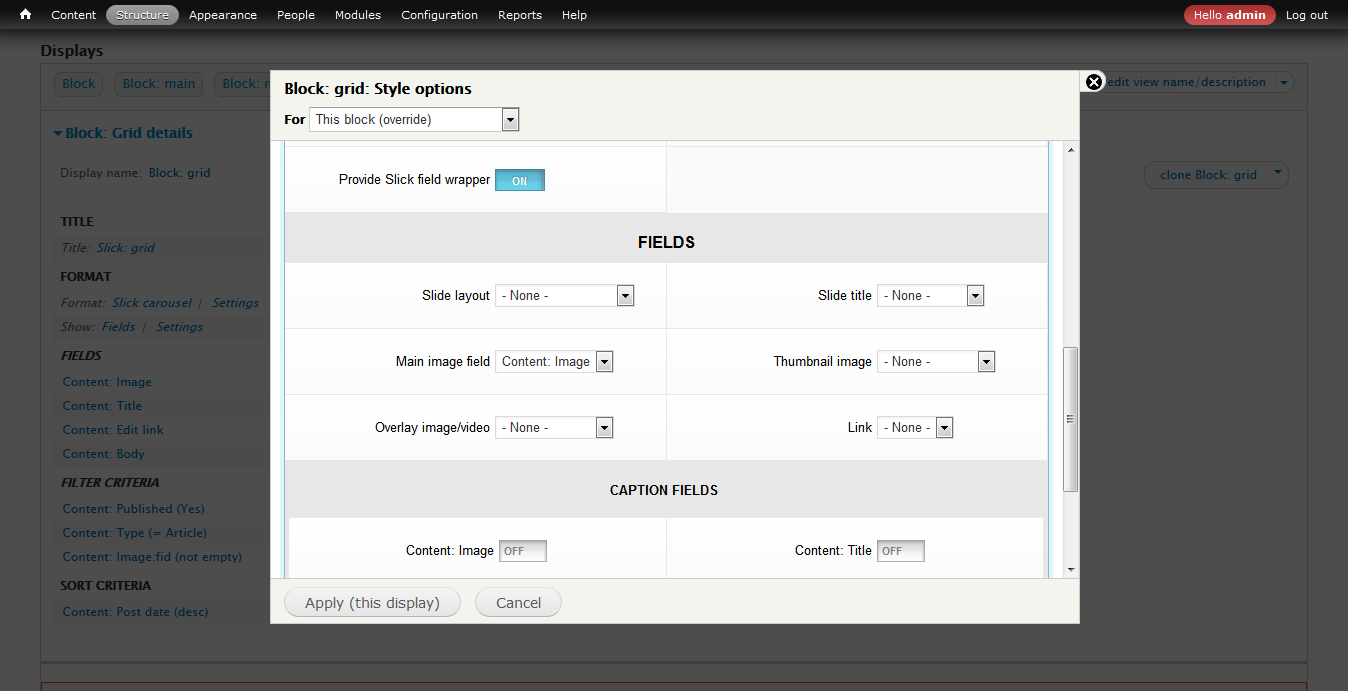
Regarding "Provide Slick field wrapper", you can ignore it by now. Those invisible options are not needed by now for the Grid. They will be visible when "Provide Slick field wrapper" is active.
Perhaps some CSS conflict most likely. They are just for convenience to have consistent wrappers, but ignorable by now.
Element ID is optional, it will be created dynamically if left empty.
Please let me know if you need more info.
Comment #16
chefnelone commentedThanks.
I imported the View. I see that the view has many Displays. Can you please tell me which is the Display which renders the grid I see in your capture: https://www.drupal.org/files/issues/Slick%20Grid.png
Comment #17
gausarts commentedIt is the one with Display name "Block: Grid".
You can delete unneeded ones ;)
You need to create one dedicated optionset, or use existing one till you change later.
Comment #18
chefnelone commentedok, but I can't get it. Maybe a conflict with other module. Many thanks anyway.
Comment #19
gausarts commentedYou are welcome, sorry to hear that. Never thought it could be any harder ;)
Maybe we should consider to build a Slick example module to ease up the process later, but that is for another issue. In the mean time let's close this as the request is fullfilled ;)
Comment #21
gausarts commentedAdded grid keywords for easy finding.
The Block: grid sample is provided at slick_example:
admin/structure/views/view/slick_x/edit/block_grid