

Needs review
Project:
Workbench Moderation
Version:
7.x-1.x-dev
Component:
Code
Priority:
Major
Category:
Bug report
Assigned:
Reporter:
Created:
26 Nov 2014 at 00:09 UTC
Updated:
25 Jan 2017 at 19:57 UTC
Jump to comment: Most recent, Most recent file

Comments
Comment #1
Leeteq commentedComment #2
Anonymous (not verified) commentedFacing the same problem, can anyone pls help.!!!
Comment #3
agentrickardMoving to the proper queue for attention.
Can you please:
* Confirm the version of Workbench Moderation you are using.
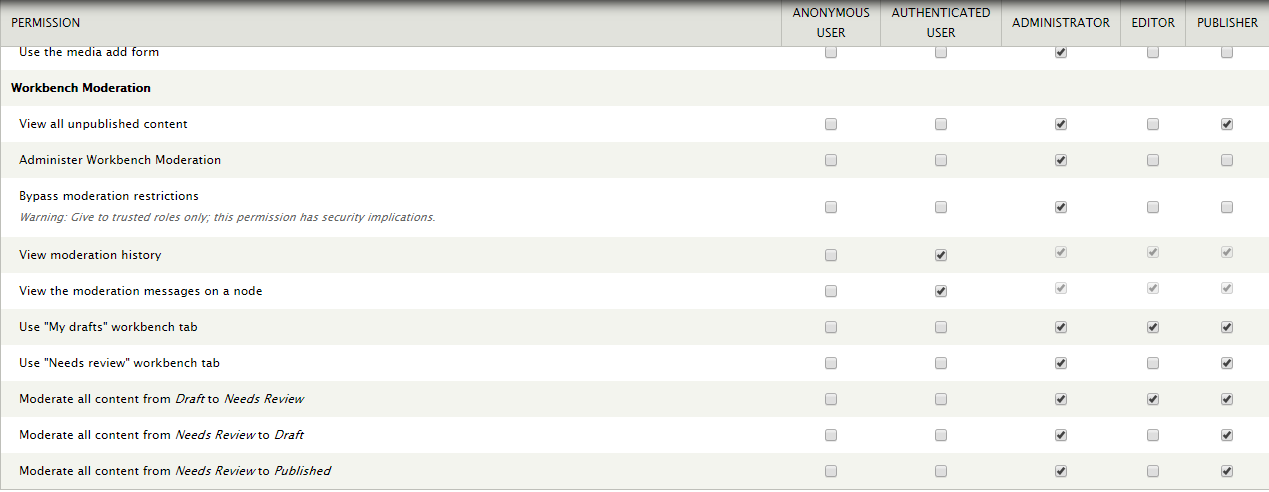
* List the permissions that each role has with regard to Workbench Moderation state changes.
* Tell us what page you are using to check how something is "kicked back to the original contributor".
Thanks.
Comment #4
huskey786 commentedI have managed to recreate this issue in a similar way. I have created my own custom views using moderation links. Am using version 7.x-1.3. There seems to be a disconnect using the moderation links from a view against the moderation states from within a node.
Issue:
- Editor uses moderation link from view to pass content to sub-editor
- Moderation link is now in sub-editor state, but opening the node, the state is still at editor.
Alternatively:
- Editor uses node state control to change to sub-editor
- Sub-editor uses moderation link to pass back to the editor
- Moderation link shows editor state, whereas node state shows sub-editor state therefore editor cannot edit content.
Hopefully that makes sense.
Comment #5
Anonymous (not verified) commentedHi Rickard,
I'm using 7.x-1.4, my problem is that when an Editor creates a node and sends it for review to the publiser. The node will be present in the Need Review section of publisher. When the publisher give some comments and send it back to editor as Draft, the node which is not visible in the any section of editors role.
The permissions are correct for all the roles.
The moderstion state from Need Review to Draft is not working for me here.
Please help.!!!!
Thanks in Advance.!!!
Regards,
Ram
Comment #6
Anonymous (not verified) commentedComment #7
adamps commentedPerhaps this has the same cause as #1240850: Publishing/Unpublishing a revision changes the author of that revision.? Setting back to draft could be causing the revision owner to be changed to the "publisher", hence it isn't on the "editor" "My Drafts". It would be on the publisher "My drafts", but perhaps that user doesn't look there.
Comment #8
oranges13Hi everyone. I was having this same issue, in that when an editor edits an author's submission and sends it back to draft, the author could not see it on their "my drafts" view on their workbench. HOWEVER, they maintained permission to edit it if provided the link directly. So this was clearly not a problem with the access to the node, simply an issue with the view that allows them to see it.
I was able to rectify this issue by adding two relationships to the "My Drafts" View, and changing a filter from an "and" relationship to an "or" relationship.
I added the relationships
Content Revision: Content (which links to the original node)
and then Content: Author (using the content revision: content relationship)
I added the filter User: Current (Yes) using the relationship Content: Author (which uses the node's original author, instead of the revision author) and put it in an OR relationship with the extant User: Current filter.
This may be potentially related to #1240850: Publishing/Unpublishing a revision changes the author of that revision. in that somewhere the metadata or author is being changed - since simply changing the status using the moderation status buttons (and not editing the revision and changing values) did not remove access from the original author in the view.
Comment #9
oranges13Here's an export of the updated view.
Comment #10
pol@orange13: I successfully imported your view, but it's still empty.
Comment #11
polIf the module 'Workbench Access' is enabled, your view is useless.
When disabled, it works perfectly.
Comment #12
oranges13@Pol
I wonder what is different about workbench access that circumvents that? Any ideas?
Comment #13
polThe Workbench access programmatically adds a view filter through
hook_view_pre_view(see source).To get into this hook, it check if the view has the tag 'workbench'.
What I did is to remove the tag of the view and it worked perfectly.
Comment #14
oranges13So I just installed this on a new site and ran into the same issue, users were not able to see revisions "sent back" to them. Editing the view to include the OR filter fixed this. Any chance we could get this updated in the Module?
Comment #15
RumpledElf commentedI have this one as well. It would be great to see this one fixed also.
Comment #16
lennart commentedoranges13,
Your modified view does not completely resolve the problem since the node now shows up both in the moderators "My drafts" view (where it should not be) after it has been sent back to the author and in the authors "My drafts" view (as expected).
Comment #17
zhinio commentedI am having the same problem.