

Closed (fixed)
Project:
Linkit
Version:
7.x-3.1
Component:
User interface
Priority:
Normal
Category:
Bug report
Assigned:
Unassigned
Reporter:
Created:
25 Jul 2014 at 20:03 UTC
Updated:
22 Jun 2016 at 01:17 UTC
Jump to comment: Most recent, Most recent file


Comments
Comment #1
DRIVE commentedComment #2
DRIVE commentedComment #3
anonSeems like the css is missing to.
What happends if you aggregate both css and js files?
Comment #4
DRIVE commentedWhen I aggregate.... the site FLIES :) ;)
You have a very good inner eye... on Basic Page (those are unpanelized), the css loads with the modal
On Panelized nodes, the css is missing just as you suspected.
The JS is there... same scripts that load all the time... so that part is good. Tracking down why the CSS doesn't load with the modal is a needle I think. Got any ideas on how I can troubleshoot that?
Thanks for your help :)
Comment #5
anonI cant reproduce this.
I can still use linkit when the node is panalized, without any problem.
Can you tell me how you do?
Comment #6
DRIVE commentedNot using any special setup (in my opinion).
Linkit works GREAT on unpanelized nodes.
My panelelized content / nodes do have up to 6 textarea fields, a file field, "Insert Image" module... a boatload of modules :D
There is a conflict somewhere or I am blind as a bat.... something is causing the Javascript and the CSS to malfunction/not-load.
Even if just the CSS were missing, the Javascript "Cancel" button should close the modal, and it doesnt... is that correct? And if I manually type in a link, it should insert it even if the CSS is missing right?
Something that has to do with Panels is killing something for LinkIt I guess.....
What specifically did I fail to mention?? Not sure what you mean by "can you tell me how you do?"
Comment #7
DRIVE commentedI wiped out LinkIt cleared everything, flushed database etc etc. Reinstalled stable version... same behaviour I reported. Wiped everything again... installed Dev version of LinkIt (7x3xdev)... same behaviour.
The ONLY difference between the Basic Page (unpanelized nodes) and Custom Type (panelized nodes) is that the Panelized content-types are using "Insert" module.
So now that I know I'm running clean, I added "Insert" field to Basic Page (unpanelized).. and edited some content and added the images. LinkIt works fine in these.
The only other field-differences between my unpanelized and panelized nodes are 1) Filefield, 2) Taxonomy Terms, 3) Tags ~~ all standard with no specialties... simple, straight from Drupal default settings. I don't think those would be interfering with LinkIt or you would know that by now :)
So, the factor that is common: Panels/Panelized nodes.... right now, that's where I'm at....
Let me know. I am willing to do some footwork, but I am in the middle of a build so CKeditor Link will do the job if need be, but I can try anything you'd like, provide you with more info etc.... let me know :) Thanks!
--------------
I did find one case where a Javascript error does appear in my debugger, but it is unrelated and this is just FYI:
When trying to insert link into explicitly set "Summary" of normal/main Body field on non-panelized node (Basic-page type)
Timestamp: 07/28/2014 09:40:14 PM
Error: TypeError: Drupal.settings.linkit.fields[editor.name] is undefined
Source File: /sites/all/modules/linkit/editors/ckeditor/plugin.js?t=E0ND
Line: 38
...
Drupal.settings.linkit.currentInstance.profile = Drupal.settings.linkit.fields[editor.name].profile;
Comment #8
DRIVE commentedTrying one last effort to get some help/pointers on this. I am out of ideas on what to look for that would cause the CSS to be missing when using panelized nodes. I really am not using anything out of the ordinary and I have very few modifications to the theme (Using Adaptive Theme). Even when I turn off all custom theme hooks and custom javascript I get the failure.
Anyone have some clues as to where I can look for finding the cause? There are no errors reported and I am fairly proficient with debugging... but a failure to load a specific file (the CSS for LinkIt) is not producing any errors "anywhere"...
For what I am doing now, ckeditor link module would be fine as I only need internal paths, but going forward, I have several builds that would really need linkit, and all of them will be using a similar setup to what I have now (modules used, node-type/fields, etc.).
I just need some ideas of how to more specifically troubleshoot at what exact point trouble is occurring :)
Thanks!
Comment #9
anonTry it on a clean install with minimal of fields and modules installed.
Then, start adding fields and modules slowly until linkit fails in the way you described it.
When it fails, you'll know whats causing the problem.
Comment #10
rv0 commentedI'm having similar issues on a site that also happens to use panels.
Linkit (in wysiwyg) works fine on basic_page edit, but fails (does not search, no errors) on an event content type.
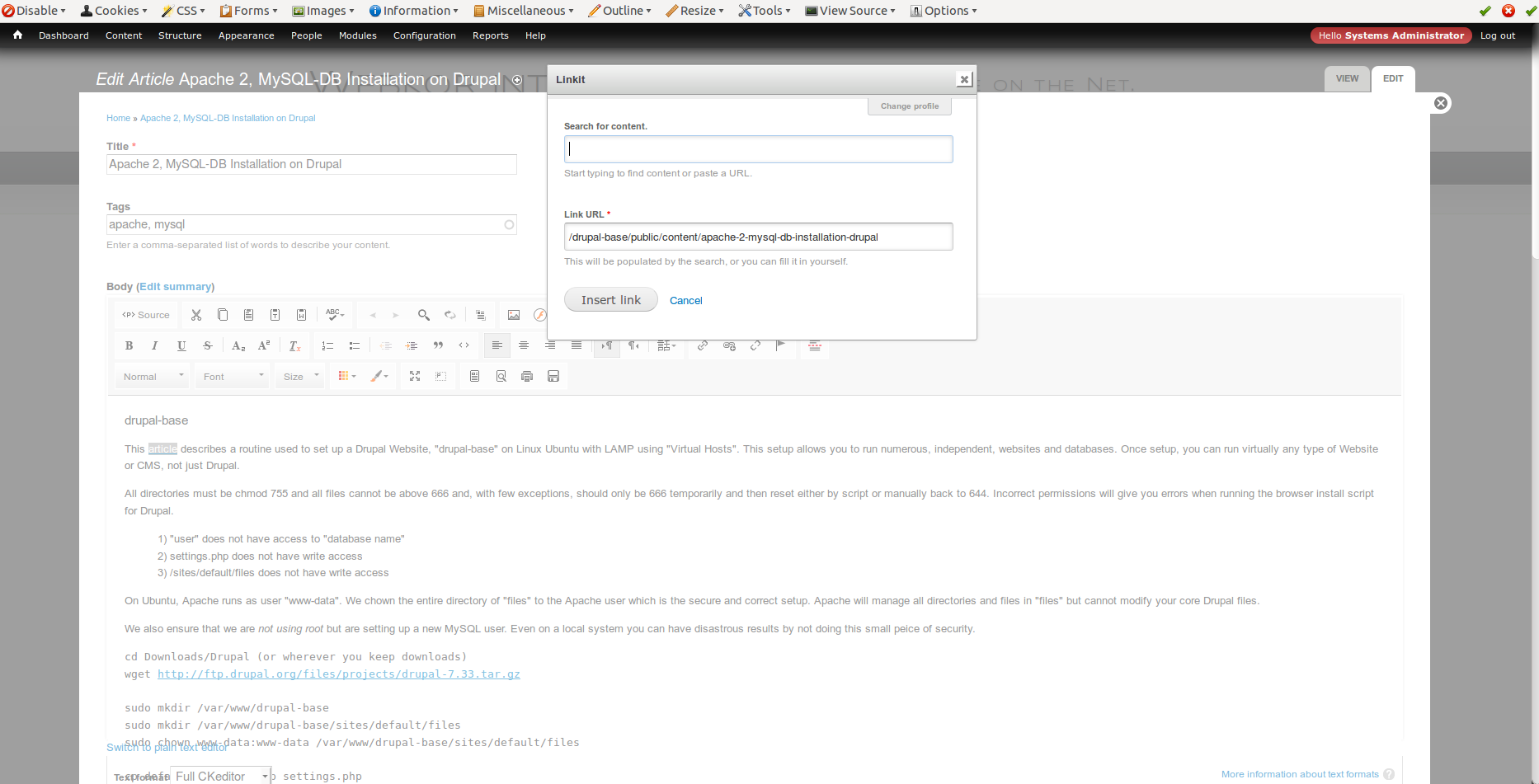
Window looks similar to screenshot above.
Basically, linkit.dashboard.js never gets loaded. Don't ask me why, I placed a console.log on top of the file and it only appeared on the page where linkit is working.
The php function linkit_dashboard_form get executed every time and the js is attached, the html of the form it generates is identical too (apart from the unique form_token). Rather clueless.
Comment #11
wrd commentedI'm seeing a similar problem. Linkit works fine in normal ckeditor text fields, but fails in any ckeditor input that appears within a panels editor overlay: panelized content, a custom content pane in a minipanel, etc. In my case, the failure actually produces a white page full of json. Search works fine; the error occurs when trying to submit the new link form.
- I've tried both the Seven and Ember themes, in case it was theme related.
- I've disabled every non-required module except those required to run minipanels, ckeditor, and linkit.
I can reliably reproduce this by:
- Editing a minipanel or panelized node
- Adding a new custom content pane
- Entering some text
- Selecting some text
- Hitting the linkit button
- Entering a URL
- Submitting the form
Edit to add:
- Tried a clean "standard" install with a new database
- Enabled following modules: panels, ctools, entity, ckeditor, linkit, minipanels, custom content panes
- Created a minimal linkit profile and ckeditor profile
Upon repeating the process of creating a minipanel, I got the same json output as with my full site.
Edit once more to add:
...and my problem disappears with the latest dev release. I should have tried that first, my apologies.
Comment #12
gmclelland commentedI'm not entirely sure, but I think for the ckeditor module they are working on a fix at #2158741: External plugin declarations are redundant. (Linkit, ckeditor_link, ckeditor_swf not working) and #2159403: Make CKEditor plugin system modular and clean.
I think this was already fixed with the WYSIWYG module if you use the latest dev.
Comment #13
anonSo is this still an issue?
Comment #14
anonComment #15
DRIVE commentedAmidst the recent torrent of bug fixes (thank you!) the issue, on my end, appears to be fixed.
I abandoned Linkit after the last round of bug-reporting but will probably try using it in production sites again.
Comment #16
DRIVE commentedComment #17
anonGlad it works for you.
I will close this issue, please feel free to re-open if suitable.