

Closed (outdated)
Project:
Quick Edit
Version:
7.x-1.x-dev
Component:
Code
Priority:
Normal
Category:
Bug report
Assigned:
Unassigned
Reporter:
Created:
18 Jun 2014 at 22:46 UTC
Updated:
28 Oct 2025 at 15:09 UTC
Jump to comment: Most recent, Most recent file

Comments
Comment #1
Håvard commentedPosted the issue text here by mistake...
Comment #2
Håvard commentedChanged the description.
Comment #3
Håvard commentedChanged the description.
Comment #4
Håvard commentedHas someone any ideas?
Comment #5
Håvard commentedAssigned myself.
Comment #6
Håvard commentedSorry folks! Works fine with a clean core, so I have probably messed it up somewhere on the road.Panels Everywhere was not enabled and I was not aware of that this issue is related to Panels Everywhere at this time.
Comment #7
Håvard commentedChanged the title and description.
Comment #8
Håvard commentedChanged the category.
Comment #9
wim leersPlease update to Quick Edit 1.1 and try again! :)
Comment #10
Håvard commentedSorry to say that it did not work. I've uninstalled modules, flushed cache etc.... only when Panels Everywhere is disabled the site doesn't crash. Thanks anyway for your reply :-)
Comment #11
wim leersOkay, that makes it clear: this is then definitely a feature request, because it obviously doesn't work yet :(
I suspect it's going to be a relatively simple if/else because apparently Panels Everywhere uses an object where Panels/Panelizer use a string.
That being said, I think this won't get fixed unless somebody provides a patch.
(Welcome to Panels Hell!)
Comment #12
Håvard commentedThanks again for fast reply :-)
My temporary solution to this problem is to discard Panels Everywhere and go back to the good old tpl-files :-)
Comment #13
magicmyth commentedHere is my initial patch for adding support for Panels Everywhere.
It fixes the fatal error caused by assuming the ctools $context will always be an integer.
Works around the fact that when the main content is rendered using a content pane, anything added to $page['content']['system_main'] during hook_page_build() will be overwritten (thus losing the data-quickedit-is-contextual-region-for-entity attribute).
Adds a new ctool's content pane: Page title (Quick edit). This is currently near identical to the one that comes with CTools except that it adds Quick Edit's required page title wrapper. This could potentially be expanded upon by taking advantage of CTools context features. Theoretically with the right entity context we could add Quick Edit support for any entity. This would mean that if a node was the current page but it was not the node/%node path (E.g. page manger generated page that renders a node using a different view mode to full), we could still set the needed meta instead of using menu_get_object(), which may not always have what we want. However I do not know how (or even if it is possible) to add an optional context that takes any entity.
Note: Currently Quick Edit does not work fully for me using Panelizer. I can quick edit but on save it loses the field that was edited (but does successfully save the edit). I've tested this happens using the standard Bartek theme so it does not seem related to this issue. But as most users use Panels Everywhere in combination with Panelizer I thought it worth mentioning here.See comment #15.
Comment #14
magicmyth commentedForgot to set "Needs review".
Comment #15
magicmyth commentedJust an update that I seem to have this fully working with Panels Everywhere and Panelizer. Seems I had an outdated Panelizer (missing panelizer_panelizer_pre_render_alter()). After updating Panelizer it still did not seem to work as it was not calling the new panelizer pre-render. Strangely clearing cache did not fix it but switching to Bartek then clearing cache and switching back to my Panels Everywhere theme solved it and now it all works great! So word of warning. Drupal's cache can be a cruel beauty at times :D
Comment #16
Håvard commented#13: thank's for the patch :-)
Now the php-error disappeared, but I got a script-error instead:
TypeError: entityElement.get(...) is undefined in quickedit.js:271
Comment #17
wim leers#13: awesome, great work! :)
Initial review:
typo.
The comment doesn't match the if-statement.
Should have a comment like
Is this intentional? This variable lives in the global scope, doesn't it?
s/Quick edit/Quick Edit/
Why the double
quickedit?In general, the code could use more comments to explain why this is necessary in general, because for somebody who doesn't use Panels/Panelizer, all of this is utterly confusing!
Comment #18
magicmyth commentedThanks for the review Wim Leers. Much Appreciated. I'll get a cleaned up version with more comments uploaded later.
Some quick explanations:
This is how CTools plugins work. I don't know the full ins-and-out but I believe CTools includes this in a limited scoped environment (otherwise every plugin would clash).
This is CTools' naming convention that will automatically select the correct functions. Basically the format is MODULENAME_PLUGINNAME_PLUGINTYPE_render(). As this is Quick Edit's title plugin it makes sense to call it that. So we end up with a quickedit_quickedit. It is possible to manually set the name of the render function in the $plugin definition but that is not how CTools' built in Page Title plugin does it and I wanted it to be as similar to that one as possible to make it easy for CTools developers to see what is different.
Worth noting is that as this is a CTools plugin, it will not be loaded unless the content pane is used. So this file will have no impact on sites that do not use it.
@Harvard
This patch does not touch any of the Javascript. I have seen similar errors myself at times but a refresh usually gets rid of them. I think there may be a race condition with the Javascript code somewhere. Though it is possible the combination of your PE theme is clashing with QuickEdit. E.g. an Omega 4 based theme will throw errors with Quick Edit when using the in-place text editor (CKEditor's in-line editor or plain text) because Omega 4 changes the CSS class name '.field-item' to the BEM style '.field__item' (See: #2326633: Add support for themes that uses different field class names (E.g. Omega 4)). Are you using a publicly available PE theme I could test?
Comment #19
Håvard commented@magicmyth
I've tested this with both Panels Everywhere themes and regular themes: AT Panels Everyewhere, Bootstrap, Bartik and others. I also tried out a clean and basic custom theme. I guess Panels Everywhere alters the selectors, because there's no js-error when Panels Everywhere is disabled.
Comment #20
magicmyth commentedI've taken Wim Leers advice and added a bit more code comments. Hopefully this will make things more clear for developers who are unfamiliar with CTools.
@Håvard I was able to consistently get that error if I used AT Panels Everywhere on the node edit page for a while but clearing my browser cache solved it for me. I have seen it on the rare occasion with the node view. Along with:
Uncaught TypeError: undefined is not a function in quickedit/js/views/AppView.js
but a simple refresh normally clears up the issue. It seems Quick Edit may be sensitive to old cache. Both Drupal's and the browser.
Comment #21
Håvard commented@magicmyth
I've cleared all cache there is in both Drupal and browser and used incognito windows in both Firefox and Chrome. No luck yet...
Comment #22
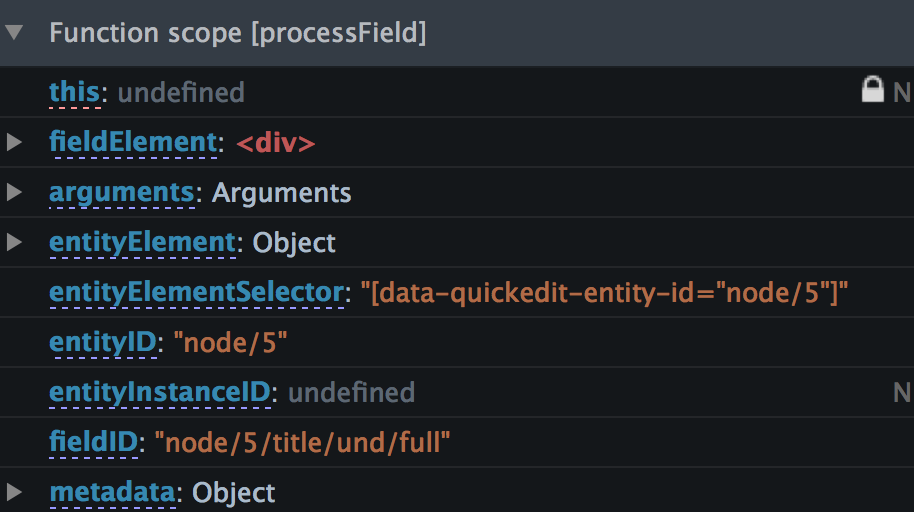
magicmyth commented@Håvard, could you place some breakpoints using Chrome or Firefox's inspectors where (or just before) you get the errors and list here the variables in local scope. The variable I'm most curious about is entityElementSelector which for me has values like: "[data-quickedit-entity-id="node/44"]". Could you check your page source for both data-quickedit-content-region-start and data-quickedit-content-region-end please? You might want to try putting some console.log() statements around that area. In quickedit.js::processField (around line 260) try changing:
to
and post here the output you get when you get the error. Thank you.
@Wim Leers are you able to make any suggestion on what could be going wrong here for Håvard? The javascript side of this is still a big black box for me.
Comment #23
Håvard commented@magicmyth
Variables:
Se attached image...
Console.log():
"Still no entityElement. fieldID" "node/5/title/und/full" "entityID" "node/5" "fieldElement" <div data-quickedit-field-id="node/5/title/und/full" class="quickedit-processed">Comment #24
magicmyth commentedThat suggests to me you are missing the data-quickedit-content-region-[start/end] attributes in your source code. Can you confirm that these two HTML attributes are missing in your browser page source code? Could you list the versions of Panels, Panels Everywhere, and Panelizer you are running please? In the code I noticed it mentions that it requires the 'content' region which I take to mean a region with the class '.region-content'. However I do not think that is required any more as I do not have that in any of my PE themes and there is nothing that uses such a selector. Possibly an older way on how this module once worked. Hopefully one of the Quick Edit devs can clear that up?
Comment #25
magicmyth commentedJust looked closer at your log and it seems its failing on detecting the page title. Though I don't seem to need it on my system have you added the content pane "Page Title (Quick edit)" to your PE site template editor?
Comment #26
Håvard commented@magicmyth
Attributes:
Yes, both attributes are missing in page source code (data-quickedit-content-region-[start/end]), but only when Panels Everywhere is enabled.
Module/theme versions:
Panels: 7.x-3.4+4-dev
Panels Everywhere: 7.x-1.0-rc1+37-dev
Panelizer: 7.x-3.1+62-dev
AT Core: 7.x-3.2+2-dev
AT Panels Everywhere: 7.x-3.0-rc1+1-dev
Page Title (Quick edit):
Have not added this pane.
Comment #27
magicmyth commentedThat's pretty recent. The only difference I have is Panels 7.x-3.4+5-dev Panelizer 7.x-3.1+63-dev but I don't think those commits would have any affect on this issue. Still try updating those two modules and see how you get on. Also add the new quick edit page title content page to your site.
Could you add some debugging statements to quickedit.module? If you have the Devel module available try a dpm() (or a dd() and upload the results). Add it to both quickedit_page_alter() and quickedit_page_prerender():
and
should do the job. Refresh your page and look at the output message. What we are checking for is that $page['content']['#theme_wrappers'] exists and has an array value of 'quickedit_wrap_content_region'. That theme function is responsible for adding those two attributes you are missing.
Thanks
Comment #28
Håvard commented@magicmyth
Updatet to Panels 7.x-3.4+5-dev and Panelizer 7.x-3.1+63-dev. Addet the quick edit page title both via Panelizer and Panels Everywhere template. No luck.
Devel debugging:
Comment #29
magicmyth commented@Håvard the value of ['content']['#theme_wrappers'][0] seems to be left out. Is it 'quickedit_wrap_content_region'?
Comment #30
magicmyth commentedUh sorry never mind my brain fritz and I missed the value. It is quickedit_wrap_content_region. That is weird because you are missing the wrappers it adds. Try adding a dpm or drupal_set_message("Wrapper called!") to theme_quickedit_wrap_content_region() to see if it is being run.
Comment #31
magicmyth commentedJust wanted to make sure. But you do have the "Page content" pane added to your site? If so can you tell me what region you are adding it to?
Comment #32
Håvard commentedEureka !! :-)
I've used the pane "Node being viewed content" instead of "Page conent" in the Panels Everywhere template. I have no idea why I did so. Now Quickedit works as designed with Panels Everywhere :-)
Thanks a lot for fast and professional support from both magicmyth and Wim Leers !! :-)
Comment #33
magicmyth commentedI should have thought to narrow down the PE setup in the first place. Ah well its forced me to read through more of Quick Edit's code :) Seems I should amend the README file with a note on PE that the Page content pane must be added.
I'm glad you have it working. Now you can let me know where else its broken :D
Comment #34
Håvard commentedI'm both happy and embarrassed (most happy) that it was only a silly mistake and that I had the chance to learn more about debugging ;-) Your patch seems to work excellent! I'll do more testing during the coming week.
Comment #35
magicmyth commentedAttached is an updated patch that:
A warning! As this patch has changed the name of the Page title plugin you will need to add it to your panel panes again. The pane editor will show a warning about the missing old Page title plugin. This is harmless and the pane can just be removed.
@Håvard no problem. It helps to catch such userability issue so that they can be documented (as is done in this updated patch ;) ).
Comment #36
Håvard commented@magicmyth
Works like a charm! :)
Comment #37
fox_01 commentedI'm using omega 4 theme with panels_everywhere as the layout engine. I geht the following message in the corresponding areas
When is switch to the bartik theme i get the following error
Patch works!!
Comment #38
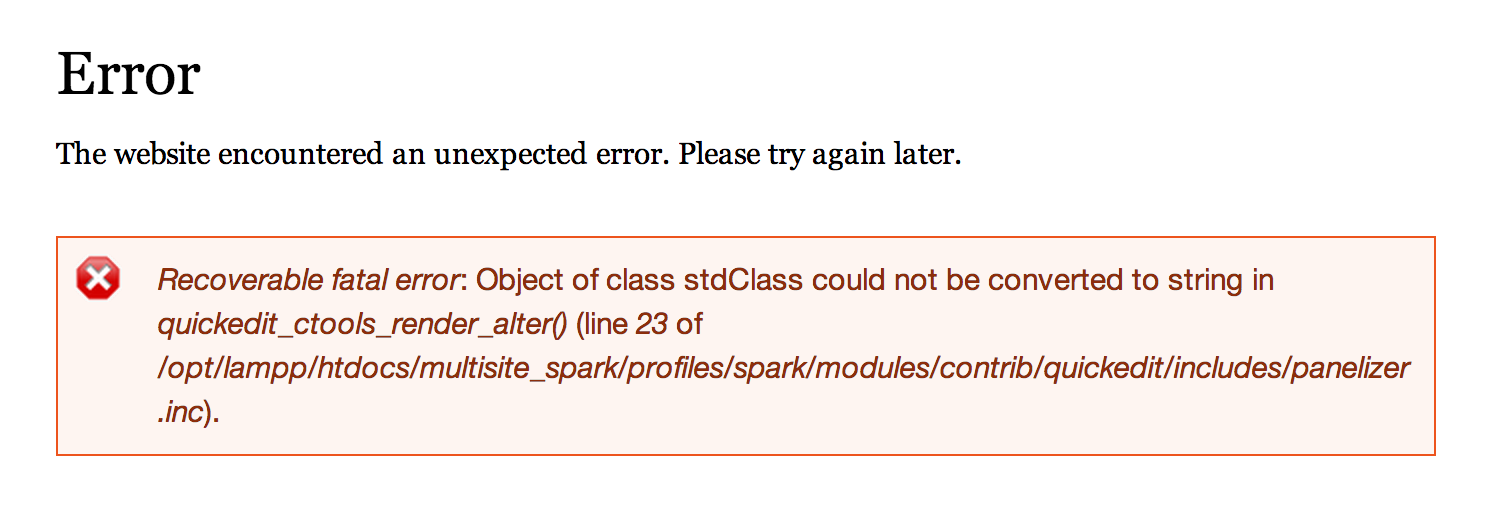
becw commentedI'm running into this same error:
It seems to be related to the fact that I'm using Panels Everywhere--the page context is not what Quickedit expects.
However it doesn't seem like the earlier patches from this issue are relevant any longer. I was able to fix this with a much simpler change, just getting the entity id from a more reliable source. Patch attached.
I also changed the issue category to "Bug report", because this seems to be an issue with code that is already part of Quickedit. If that's not the correct label, I'm sorry!
Comment #39
thejimbirch commented#38 works for me. Thanks @becw
Comment #41
charder commented@becw Patch works perfectly for me! Thanks!
Comment #42
vladimirausThank you for your contributions. 🎂
Drupal 7 is no longer supported. 🚀
Marking as outdated.