

Closed (cannot reproduce)
Project:
radix
Version:
7.x-2.x-dev
Component:
Code
Priority:
Normal
Category:
Bug report
Assigned:
Unassigned
Reporter:
Created:
6 Mar 2014 at 14:24 UTC
Updated:
22 Jan 2017 at 01:18 UTC
Jump to comment: Most recent, Most recent file

Comments
Comment #1
socialnicheguru commentedresource:
http://icalialabs.github.io/furatto/tooltips/
Comment #2
shadcn commentedThanks for the bug report. We have removed tooltip implementation from radix base theme as it is not really used in the base theme. The best way to implement that is in subthemes.
Comment #3
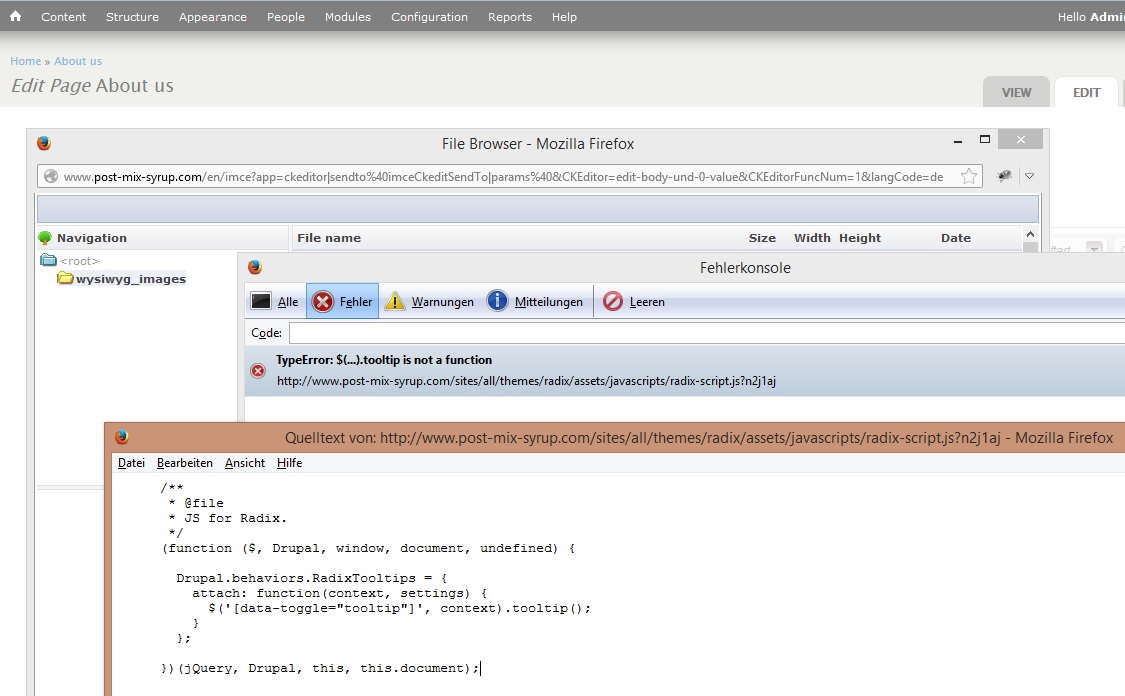
landaupfalz commentedI'm using the version Radix v7.x-3.0-alpha3 and having the same issue when I try to upload a file using the "IMCE Wysiwyg bridge" module. See the attached screenshot. Haven't you removed the tooltip code from this version?
Comment #4
shadcn commentedIt's in the latest dev.
Comment #6
scottalan commentedI'm using OA2 and I'm getting this error when trying to create a sub-theme of the OA Radix theme. They are using version: 7.x-3.x-dev specifically at commit: 38eb2d99.
I replaced it with the latest commit as of this post and I'm still getting the error. Tooltip hasn't been removed as state above [#2]
Even after removing the reference to the tooltip there is an undefined error on .popover() as well. Guess I'll try to find out what's going on. If anyone has some more insight please let me know.
Comment #7
scottalan commentedSeems this has to do with the fact that creating a sub-theme of OA Radix screws everything up. bootstrap.js doesn't get loaded so .tooltip() and .popover() aren't defined. Reference: https://www.drupal.org/node/2170593#comment-9425375 for anyone finding this from OA2. Sorry Radix :)
Comment #8
capfive commentedI'm with Scottalan,
I had to comment out the line of code for Bootstrap popovers
took me like an hour to solve this issue!
Comment #9
socialnicheguru commentedThis is still an issue with the latest release
Comment #10
socialnicheguru commentedas of today I cannot reproduce this