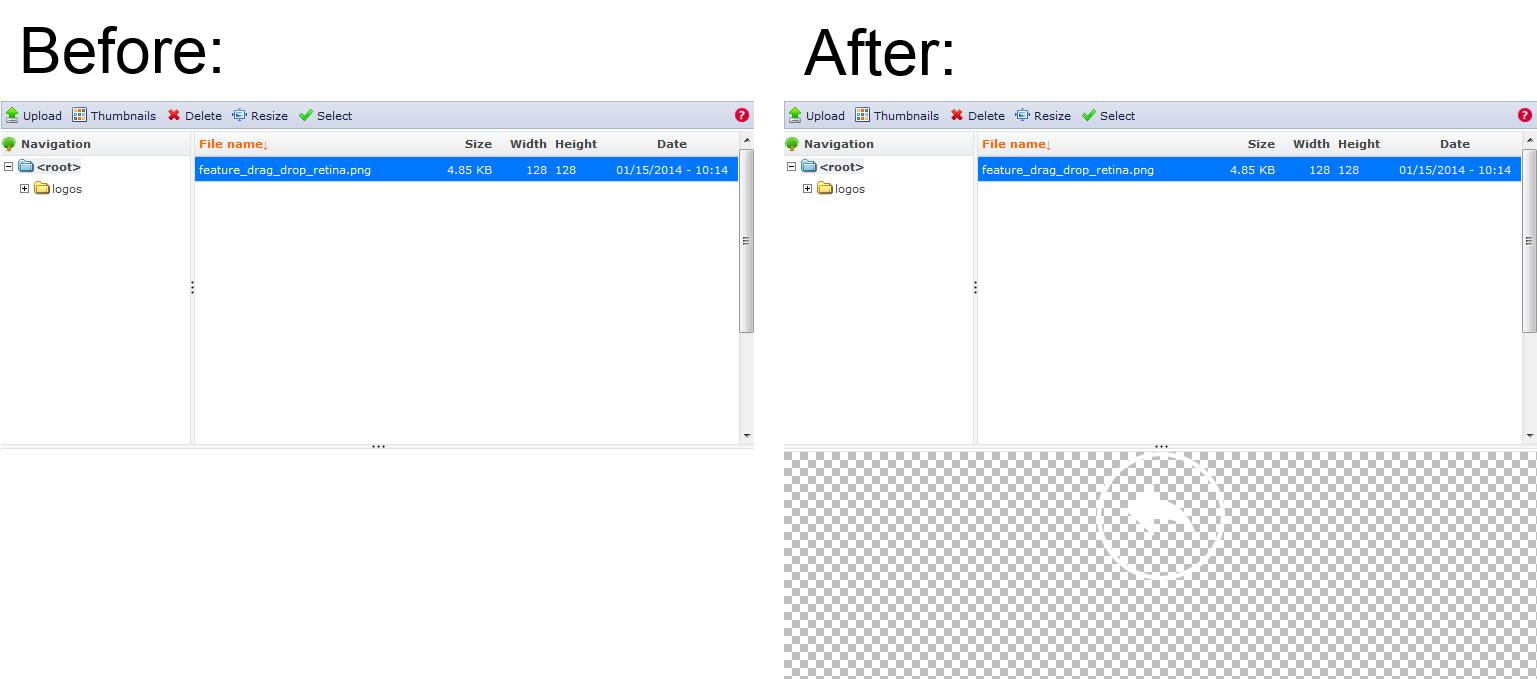
The current background of the file preview in the IMCE is white. When working with images that have transparency and/or are mainly white (e.g. a white round button), the image blends with the background and the content editor doesn't know how the image looks like in real.

Most image editors solve this issue by providing a white/grey dotted background to indicate transparency. I'd like to see the same functionality in IMCE. For most users working with jpgs / photos, there won't be a difference, but this would be really helpful for users working with transparent pngs.

Preview background in IMCE

Comments

bkonetzny’s picture

StatusFileSize
new300 bytes
new188 bytes

Added patch and preview-bg.png for the patch (not sure how to include this in the diff).

bkonetzny’s picture

Status: Active » Needs review
thalles’s picture

Status: Needs review » Reviewed & tested by the community

Looks good to me!

  • thalles committed 417f87e on 7.x-1.x authored by bkonetzny
    Issue #2174847 by bkonetzny: Better preview for images with transparency...
thalles’s picture

Status: Reviewed & tested by the community » Fixed

Thanks for your good job @bkonetzny!

Status: Fixed » Closed (fixed)

Automatically closed - issue fixed for 2 weeks with no activity.