I am trying to add custom styles to CKEditor 4.3 using WYSIWYG 7.x-2.x-dev, to appear at Styles menu.
While with previous versions (CKEditor 3.x and WYSIWYG 7.x-2.) there were different solutions and even module for that, CKEditor styles. That module is not needed (it seems to me) except it is friendlier than Text Formats / WYSIWYG profiles to cope with (am I wrong?)
My questions is: how to control which entries goes into block styles and which into inline styles?
Here is configuration:
In Text formats, I've added under Rules for Class Names:
quote-left,
quote-right,
intro
In WYSIWYG filter, I've added under CSS -> CSS clases:
intro=p.intro
quote left=blockquote.quote-left
quote right=blockquote.quote-right
Quote styles went into inline styles while intro style went into block style (and I want them in opposition to that).
How can I do that? (or is this a question for WYSIWYG filter?)


Comments
Comment #1
afoster commentedCheckout the crazy awesome step by step guide by andrew mallis to wysiwyg config. It documents the process of WYSIWYG setup very well.
http://bit.ly/ideograph-wysiwyg (Check out the "Set some Custom styles Section").
But I can say you should do this is 2 steps. Turn off wysiwyg filter, get those block/inline styles working, then turn back on the wysiwyg filter and make sure you add in the required classes for the filter so they don't get trimmed.
Comment #2
twodNothing in the text format configuration currently affects CKEditor via Wysiwyg so that part is not relevant here.
Wysiwyg Filter currently only auto-configures TinyMCE's content output filter based on the format settings (through
hook_wysiwyg_editor_settings_alter()). It won't actually change the UI. I don't think it interacts with CKEditor at all either.You can't change which style goes into which box. Wysiwyg just sets the stylesSet setting and the editor determines which style to place where based on the elements they apply to.
P are block elements, and they can normally only get block styles.
I'm not sure why blockquotes went into inline styles, but there's nothing I can do about it, sorry.
Comment #3
PascalAnimateur commentedI'm also struggling to load custom styles in CKEditor 4.5.3 using wysiywg 7.x-2.2+63-dev ... my styles just won't append/override the ones defined in my WYSIWYG profile!
I've got a custom ckeditor.config.js correctly loading (tested by changing editor color) and added the following:
But it doesn't add/replace Red to the block format list.
Anybody got this to work in a custom module?
Comment #4
mozh92 commentedHello,
1. I'm copy file sites/all/modules/ckeditor/ckeditor.styles.js in my theme folder sites/all/themes/NAME_THEME
2. after go admin/config/content/ckeditor and edit Profile - for example: Full
3. scroll to advanced options and select yes option for "Load ckeditor.config.js from the theme path" (admin/config/content/ckeditor/edit/Full)
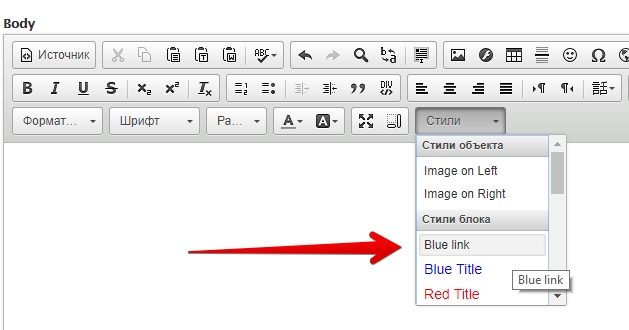
4. after you can change sites/all/themes/NAME_THEME/ckeditor.styles.js For example I added next line:
if(typeof(CKEDITOR) !== 'undefined') {
CKEDITOR.addStylesSet( 'drupal',
[
/* Block Styles */
// These styles are already available in the "Format" drop-down list, so they are
// not needed here by default. You may enable them to avoid placing the
// "Format" drop-down list in the toolbar, maintaining the same features.
/*
{ name : 'Paragraph' , element : 'p' },
{ name : 'Heading 1' , element : 'h1' },
{ name : 'Heading 2' , element : 'h2' },
{ name : 'Heading 3' , element : 'h3' },
{ name : 'Heading 4' , element : 'h4' },
{ name : 'Heading 5' , element : 'h5' },
{ name : 'Heading 6' , element : 'h6' },
{ name : 'Preformatted Text', element : 'pre' },
{ name : 'Address' , element : 'address' },
*/
+ { name: 'Blue link', element: 'p' , attributes: { 'class': 'link_dark_blue' } },
{ name : 'Blue Title' , element : 'h3', styles : { 'color' : 'Blue' } },
After in ckeditor in styles option I see my line (see screenshot)
Comment #5
rooby commentedmozh92: You instructions seem to be for the ckeditor module. Do they work for this module?