

Closed (fixed)
Project:
Commerce Backoffice
Version:
7.x-1.x-dev
Component:
Code
Priority:
Normal
Category:
Feature request
Assigned:
Unassigned
Reporter:
Created:
19 Nov 2013 at 23:10 UTC
Updated:
28 Jul 2014 at 18:37 UTC
Jump to comment: Most recent, Most recent file

Comments
Comment #1
candelas commentedi was having this problem and the patch worked for me. thanks MichaelP, i was getting crazy because the prize changes!
Comment #2
rbosscher commentedThanks solved for me too
Comment #3
jsacksick commentedI'm not 100% sure about this patch, I decided to trust you since it's RTBC and I committed it (fdb576c)
Comment #5
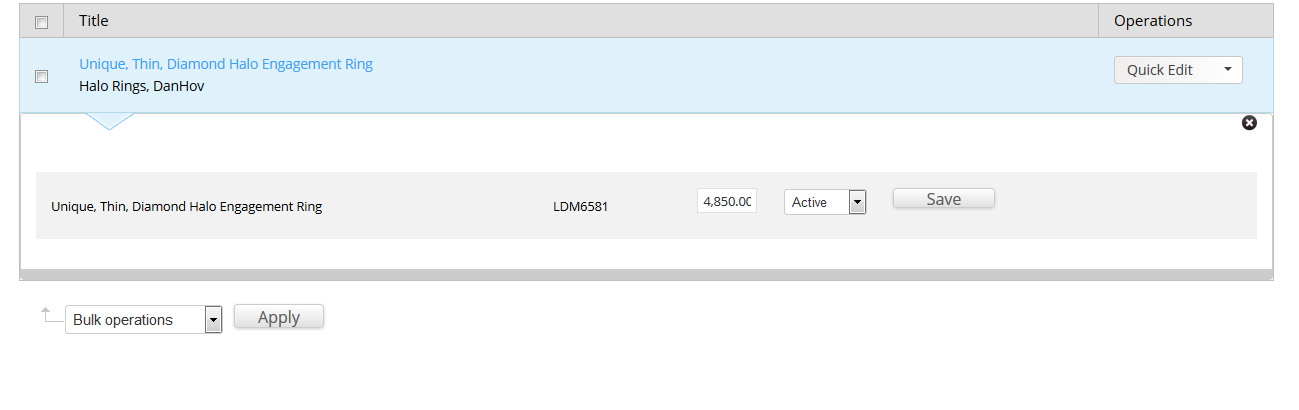
kruser commentedI don't think this fixes the problem. In USD, if I click quick edit on a product that's 4,850.00, the editable price field keeps the comma. Upon being saved, it then displays the price as $4.00.