

 The 2026 Drupal Business Survey is open. Your response will help shape the future of the Drupal business ecosystem.
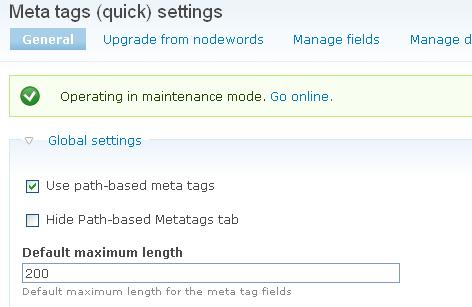
Default maximum length under tabs General -Global settings- on Meta tag quick configuration seem not working.
I suppose this value change the max length of field on DB table, but, when I upgrade from nodewords, the max length of data field on {field_data_meta_meta_xxxx} are fixed to 160.

Comments
Comment #1
fabrizior commentedComment #2
fabrizior commentedI’ve found one workaround to this issue.
Do not set any “Create and attach” item. If must only set "Default maximum length" and submit (save the setting).
Now you can set “Create and attach”. This operation create new tables for metatags, with the correct field size. Next, you can upgrade or do any other operation.
Comment #3
tsmulugeta commentedHi,
I have a solution that DOESN'T INVOLVE removing the module. If you go to the Meta Tags (Quick) setting, and find that your changes to the DEFAULT MAXIMUM LENGTH (under Global Settings) has no effect, do the following:
- Go to www.your-url.com/admin/reports/fields
- Scroll down until you find the FIELD NAMES: meta_description and/or meta_keywords
- Click on any of the links under USED IN for those FIELD NAMES (such as Path-based meta tags)
- Click on EDIT for meta_description and/or meta_keywords
- Scroll down to Maximum length and change the value (if this is no editable, then delete meta_description and/or meta_keywords for that CONTENT TYPE - add again and change the value)
Hope this helps!
Comment #4
astonvictor commentedD7 reached its EOL back in January 2025, and there is no active release for D7 for this module anymore.
Development or support is not planned for D7. All D7-related issues are marked as outdated in a bunch.