BACKGROUND: i played around with my rudimentary copy-pasta dev skills and changed it enough of Navbar that now that am seeing an update for it, i may just well fork my hacks into a separate module to at least keep the integrity of Navbar (since it's a dependency of Panopoly, which am using). But after perusing the issue queue I stumbled upon #1757466: Prefix all navbar classes to prevent theme clashes and #1955940: Change Menu tab to Main Menu and add Admin tab and these reminded me of the reason why i hacked navbar:
(1) Is there a structural reason why it shouldn't contain the LOGO and NAME of the site instead of HOME?
my patch basically substituted HOME with the logo and name of the site. i got the result i wanted but the hack isn't that pretty because it's just the default whereas i think these theme settings should be an option. but this got me brazen enough i kept changing things to get Navbar closer to Admin with Admin Tools (which i had to give up because it breaks with Bootstrap).
(2) Is there any structural reason why it doesn't include the NAVIGATION menu (more specifically CREATE CONTENT)?
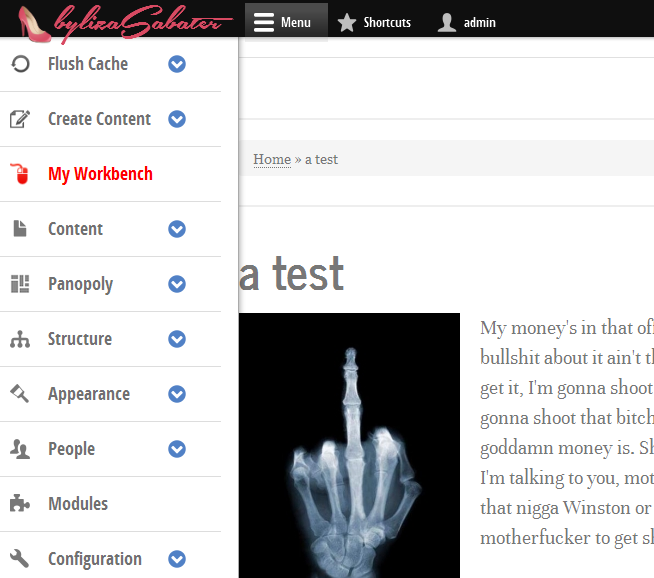
i also tried Navbar user-facing but it was problematic enough i had to give up on it. yet looking through it's code was how i ended up hacking at Navbar in the first place. in my setup you can see i have a CREATE CONTENT submenu. i've been a Drupal front-ended for 9 years, so my back-end skills arent that great. i couldn't add the menu programatically, so what i did was to clone the whole tree and add it at the head of the management menu. this solved my need for the time being but if i add or remove any node-types, i would have to delete these manually.
so, to address #1955940: Change Menu tab to Main Menu and add Admin tab, if y'all are adding MAIN MENU as an option, why not also add NAVIGATION, which would be the most logical choice because it contains the heart and soul of the second most important tools of the site, meaning, the CREATE CONTENT menu tree?
i say, get rid of SHORTCUTS (which am using by necessity not choice) and make it so you can add ANY menu of choosing, even a custom one.
last but not least, I MISS ADMIN TOOLS *sad panda*
if you look at the image i have enclosed (and apologies in advance for the test image and Samuel L Jackson IPSUM, but this is how i keep myself entertained whilst developing) am using the Navbar Flush-Cache module --which needs some debugging (not all the links work and i havent had time to figure out patches). i think this module should be merged into Navbar as an admin option... BUT! if you're using DEVEL, where do you put it?
that's why am thinking it would be better to sacrifice SHORTCUTS for the ability to add any menu of your choosing.


Comments
Comment #1
jessebeach commentedliza, thank you for posting this issue.
You have a couple options here to address the use cases you raise
hook_navbarhook_navbarandhook_library_alterI'm going to close this general issue. Followups should be included in their own specific issue.
Comment #2
Doneeo commentedThis is what i've done.
1. Go to navbar.module
Past the next code above The home tab:
Around line 448
2. Go to navbar.icons.css
Copy your logo and tweak it your way, this is mine.
If you want to make it fully responsive you could paste your code also under a @media ->
navbar.icons.css
@media only screen and (min-width: 16.5em) {
}
Viola!
This is maybe a quick fix but you could also use a hook via template.php.