

Closed (fixed)
Project:
Vagrant Drupal Development
Version:
8.x-1.x-dev
Component:
Miscellaneous
Priority:
Normal
Category:
Support request
Assigned:
Unassigned
Reporter:
Created:
24 Oct 2013 at 10:48 UTC
Updated:
30 Sep 2015 at 21:34 UTC
Jump to comment: Most recent, Most recent file


Comments
Comment #1
ericrdb commentedHi, this should be possible. You'll need to enable your mysql root account to login from any host, as this is securely restricted to localhost by default.
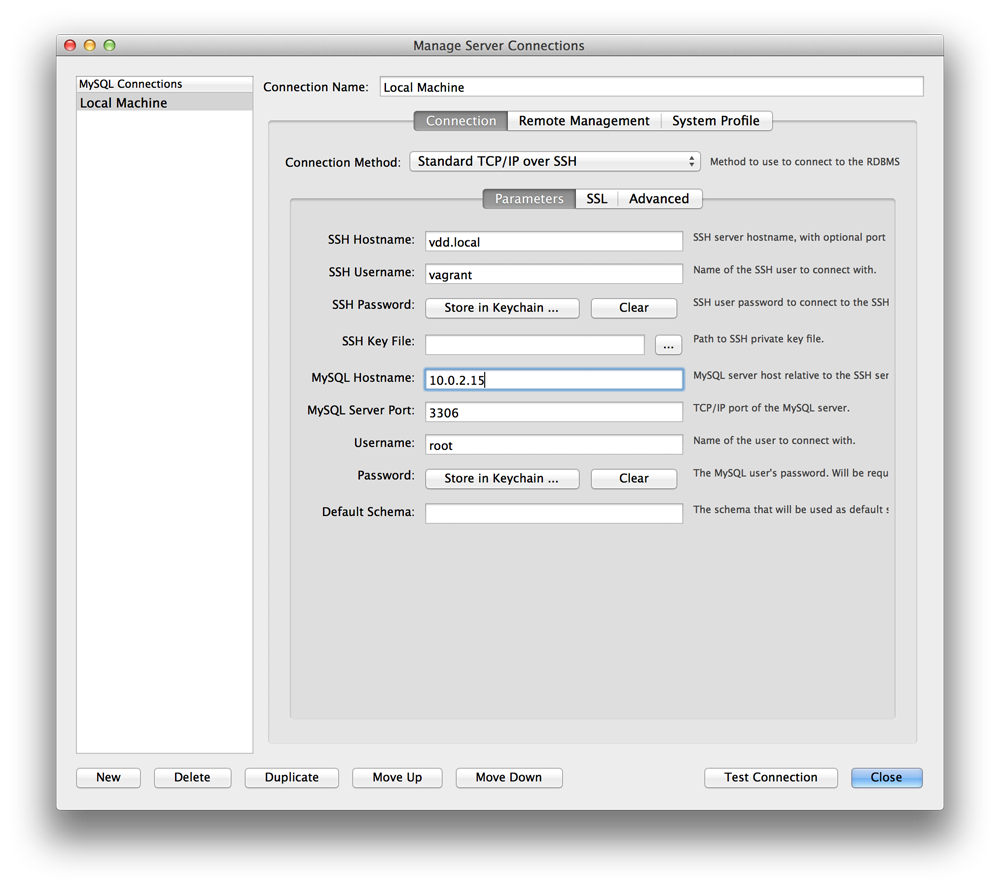
Also, see attached using MySQL Workbench. Enjoy
Comment #2
duozerskEric,
I'm not really sure, but as the VDDs are meant to be used for development on the developers' local machines - can we make these root account permissions (to enable connection from the host) the default ones?
Thanks
AndyB
Comment #3
ericrdb commentedYeah, that's a good idea. I'll look into that.
Comment #4
rootworkWhen I run this command:
grant all privileges on *.* to root@'%' identified by 'root'; flush privileges;within the mysql cli from the vagrant box, I get this message:
ERROR 1227 (42000): Access denied; you need (at least one of) the RELOAD privilege(s) for this operationIf I try to access the mysql cli using the password (i.e. running
mysql -prootinstead of justmysql), I get:ERROR 1045 (28000): Access denied for user 'vagrant'@'localhost' (using password: YES)I'd also like to see this set up by default, as I think this is a pretty common workflow for local development. But at the moment I can't seem to get the instructions above to work.
Comment #5
rootworkAh, got it. In #1 above, instead of just typing
mysql, you should typemysql -u root -proot.I forgot to specify the user above which is why it didn't work for me at first. But in any case granting the privileges won't work unless you use the user/pass combination when you access mysql.
Comment #6
rootworkSorry to generate so many issue replies, but I wanted to let you know that I've added documentation of the above to the getting started page.
Comment #7
willvincent commentedThe only change needed for this to work is to edit vdd/chef/cookbooks/berks/mysql/attributes/default.rb and change line 10 from false to true:
change to:
Comment #8
cuteapoot commentedHere's a patch to accomplish #7. My only question is whether we want to make changes to stuff in the
berksfolder, or if that's code that needs to remain as it is.Comment #9
ericrdb commented@bobojo I'm not too excited about modifying the berks files and we can declare this in the mysql attributes easily enough instead.
Host-based connections now work with Sequel Pro after implementing the attached patch for me. Anyone verify? Thanks
Comment #10
siliconmeadow commentedUsing the patch from #9 worked fine for me using Sequel Pro. :-)
Connection settings in Sequel Pro I used:
Connected and examining the phpMyAdmin db:
Comment #11
siliconmeadow commentedComment #13
ericrdb commented@siliconmeadow Thanks for confirming. Cheers