

 The 2026 Drupal Business Survey is open. Your response will help shape the future of the Drupal business ecosystem.
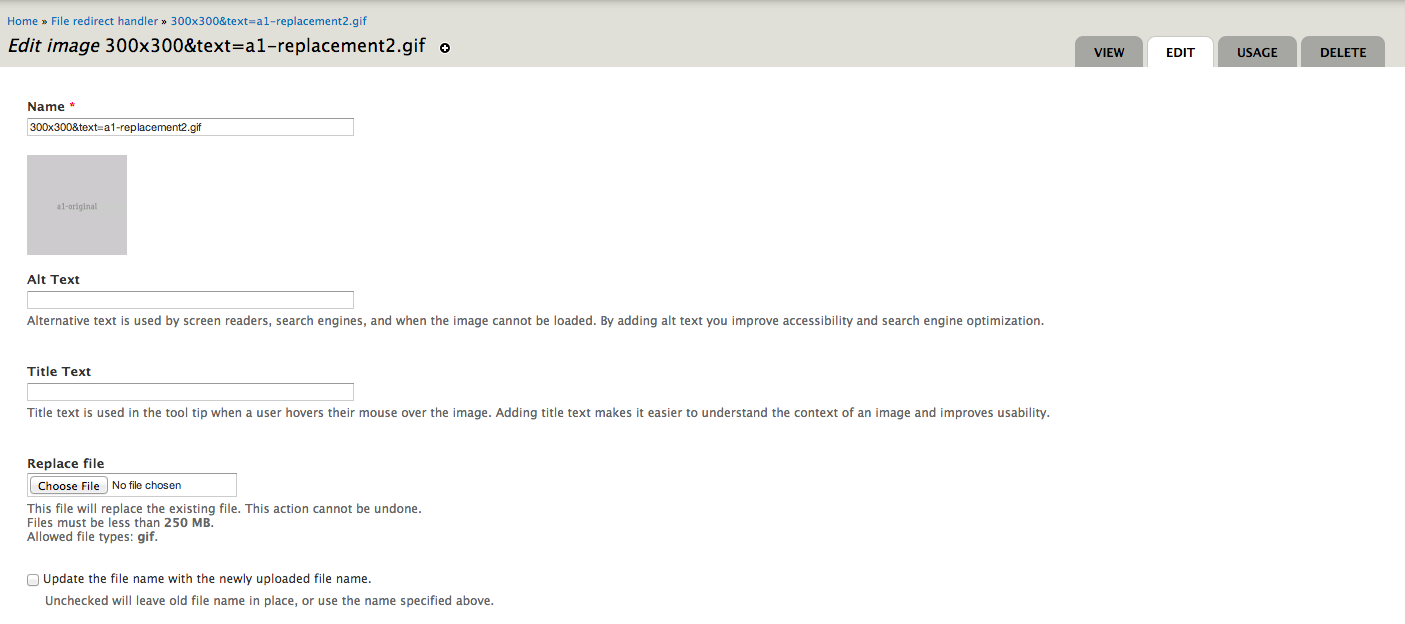
I've written a patch which adds a checkbox to the file replace page in File Entity. This option allows users to replace the file name with the newly uploaded file's name. This affects only the entity, it does not change the file name in the file system. Patch forthcoming.

Comments
Comment #1
sheldonkreger commentedPatch.
Comment #2
sheldonkreger commentedScreenshot of the new checkbox.
Comment #3
lotyrin commentedCould you describe the use case here in a bit more detail?
Also, it looks like file_entity has tests, probably should add one for this.
Comment #4
maxplus commentedHi,
I tested your patch because I like the idea of replacing the entity name (and file name) when replacing a file with a new one.
But when I use the checkbox, nothing new happens. So it does not make a difference if I use the checkbox or not.
The only way to make a change in the entity name is by changing it in the text field on top of the edit page.
Comment #5
grossmann commentedI was looking for the same functionality like maxplus mentions to change the file name in the file system (not the file entity name).
I hve a usecase where one file entity is linked to lots of nodes (datasheet documents). If now the filename of the document changes I like to update the file not only with the new content but also the correct filename. So if users download the doc the download a file which is named equaly to the file entity.
Would it be possible to implement this funcionality in this patch?
Comment #6
haleagar commentedI'm working on a patch that does rename the file on disk if checked, but does not if not checked.
This is partly because the behaviour of what to do in this case has changed in recent releases, so why not let the user decide.
I suppose the auto rename of the entity should be an option as well, as in this patch, but when all is done you get a lot of "optionals" on the form.
Maybe an option to set the default behaviour is needed?
And last in my case I'm also trying to roll in a feature/option to create a redirect from the old file name to the new file name (if the redirect module exists)
But I suspect that should be a separate patch, but makes sense to have with the rename file options.
Comment #7
haleagar commentedI also see a problem with the patch, the added checkbox is form item "replace_name" but that is not referenced by the code that changes the entity name, it is simply always changed making the checkbox irrelevant.
Here is my first patch that fixes above (option to keep or change entity name)
and adds requested changes (option to keep or change file name)
Note: this also incorperates https://www.drupal.org/node/2271229#comment-10419269
Comment #8
haleagar commentedComment #9
haleagar commentedComment #10
haleagar commentedMy previous patch is nice and simple.
I submitted it on it's own as it's more likely to be easily reviewed.
And I realize adding an additional dependency on redirect may not be welcome.
None the less I hope this further update patch more completely handles most use cases.
Here in this next version, I've added an additional option to create a redirect for changed file name (if the redirect module is installed).
I also handle redirects in the case a file is changed multiple times, and if the file returns to a previous name.
Also included in this version is the possibility to set the default values for the options on the module admin form. /admin/config/media/file-settings
Comment #12
haleagar commentedSorry didn't catch that warning when redirect no present.
2 line change to check for redirect module, and form value present and true.
Comment #13
haleagar commentedComment #14
PascalAnimateur commentedWhen checking "Update the entity name with the newly uploaded file name." and without replacing the file, I get the following error:
Notice: Trying to get property of non-object in file_entity_edit_submit() (line 876 of /.../file_entity/file_entity.pages.inc).Comment #15
PascalAnimateur commentedBased on #12, here's my take on this.
This patch adds the option "Keep original filename" which, when checked, rename the uploaded file to the name of the original, replaced file. There's a global setting to control the default behaviour in the File settings.
Comment #16
sirtetI just ran into an issue with filesystem-filenames being renamed:
I have Images on the site with media 2.0
They are referenced in images, but sometimes also via their URL.
If a user replaces the File, he sometimes is not aware of the implications this has (for files linked via URL).
So for my case, i would like a default behaviour of keeping the original filename.
And i think it would be great if there was a default help-text about the issue.
Comment #17
joseph.olstad@sirtet , does the patch in comment #15 work for you?
also, you say media 2.0 , are you referring to version 7.x-2.0 or 7.x-2.14 (latest)
would be worthwhile re-triggering the tests on #15 , not sure if it still applies to head.
Might need a reroll
Comment #19
joseph.olstadCan someone please reroll patch #15 ? Thanks.
Comment #20
sirtetI have a 2.0 release, i think beta4...
Currently i can't update, test anything, etc. too low on time.
What i did was look at the d8 version via simplytest.me, and i saw the UI is still the same.
Just wanted to chime in that i guess this is quite a common pitfall, that people replace an image FILE,
when they actually just want to replace the file's content.
PS:
A similar Issue is to be able to rename filesystem-filenames during (initial) upload:
#2090889: rename file during upload (filesystem- name).
Same as i just stated there, i think that maybe it could be of help to implement this feature not only for media-files, but for any file-upload?
Comment #21
joseph.olstadhere is a re-rolled patch.
Comment #22
joseph.olstadok, this is going in, works great.
Comment #25
joseph.olstadGreat patch, thanks!
this will be in 7.x-2.16
Comment #27
unsettlingtrendThis patch/solution confuses me. Sorry.
We have two scenarios:
1. We are uploading a new file of the same file extension: ver1.xls -> ver2.xls
2. We are uploading a new file of a different file extension: ver1.xls -> ver2.doc
Before this update
1. ver2.xls is the new file, but it's physical filename will be changed to the original ver1.xls
2. the file is now ver2.doc, and the name is updated to ver2.doc
Now, if you check this box
1. The same thing as before: ver2.xls is the file, but it's physical filename will be changed to ver1.xls
2. The file is now ver2.doc, but is named ver1.xls
I don't understand how this is useful, not to mention the fact that it ultimately only allows you to rename the wrong file extensions.
Comment #28
vaccinemedia commentedI'm not sure if this is related to the work that's been done here but I have noticed the following behaviour:
We have a client who are uploading docs with dates in the filenames and when they are replacing them with new versions with new filenames, the downloaded version is the new and updated one but has the same filename as the previous version retaining the date which is incorrect.
i.e. they have a file called doc_august_2017.doc and later on replace it with doc_april_2018.doc but when the end user downloads it, they get the April version with the August 2017 filename.
Is this correct or a bug?
Comment #29
unsettlingtrendAs I understand it, it's correct. A file with the same file extension as the one it's replacing will ALWAYS be named the same as the old file. I submitted a patch for this: https://www.drupal.org/project/file_entity/issues/2958574
There's a good argument against it, as links to the physical file will break, but I'd prefer to give people the option if they need it.
Comment #30
joseph.olstad#2958574: Enforce stricter "Keep Original Filename" option for same extensions
without having deeply reviewed, it looks like this is a good idea, follow up in the other issue