Hi,
I have a content type (slide) with a field collection, in this collection i have am image field. In the other hand i have 6 different crop image styles.
When i create a new slide i can upload up to 6 images, and in any of them i can apply one of my 6 different crop styles.
So the fianl result will be:
SLIDE
Image field 1 -> cropped with manual crop style A
Image field 2 -> cropped with manual crop style B
Image field 3 -> cropped with manual crop style B
Image field 4 -> cropped with manual crop style D
Image field 5 -> cropped with manual crop style E
Image field 6 -> cropped with manual crop style A
But when a view the content, i only see one crop style applied, because i can only assign one style in Home » Administration » Structure » Field collections » Field collection field_content » Content Image (the image field) » Manage Display » Format Image Style
So whats the point of being able to choose multiple crop styles if you can only manege the display of one? I'm missing something?
Thank you


Comments
Comment #1
matthijsHi,
The point of being able to crop multiple styles is that they can be used on various places. You could use the thumbnail in the teaser, a large image in the photo slider... and so one.
To achieve your goal you need to create a new image style and add the "Manual Crop: Automatically reuse cropped style" effect. This effect will search the database for an applied crop selection and reuse it.
Afterwards update your view mode to use the new image style and you're all set!
Good luck!
Matthijs
Comment #2
fernando vesga commentedHi,
thank you for your answer.
May be i didn't explain myself right.
I don't need to use different crop styles in different places, i want to use different styles in the same place. I mean.
if i have an image field with multiple uploads, i want, for instance that first image will be cropped with style A, and second one with style B, but other instance of this content type will have the first image cropped with style B and second image cropped with style C.
So if i view my first node, i'd like to see two images with 2 different crops applied in the same view mode. Full Node
I don't know if this is a bit confusing :)
Thanks
Comment #3
matthijsHi,
Your question was quite clear, I understood it correctly, but maybe my answer wasn't...
This should do what you want, you crop 2 different images with 2 different styles and this third style (which is only used in the node view) will look for the a cropped style and apply it without affecting the image any further.
Could you please try this or let my know what part of my answer isn't clear?
Matthijs
Comment #4
fernando vesga commentedOk, thanks. i see what happend, i was using 7.x-1.4 version instead dev version.
But i was using it because dev version it's not working form me.
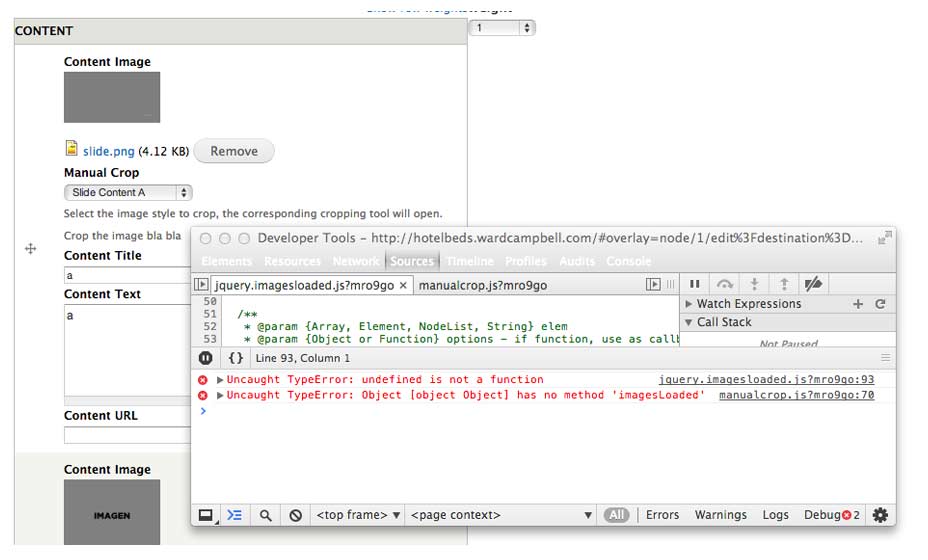
When i was with 7.x-1.4, any time i selected a crop style, the crop area appeared inline, but now i can see the crop made it in the thumbnail, not critical just confuising, but i can crop any more
the reports page shows no errors
i attach an imagen with the js errors
thanks
Comment #5
fernando vesga commentedComment #6
fernando vesga commentedFixed by using this library
https://github.com/desandro/imagesloaded/tree/0e68c8ea901cdec8844d4ceca2...