

Closed (fixed)
Project:
Open Atrium
Version:
7.x-2.x-dev
Component:
Code
Priority:
Normal
Category:
Bug report
Assigned:
Unassigned
Reporter:
Created:
20 Jul 2013 at 04:09 UTC
Updated:
15 May 2014 at 07:28 UTC
Jump to comment: Most recent, Most recent file



Comments
Comment #1
mpotter commentedI am not able to reproduce this on any of my sites, even a fresh install, so not sure what's different with your setup. Can anybody else reproduce this?
Comment #2
hefox commentedThis message is horrible. It can come from so any element in any form, and sometimes not even a sivible form as views uses executing the exposed form to figure out exposed input, and doesn't always display the form but does display the error messages from the form...
Anyhow I usually poke into form.inc, find the part that outputs that message a dsm to see what element is actually reporting it.
Comment #3
technocrat commentedYeah, I get the error message too when I create a default section. Also, I can't create regular discussion posts when inside a section. The contextual content create links only show "Create Team" and "Create Section Page" even when viewing a section. This is on a fresh install of the 7.x-2.x-beta1. For some reason, when I do create a discussion post I still can't connect it to a "discussion type" section, or any for that matter.
Not sure if it's related but I got this warning while installing OA. Right when i was asked which panopoly apps to install.
Warning: Illegal string offset 'name' in apps_profile_apps_select_form() (line 101 of ~/openatrium/profiles/openatrium/modules/contrib/apps/apps.profile.inc).Comment #4
technocrat commentedAlso, here is a screenshot of the Features which say I have unmet dependencies.
Comment #5
hefox commentedThose are example features from contrib modules; oa features are under Open atrium vertical tab and panopoly features are under Panopoly tab
Comment #6
Argus commentedI have seen this error on my beta3 installation. Indeed also when adding a calendar display on a sectionpage, with a non-admin user.
Comment #7
Argus commentedAfter removing the calendar (View: Open Atrium Calendar: Calendar) the error is gone. And it doesn't return when I add the calendar again. Maybe it is related to an event on the calendar the user doesn't have access to?
Comment #8
potassiumchloride commentedI have this error on my beta3 installation when I add a section page that is a default. I don't get it when I add a calendar or a discussion section.
Comment #9
mpotter commentedJust had this happen during the Drupal Association webinar today, so at least I have a test case to debug this now. It was working yesterday so not sure why this is intermittent, but I'll try to track it down. In this case it was for anonymous users trying to access a new "Task" section.
I think it's related to something in the Panelizer configuration for the View that is being displayed on the page.
Comment #10
mpotter commentedOK, think I fixed this in 51ba193. Code wasn't using the correct helper routine to get the current Space context.
Comment #12
hazit commentedHi again
I'm now getting this when I create a new space. I'm using a (still relatively) fresh instal of OA 7.x-2.x-dev.
Comment #13
mpotter commentedThis usually means you have a widget on your Space page that is set up incorrectly and need to revert the Customize Page options. I cannot reproduce this on a fresh install of OA2-dev.
Comment #14
hazit commentedThanks Mike - your advice worked.
________________________________________
Just a note to other newbies who might be getting the following error for their Open Atrium 2.0 Spaces and find themselves here:
'An illegal choice has been detected. Please contact the site administrator'
Try selecting "Customize this page" then deleting any content panes that you are not actively using, or that relate to content types you may have recently created or customised.
If that still does not work - try deleting and re-adding the content panes you are using for that Space using the "Customize this page" option.
This worked for me.
Another option if you are having problems with Spaces is to go to Panolopy/Pages and scroll down to 'Overridden Page Templates'. Find the Space/Section you are having trouble with and select 'Revert' *NOTE you will lose any customisations you have made to that Space page if you do this and will have to re-do them.
If this does not help, or if you are getting the above error with newly created Spaces, double-check that you have not made any customisations to the template that are causing you trouble or that relate to content types you may have recently created or customised (found under Panopoly/Panopoly Pages/Page Library).
Comment #15
hosais commentedHi,
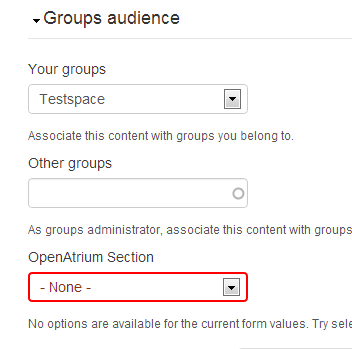
I create 6 spaces. I gave each spaces with one news section. Then I added 4 document posts on three of the 6 sections. I have this error when I create one document post. After saving the post, it shows the error and section selector is red and there is no section that I can choose. I attached the picture for reference. The only thing I did to customize this web so far is change the logo and created an mini panel.
With that error, in the section page, the posted document is not showed.
hosais
Comment #16
hefox commentedComment #17
hosais commentedHi,
After few times tests, here is the way to reproduce the error:
1) create a space
2) create a news section in the space
3) create a document post with TWO files attachment.
Then it produce this error always. I tested many times, the most important thing here is TWO files attachment.
Without attachment or just ONE file will not have this error.
after some more tests, the only way to have a document has two files is create the document post with one file attached, saved and then edit and add another ONE file again. It seems only one file can be uploaded each time it saved. Could anyone explain why this happened?
hosais
Comment #18
hosais commentedBy the way,
My installation is 7.x-2.0 not dev version.
hosais
Comment #19
hefox commentedPlease stop changing the version and read about using issues in the issue queue handbook.
The issue likely exists in 2.x-dev; if it didn't this issue could be marked back as fixed since there's no reason to have an open issue for a fixed bug.
Comment #20
mpotter commentedSounds like the Space / Group Audience (og_group_ref) field is being cleared by the multiple attachment upload. This field is hidden in the collapsed "Access" fieldset of most content types. The value of the Space field is used to select the options for the Section reference field. If the Space field is empty, then the Section field will not have any values and you won't be able to save it.
Seems to be an issue with the Ajax of the Media attachment messing up the Space and Section fields and will look into it.
Comment #21
mpotter commentedOK, I actually cannot reproduce this. Exactly how are you doing #3? I was able to add two files easily:
a) Click the Select button in the attachment area, choose a file, click Upload, click Next, click Save.
b) Click the "Add another" button
c) repeat (a)
I can add as many attachments as I want to a document in this manner. If you are trying to use a multi-upload plugin, then this is a dup of #2122015: Field 'oa_section_ref' will be resetted after Upload via plupload / Media_Multiselect. Otherwise can't you just use "Add another" button to add more attachments? I certainly don't need to save after each one.
Comment #22
mpotter commentedAnd actually, I'm close to closing this issue since this is really unrelated to problem in the original post.
Comment #23
hosais commentedHi mike, I did the steps as you mentioned and I did not try to to use a multi-upload plugin and I use add another button. I installed two web sites, in my computer and remote web site (hostmonster). Both of them have this issue.
I am installing a new dev version now in my computer and I will try to test it ASAP. If it has the same result then I will do the tests in another completely new installation for clarifying status of 2.0 version.
hosais
Comment #24
hosais commentedHi,
After testing dev version, it has the same result. I just install a new dev version. After installation, the only things I did are
1) create space (private space)
2) create news section
3) create document post with 2 MS-word files (select 1 file, next, save, add another button, select 1 file,next, save, publish the post). <- then it has the error message.
hosais
Comment #25
hosais commentedHi,
I install a new version at getpantheon.com.
The result is the same. If you want to check the web site, the administrator is tester and password is 123. the version is oa2 2.0
Web: http://test-itaroko.gotpantheon.com
hosais
Comment #26
Argus commentedI followed the steps to reproduce on your testsite and indeed the error is produced.
No Section is assignable, so the node won't save.
When I remove the attachments, the node is created without a problem. After the node is saved, I can attach files (one or two) without problems.
Comment #27
Argus commentedFurther testing, I can create a node with a png file attached without problems. And also with two png's.
One png and one docx file won't work. I checked if docx files are allowed, they are.
Comment #28
mpotter commentedReproduced! I was testing with images and it only fails when uploading more than one non-image document (pdf seems to fail as well as docx). Definitely a problem with the Ajax being used in the Media popup conflicting with the OA2 Section selector. Looking into it.
Comment #29
mpotter commentedCommitted this in b917bf3 to oa_core. The issue was fixed in the latest -dev of the reference_option_limit module, so just needed to update the patches #1986532: Support organic groups OG reference widget and #1986526: Support one field changing 2+ fields and update oa_core.make to point to the latest version.
Comment #31
santoshnath07 commentedIn my case the err occur due to the node was not published.
thnx.