

Closed (fixed)
Project:
Localization client
Version:
7.x-1.3
Component:
User interface
Priority:
Normal
Category:
Bug report
Assigned:
Reporter:
Created:
3 Jul 2013 at 08:59 UTC
Updated:
16 Dec 2015 at 22:44 UTC
Jump to comment: Most recent, Most recent file


Comments
Comment #1
gábor hojtsyIt may be a problem if you have no internet connection. However drupal.org was recently migrated to https en-masse, so that may also be an issue (with the redirection happening improperly possibly). Did you try with https in the setting?
Comment #2
Balbo commentedI do have internet connection.
Using https in the server address return the same error.
Comment #3
Balbo commentedDon't know if it may be helpful, this site is running on a windows server machine.
Comment #4
Balbo commentedWhat other "more info" can I provide to maintainer?
Comment #5
sebcorbin commentedThere may have been some problems on localize.drupal.org side at the time you hit this issue, is this still the case?
Comment #6
gyogyika commentedSame problem.
Comment #7
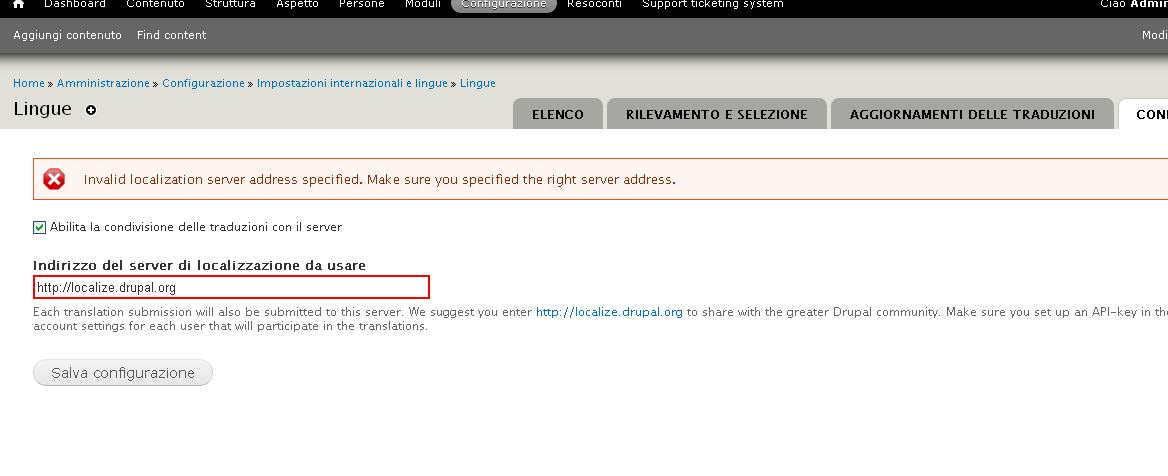
sebcorbin commentedCan you verify that you have exactly
http://localize.drupal.org(without trailing slash).Can you provide the output of
drush ev "var_dump(xmlrpc('http://localize.drupal.org/xmlrpc.php', array('l10n.server.test' => array('2.0'))));"Comment #8
vvs commentedI have the same error.
drush ev "var_dump(xmlrpc('http://localize.drupal.org/xmlrpc.php', array('l10n.server.test' => array('2.0'))));":Worked for me only hard set:
drush vset l10n_client_use_server 1But on send string through l10n_client I have an error:
php_network_getaddresses: getaddrinfo failed: Name or service not known.I'm add nameserver 8.8.8.8 on my /etc/resolv.conf and solve my problem! Thanks all! :)
Comment #9
Sahin commentedUpgraded to 7.24 and faced the same issue.
Comment #10
gábor hojtsy@Sahin: probably related to #2124931: Update l.d.o syncing for d.o update of project data.
Comment #11
Holygoe commentedI have same problem. Hmm....
Comment #12
Holygoe commentedIt's work!!! :) I set "openssl" of PHP
Comment #13
japerryGreat, drumm updated the rules so the staging server should be accessible. Lets have some other community members try it and if so we can mark as fixed.
Comment #14
baluertlAm I doing something wrong or not this part shall be tested?
Comment #15
baluertlAfter saving the server's address as passing auth tokens via URL (https://drupal:drupal@localize-7.staging.devdrupal.org/) and user's key saved in their profile, still can not upload a new translation to server.
Comment #16
gábor hojtsy@Balu Ertl: are you a member of the language team you are trying to suggest strings for and are you able to suggest to that team on the l.d.o staging site UI?
Comment #17
gábor hojtsy@Balu Ertl, @japerry: I opened #2543440: Localization remote submission fails for the server bug, let's leave this issue open because people submitted it regardless of a staging server (vs. the invalid server), so the issue is relevant either way, but the staging problem is not relevant here anymore. Let's continue there.
Comment #18
baluertl@Gábor Hojtsy: yep, on the Simplytest site I tried to submit translation to Hungarian locale, and I assigned the key of my group admin account on Staging site. However for counter-testing today I also set up a non-admin simple user both on Simplytest and Staging, but the results are same.
Comment #19
sebcorbin commentedSeems that the issue was solved way back then