

Closed (won't fix)
Project:
Metatag
Version:
7.x-1.25
Component:
User interface
Priority:
Major
Category:
Bug report
Assigned:
Unassigned
Reporter:
Created:
14 Jun 2013 at 14:48 UTC
Updated:
10 Apr 2026 at 10:19 UTC
Jump to comment: Most recent, Most recent file


Comments
Comment #1
ibedoya commentedI have the same problem. I want to update from beta4 to beta7, but I can't for this issue.
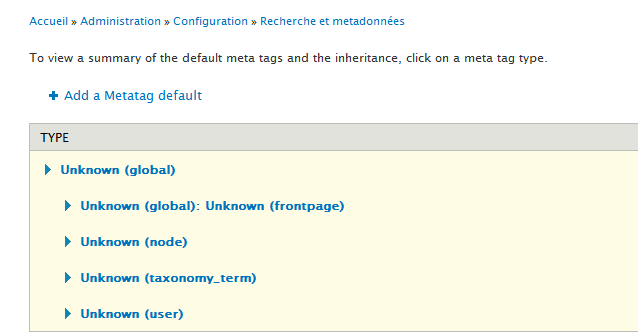
I didn't test a lot on non production environment, only I tried to upgrade and i got some metatags as Unknown:
And as emicoma said the select menu is empty when I try to add a new one.
Regards.
Comment #2
damienmckennaPlease check to see if you have any additional modules that implement either hook_metatag_config_instance_info() or hook_metatag_config_instance_info_alter(), an out-of-date module might be interfering with Metatag.
Comment #3
ibedoya commentedI have only metatag_metatag_config_instance_info() and metatag_views_metatag_config_instance_info() that implement the hook. All metatag modules are updated and I dont have any other module that implements that hook or other metatag hook. I mean I have no modules that implement hooks from metatag module except metatag sub-modules but I only have metatag module enabled, I mean I have no more metatag modules enabled, only the metatag 'core'.
Thanks.
Comment #4
ibedoya commentedComment #5
emicoma commentedProblem still alive..
No other module with hook_metatag_config_instance_info() or hook_metatag_config_instance_info_alter()
Another solution to try ?
thanks..
Comment #6
mitsuko commentedThe same here... Everything was working and my local machine, after migration on a remote server, I get the "Unknown" bug. Read this issue, update to 7.x-1.x., flush caches, but the problem was still here. tried to uninstall and install again without success.
help would be much appreciated.
Thanks
Comment #7
damienmckennaDid you upgrade from D6, by any chance?
Comment #8
damienmckennaAlso, what version of PHP are you using?
Comment #9
guitarma commentedI am ripping my hair out trying to figure this out! I have not even upgraded my Drupal, I just cannot, for the life of me get Metatags to appear in my nodes. I have installed it on one computer without any issues at all. But on my laptop there are no default settings for Metatag. And when I attempt to add a default, I get this:
PDO Exception: SQLSTATE[4502]: Base table or view not found: 1146 Table (databasename)_db.metatag_config' doesn't exist: INSERT INTO {metatage_config} (instance, config) VALUES (:db_insert_placeholder_0)...... etc... etc...
Comment #10
damienmckenna@guitarma: If you don't have a table named 'metatag_config' please uninstall the module and reinstall it, that's a required table.
Comment #11
damienmckenna.. of course if you've running from a copy of another site then you may want to make sure both the {metatag} and {metatag_config} tables were copied too.
Comment #12
olofbokedal commentedI had the same problem. No other modules implementing any of the mentioned hooks, and the only enabled module that's related to metatags was the core metatag module.
The problem disappeared when I truncated the cache_metatag table.
Update:
After some more research, I've figured out that the cache with the ID metatag:config:instance:info:en gets built differently at some times. I've enabled the metatag_opengraph module, which causes the cache_metatag table to be emptied. When I reload the metatag configuration page, the problem appears. Then, I truncated the cache_metatag table, reloaded the page, and the problem was gone. The only difference was the value for the metatag:config:instance:info:en cache.
Invalid value:
Valid value:
Update 2: I'm using Features to store the configuration. Haven't tried this behavior without it.
Comment #13
olofbokedal commentedSeems to be caused by Entityforms (both 1.x and 2.x). Don't know if this issue should be moved to that module yet, will investigate further.
Steps to reproduce:
The crucial step is to create a new entityform type. Without an entityform type everything still works as it should.
Comment #14
olofbokedal commentedI don't think this is Entityforms fault. Entityforms implements hook_entity_info_alter() which calls entityform_get_types(), which calls entity_load_multiple_by_name(). I tried to comment out the last call, and everything worked.
I've also noticed that it only happens if you clear the cache via Drush or Administration menu, and the first page you land on is the Metadata configuration page. If I clear the cache via Drush, visit any other page, and then visit the Metadata configuration, everything works.
It has to have something to do with the entity cache. Honestly, this is starting to get to complex for me.
Comment #15
varsharani commentedI have same issue. I repaire & optimise table from database but I experienced that some meta tag issue. I can't add meta tag while creating the node content.
I attached screenshot also.
Comment #16
p5B0EODLAElkqmSm commentedsubscribe
Comment #17
dave reid@olofjohansson That sounds *exactly* like it's Entityforms fault by your description, because it would mean it's breaking hook_entity_info() and would explain why the defaults look so messed up on the Metatag config page. I filed #2130131: Triggering an entity_load() from entityform_entity_info_alter() causes all sorts of problems as a bug against Entityforms.
Comment #18
tedbowI have created a patch on related #2130131: Triggering an entity_load() from entityform_entity_info_alter() causes all sorts of problems
I haven't read through this issue but referenced issue is definitely a problem with Entityform.
Comment #19
tedbowFYI, I made new releases for Entityform that fixes this issue.
Comment #20
mitsuko commentedI don't use entityform module but I still have this bug.
My php version is 5.3.10-1ubuntu3.8 and it's a site started width drupal 7 (no upgrade from 6.x to 7.x).
Comment #21
damienmckennaMitsuko: Have you created any custom entity types on you site via code, or are you using any modules that create new entity types beyond what comes in core?
Comment #22
cameron prince commentedI triggered this problem when I was experimenting with hook_metatag_config_default() in my own module. Even after disabling my module and clearing cache, normal behavior wasn't restored. I ended up restoring my database to recover. It's definitely data-related.
I don't use entityform and the entity I'm working with is a standard node.
EDIT: To follow-up on this, the cause in my case was calling hook_metatag_config_default() from within my .module file rather than in an include file.
Comment #23
rag_gupta commentedEverybody will search using Unknown .. so it should be in the title. I've spent some time to reach this post.
Comment #24
rag_gupta commentedSubscribing
Comment #25
mxtI have the same issue using latest metatag version.
What is strange: if I RESAVE the front page meta tag settings, all things return right ("unknown" disappear)
Comment #26
damienmckennaLets try to get this fixed for 1.0.
Comment #27
tobiberlinHey,
I have the same issue. All I did was experimenting with one custom token. After clearing all caching the issue appeared. After resaving the front page global "Unknown" disappears. At least it was just a kind of "aesthetic" problem to me as I was till able to override nodes metatag settings.
Best,
Tobias
Comment #28
grotter commentedJust letting everyone know that I came across the same problem and narrowed down the issue to some custom, totally unrelated code throwing PHP warnings (I hadn't properly enclosed a constant definition in quotes). I'm sure this problem is PHP-version dependent, so it may only crop up in certain environments.
I ended up fixing the issue by correcting the faulty code, then uninstalling / reinstalling the module, which unfortunately means I lost all configuration and override settings.
Comment #29
damienmckennaI ran into this myself recently when I was fiddling with hook_metatag_config_default_alter() because I was modifying the data structure in a way I shouldn't have, once I fixed my custom code problem the oddity went away.
Comment #30
damienmckennaComment #31
damienmckennaDemoting this, it seems like the problem is triggered by custom code that's accidentally borking something Metatag expects to be a certain way; I think it'd be worth documenting for developers the fact that it's caused by custom code, so I'm leaving it open and changing it to a Documentation issue.
Comment #32
detectivepixel commented#27 was the solution for me.
Cleared Cached, edit metatag Node clicked save. Problem solved.
Comment #33
lstk commented我也遇到了这个问题。我的解决方法是重启服务器就好了,我的服务器环境是ubuntu+nginx。
I have same issue.I restart my server to solved the problem.
Comment #34
damienmckennaSo, as I have been suspecting, it seems that custom code is to blame for the UI behaving oddly. I'm going to leave this as a UI bug because it'd be nice to identify the cause of the problem and warn the site builder, rather than allowing the UI to break.
Comment #35
damienmckennaThis can happen if something's wrong with the entity configurations and the Metatag support is not enabled properly. Please test the latest -dev release (or 1.5, due today) and let me know if the problem persists.
Comment #36
himanshupathak3 commentedProblem persists still after updating metatag module to the latest stable release
Comment #37
himanshupathak3 commentedTaxonomy vocabularies are coming unchecked by default. The case is I have 2 vocabularies which are customized. When I installed the latest stable release, those vocabularies should be checked by default, which was not happening, so it was showing them to be "unknown". Checking those customized vocabularies and saving the config form Fixed my problem, but it should be in code so that it updates them automatically after running update.php.date.php.
Comment #38
damienmckenna@himanshupathak3: I'm working on an improvement for the logic around which entities are enabled by default: #2499865: Auto-disable more entities Glad to know that this is at least resolving your problem, hopefully it'll do likewise for others.
Comment #39
Tsegaye commentedI had the same issue when I updated the module for Metatags. I went to the Metatag setting under Configuration, admin/config/search/metatags/settings then enabled the content types, User, Taxonomy checkboxes. That fixed the Unknown node issues.
Comment #40
wfraga commentedI had a same problem, and in the my case, I had using features and kraftwagen, and this problem happned in Production. But, was something simple. The defualt configuration (admin/config/search/metatags), for some reason, was changed. So just chage the configuration to the default options.
Comment #41
matthieu_collet commentedthis problem is back with Metatag 7.x-1.25 on Drupal 7.64 on some of my websites...
anybody else ?
Comment #42
frodeste commentedWe see this issue too. Suspect PHP version problem.
Comment #43
matthieu_collet commented"Content" or "Taxonomy terms" have to be checked here
/admin/config/search/metatags/settings
it solved the problem for me
Comment #44
jhodgdonWe ran into this today on a 7.x site. By disabling some additional modules, we narrowed down the problem to the Schema.org Metatags submodule for Recipes. It was working fine a while back, but recently the PHP version was updated (7.4.x) and all kinds of problems have been cropping up, including this one. Here's the project:
https://www.drupal.org/project/schema_metatag
If we disable the "Recipes" sub-module, the problem goes away (after clearing the metatag cache by saving on the settings page). If we re-enable the Recipes submodule, the problem comes back (after clearing the metatag cache by saving on the settings page).
Will investigate further...
Comment #45
jhodgdonUgh. Now that the content types are showing, every single config page for a metatag default is completely empty. :( It seems to have forgotten how to do metatags completely.
Comment #46
pamelalies commentedI was trying to track down this issue with disappearing metatags (and all tokens) for a couple of months, and I finally found the solution for our sites! I thought I would post it here in case anyone else might have the same root cause - because it wasn't an easy one to track down.
This issue broke all site tokens, so it was messing up lots of things - anywhere tokens were used on the sites. It was causing blank webform submission emails to be sent (because the data is fed into the emails via tokens), and several other nasty things.
I know a lot of people mentioned that it started happening after upgrading PHP to 7. In our case the problem was caused by the Colorfield module, which has some of the "curly braces" code, which is deprecated in PHP 7.4.
I applied this patch to our installed Colorfield module, and it fixed this issue that's been plaguing us.
https://www.drupal.org/project/colorfield/issues/3163653
You wouldn't think that a module throwing a warning would break so many other things, but in this case it did. If this isn't your exact problem, you might try fixing any other curly braces deprecations in any other modules you might have installed and see if it helps you as it did us.
I'm posting this solution everywhere I see people talking about this issue (which is a lot of posts on Drupal.org!) to help as many fellow developers as possible...hope it helps!
Comment #47
damienmckennaI thank you for your contribution to the Metatag module and the Drupal community as a whole. The D7 version of this module is no longer supported, so I am closing this issue.