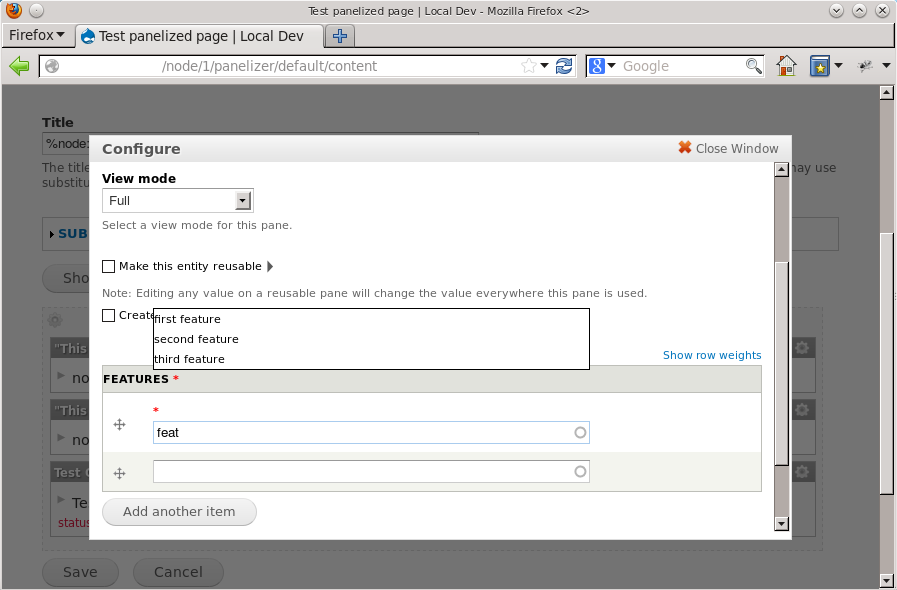
When using an autocomplete form field in a CTools modal dialog (for example a Fieldable Panel Pane with an Entity Reference field), the position of the autocomplete result is incorrect if the user has to scroll down in the modal dialog to see the field. The results appear near the top of the modal content dialog, rather than directly below the field.
Steps to reproduce
- Create /modify a Fieldable Panel Pane bundle to contain an Entity Reference field.
- On a panel page, add a new instance of the FPP.
- Scroll the modal dialog down to the Entity Reference and start typing to activate the autocomplete.
Expected behavior
The autocomplete results should appear directly below the Entity Reference field.
Actual behavior
The autocomplete results appear part-way up the modal dialog content (see attached screenshot).
I've tested this on Drupal 7.x-dev in Firefox and Chrome on Ubuntu (DrupalPro).


Comments
Comment #1
jlapp commentedIt appears that the autocomplete JS does not take into account the scroll position of the modal dialog. I'm attaching a patch to fix this. This patch is against 7.x-dev, but the code in question seems to be identical in 8.x-dev, so it should apply there as well.
If there is a better place to correct this or a different method, please let me know and I can create a new patch.
Comment #2
jlapp commentedComment #3
Madis commentedRan into the same issue with a custom form's autocomplete field and can confirm that the patch works and didn't seem to break autocomplete outside modals. This problem might have to be resolved by Ctools rather than core though.
Comment #4
gaëlgYes it works. I had this problem with Scald.
Comment #5
nod_What #3 says. No business having javascript selecting
#modal-contentin core code when D7 core doesn't support modals.The position is set in keyup event, ctools just have to add a listener on the input for a keyup event and add the offset for the scrolling. Also it should be using closest() not parents(). Something like:
$('#autocomplete').css('top': '+' + $input.closest('#modal-content').scrollTop());Comment #6
tstoecklerClosing #1947790: Core's autocomplete.js does not account for scroll offset in a CTools modal as a duplicate and uploading the patch from there here.
I'm really not a JS guy so
scares me.
I might try something here, but some guidance would be helpful.
Comment #7
yesct commentedIs there another place in core that does what is needed in terms of the listener that we could use as a guide?
Comment #8
yesct commentedwonder if this is related to #1951584: Autocomplete fields appear in wrong place for non-admins in page view when using Bartik in Firefox & Chrome?
Comment #9
jlapp commentedHere is an updated patch against CTools based on the feedback from #5.
Comment #10
jlapp commentedComment #11
Anonymous (not verified) commentedApplied the patch in #9: works perfect, thanks.
Comment #12
guedressel commentedApplied the patch in #9: works for us too.
Comment #13
guedressel commentedComment #14
japerryThis patch breaks 'add content' button when trying to add content to a panel.
Marking needs work.
Comment #15
Anonymous (not verified) commentedI'm pretty sure this patch doesn't break anything, it just adjusts the css position of an autocomplete box. Didn't break anything for me anyway. Must be something else in your setup that breaks the 'add content' button.
Comment #16
drcolossos commentedI cannot see anything breaking. We applied this patch and it works as expected. Nothing breaks. Looking at the CSS that the Javascript "manipulates", I don't think that the patch is causing issues.
Comment #17
caschbre commentedWe've been using this patch since it came out and have not had any issues.
Comment #18
jlapp commentedjaperry, could you provide any further details on what you're seeing? The patch is still working fine for me and others - the "Add content" button works as expected for me.
Comment #19
japerrySure, here is a screencast, using the latest dev version of panels.
http://www.youtube.com/watch?v=ZCh5pHboDsk
Comment #20
jlapp commentedThanks japerry. I see the issue now - my patch in #9 uses functions that are only available in newer versions of jQuery. The project I wrote this patch for was using jquery_update to run jQuery 1.7 and I assume the others who tested this patch were as well, so it worked in those cases. I will write an updated patch that works with the version of jQuery that ships with D7 core and post it here shortly.
Comment #21
jlapp commentedHere is an updated patch based on #9 that does not require jQuery Update / jQuery 1.7. It should work with the D7 core version of jQuery (1.4.4) or later.
Comment #22
japerryAwesome! that fixes the problem for me. Marking as RTBC and committing to the sandbox.
Comment #23
japerryFixed!
http://drupalcode.org/project/ctools.git/commit/2fd433e7a3c20a5859079ed1...
Comment #24
andrewbelcher commentedUnfortunately this fix actually causes problems as well. It doesn't account for the possibility of the autocomplete being contained within a positioned ancestor, in which case it ends up putting the autocomplete far too low.
Comment #25
andrewbelcher commentedHere's a patch that fixes it by checking for a positioned parent and then filtering on modals.
Comment #26
japerry(Re)Fixed! thanks for the patch and bug report.
Commit: http://drupalcode.org/project/ctools.git/commit/2a5c109