Hi,
I've followed the install and readme files, set up aggregator category, enabled permissions, etc. but still getting an error on the settings page saying the feed plugin is not enabled for MySite. I've deleted the module, downloaded it again, applied the cols.patch. I've tried many things and it's drivin me nuts! Any ideas?
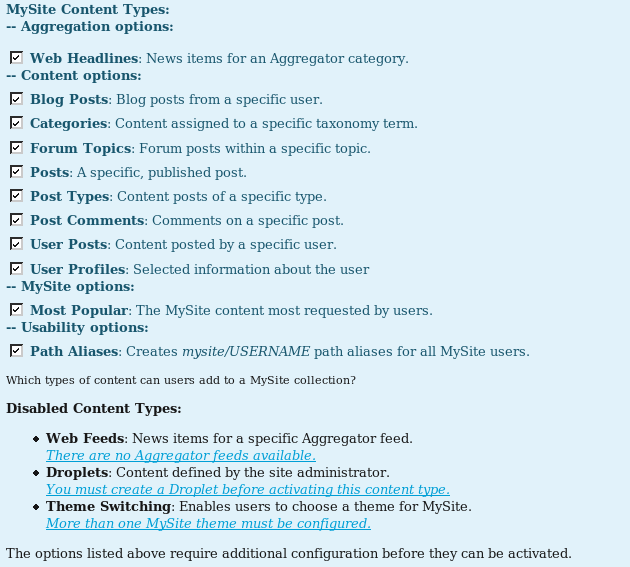
It also says droplet plugin not enabled, but not installed any droplet. Also says theme plugin not enabled, but not allowing users to change themes.
In the user's mysite page, the add web headlines option is there but just shows the user feeds category.
Drupal 5.2 PHP 5.1.6 MySQL 4.1.21



Comments
Comment #1
agentrickardI can't determine anything based on the description you've given.
Plugins are set to 'inactive' when certain requirements have not been met. Once those requirements have been met, you should be able to activate the plugin. On the /settings/feed page, do you see the link that allows you to activate the plugin? On the main MySite settings page, does the plugin ever appear in the allowed content types list?
In this case, screenshots or direct access to your site is the only way I can help you.
You might also try the patch here: http://drupal.org/node/174433, though I don't think it is related.
Comment #2
Anonymous (not verified) commentedThanks for your reply. I don't see an enable plugin button anywhere, and there's no settings/feed page, just settings/type/feed.
Here's a grab of the settings, will post one of the feed page next
Comment #3
Anonymous (not verified) commented...feed
Comment #4
agentrickardThe active/inactive settings were put in to avoid this type of confusion, but seem to not be clear.
To activate the feed plugin, simply go to the normal aggregator settings page and add a new feed. The feed plugin can only be turned on once at least one feed exists. See mysite_type_feed_active() and mysite_type_hook_active() for the technical details.
The same is true of Themes and Droplets.
To activate the Droplets, you first must create one.
To activate theme switching, you must go to admin / themes and enable at least two themes. Then you must go to amysite/type/theme and select more than one theme.
Once these requirements have been met, you can activate these three plugins.
If you have any ideas about how to make the documentation more clear, please post them below.
And thanks for the screenshots; they really helped.
Comment #5
Anonymous (not verified) commentedYay! OMG, can't believe it was that simple. I'd enabled a feed before, but not in the user feeds group as my brain thought they were for users and I wasn't thinking properly. I don't think it's your instructions, I've been developing this site for a while now and doing 14 hour shifts!!!
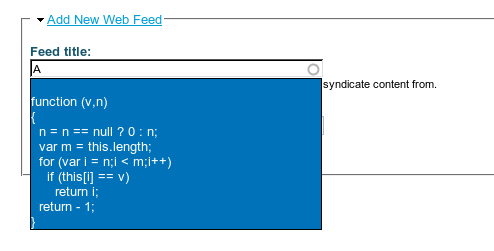
One problem I'm still having though is on some of the fields, like when a user enters the name of the feed they want, a function is displayed - see attached. Maybe it's discussed elsewhere, just haven't had chance to look yet...
Comment #6
agentrickardWow. I have no idea where that is coming from.
When a user types a feed name into the search box, the functions mysite_type_feed_custom_form() is called and contains an autocomplete.
But the autocomplete just runs this function mysite_type_feed_autocomplete(), which searches feed titles.
Is this live on your site? Perhaps someone entered PHP code into the feed title to try to find a security exploit?
If so, just delete that feed through the aggregator admin. MySite (and Drupal) should not be vulnerable to this type of exploit.
Comment #7
Anonymous (not verified) commentedHiya,
The site's going 'live' on monday and it's not in the aggregator table. I'm not completely sure it's a mysite specific problem. I did a search of the whole db for the word %function (v,n)%. I'm thinking it's something to do with the autocomplete thing itself (jquery?). I'll keep digging...
Thanks for your help!
Comment #8
agentrickardI looked briefly at autocomplete.js and jquery.js -- note that MySite requires the jQuery Update module.
I'm closing this issue, since we fixed the original problem. If you find that the autocomplete issue is MySite specific, please open a new bug report.