Active
Project:
Date
Version:
7.x-2.6
Component:
Date Field
Priority:
Normal
Category:
Bug report
Assigned:
Unassigned
Reporter:
Created:
19 Sep 2012 at 20:40 UTC
Updated:
26 May 2014 at 14:57 UTC
Jump to comment: Most recent


Hi
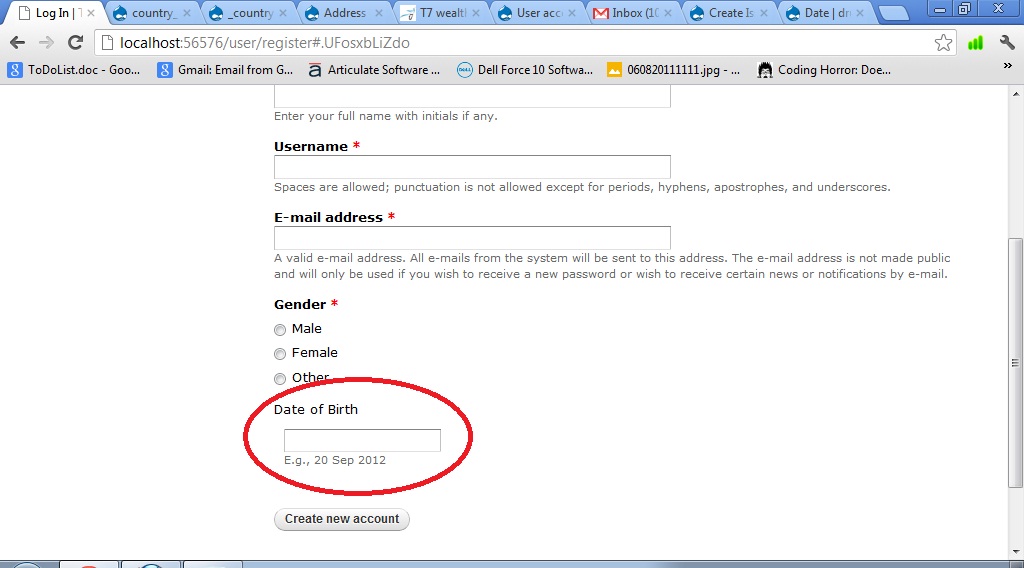
I added a Date field in my user registration page with a field label "Date of Birth". But this label is not appearing in Bold letters like other field labels. I am using Drupal 7.15 (Drupal Commerce distribution) and running SQL Server database. PHP version is 5.3. I have attached the marked page image with error (see circled portion in red). Please help.
| Comment | File | Size | Author |
|---|---|---|---|
| date_field_error.jpg | 100.51 KB | syam.mohan.vs |

Comments
Comment #1
syam.mohan.vs commentedAnother issue - the date field value below the label has a padding compared to rest of the fields values (See the image attachment in the previous post). This can be fixed by
1. Go to"\sites\all\modules\date\date_api" and then open date.css file.
2. Change this section
/* The exposed Views form doesn't need some of these styles */
.container-inline-date .date-padding {
padding: 10px;
float: left;
}
to
/* The exposed Views form doesn't need some of these styles */
.container-inline-date .date-padding {
padding: 0px;
float: left;
}
Hurray !!!
Comment #2
syam.mohan.vs commentedAnother Issue - Red star marker not appearing against label in other fields. This can be fixed by applying a patch file mentioned at #12 of http://drupal.org/node/1248786.
I applied the patch manually by using the info at http://drupal.org/node/534548 as a guide.
Hurray !!!
Comment #3
syam.mohan.vs commentedEven after playing around with the date module css files am not able to make the date field label bold. Please help.
Comment #4
nerdoc commentedI would increase the priority as it renders a simple form VERY badly in sense of good look&feel. This IMHO is a major issue.
Comment #5
odisei commentedIs there any progress on this issue?