

 Come together with the global Drupal community in Rotterdam, 28 Sept – 1 Oct 2026. Sessions, contribution, connection, and Early Bird savings until 8 June.
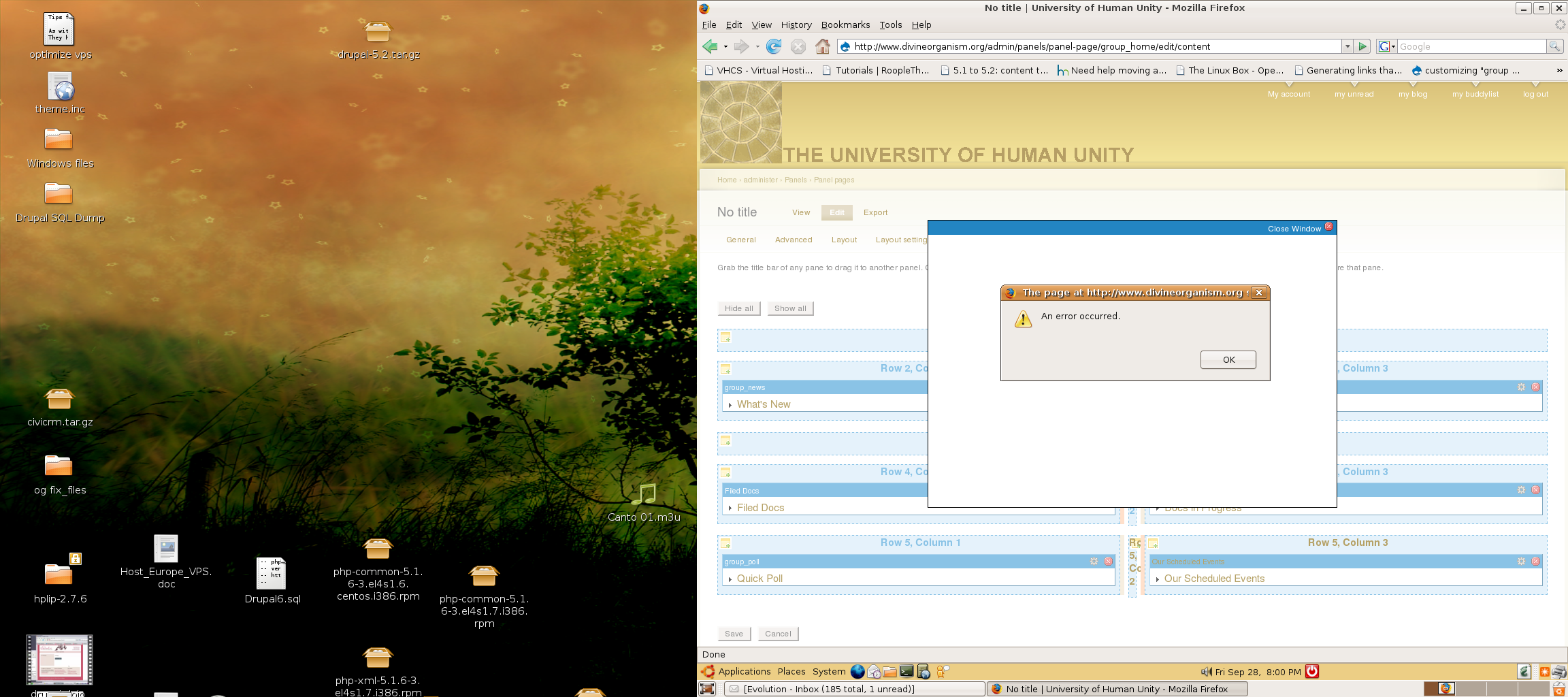
The content add or edit function that produces the little pop-up window doesn't work for me in firefox, but it works okay in IE. When i hit edit, the pop-up window appears, but is blanck and has a smaller browser window within it the says "an error occurred."
I'm not usre that this is a bug as i haven't seen other reports so i suspect it could be one of my browser settings. I tried allowing pop-up for my site address, but that didn't seem to work.
Any suggestions?
Thanks!
| Comment | File | Size | Author |
|---|---|---|---|
| #19 | panels_screeny.png | 43.1 KB | uberellis-dupe |
| #6 | Screenshot_32.png | 1006.91 KB | gracearoha |


Comments
Comment #1
catchI get this occasionally on Firefox 2.0.0.x - it's usually if I've used a different tab then return to the panel, refreshing the page usually makes it work again, but if I'm entering content, go off to look for something, then return to the tab, it can result in losing whatever was in there.
Could you confirm if this always happens in Firefox, or just intermittently? And which version of Firefox?
Comment #2
catchComment #3
gracearoha commentedcatch, i am using version 1.5.0.12 of Firefox on Ubuntu Dapper. The strange thing is that i was using panels quite successfully on my local server - never had a problem with the pop-up window. But then i set up the panels on my remote server and i have never been able to get the pop-up window to work on FF. I have to go into IE (which is extremely slow and intermittent on Linux) to get it to work. But then i can jump over to my local server and it works fine.
I really thought that it must be the allow settings in FF for pop-up windows. But i included my site in the list and still no go..
Comment #4
catchhmm. If I get a chance later I'll try to work out the specific steps taken on firefox 2 (XP) to reproduce this, then run them on IE7 and IE6 to see if it's present on those at all on my system.
Comment #5
catchOK to reproduce on Firefox 2.0.0.x
Have two firefox tabs open on the same drupal site.
In one, have the panels content interface.
In the other, have a node or something else.
Edit and save a node or comment.
Try to "add custom content" or open existing custom content, and you'll get "The input was invalid". This results in loss of data if you have input in an add custom content form, switch tabs, then go back and try to save it.
IE7 and Opera tests later hopefully.
Comment #6
gracearoha commentedthanks for testing that out, catch.
Actually for some reason, even if i open up a fresh browser with no other windows open, i get an error message when i try to add or edit content to the panels.
see attached screen shot
Comment #7
catchOK confirmed exactly the same behaviour as #5 with IE7/XP.
Gracearoha - are you using Alpha10 or the latest -dev snapshot?
Comment #8
gracearoha commentedi'm using alpha 9
Comment #9
merlinofchaos commentedI believe this is related to how Panels caches the display you're working on. As you make changes, it saves the display in the 'cache' table so that there is a temporary location.
If this table gets cleared, you lose your work. In a future version I'll switch to using a private cache table so this can't happen, but it's annoying that I have to.
Comment #10
gracearoha commentedI just uploaded a fresh install of Drupal 5.2 on a VPS and the panels beta 9 seems to work fine there. Will be moving my whole site there, so hopefully all will be well.
I was beginning to suspect that the recent upgrade (5.1 to 5.2) i had done on the (probelm) site had some problems. So perhaps there was something else going on there also.
Because the site on my local host also using the panels beta9 and the very same browser has no problems.
Thanks so much for all your great work.
This new panels is really awsome!
Comment #11
merlinofchaos commentedDon't close this just yet; I'm not convinced it is fixed.
Comment #12
catchJust to confirm I'm still getting the same behaviour described in #5 with alpha 11.
Comment #13
gracearoha commentedRegarding #10 above. I am still having the same problems even on the new server.
Using Panels alpha 9 with Drupal 5.2 i have the problem described in #5.
Comment #14
gracearoha commentedRegarding #10 above. I am still having the same problems even on the new server.
Using Panels alpha 9 with Drupal 5.2 i have the problem described in #5.
Comment #15
wim leersYou should upgrade first to alpha 11, gracearoha.
Comment #16
agn507 commentedI have alpha 11 and am having the same problem. Both in firefox and safari on OS X. This happens even with fresh single browser windows.
Comment #17
merlinofchaos commentedOne thing to check out; older versions of devel.module, or any module which appends content at the end of the page, can interfere with the AJAX functionality and cause problems like this. If you have devel.module make sure to update it to the latest, or disable any output that it makes and see if this is related to your problem.
Comment #18
catchDevel module not in use on my site at the moment, although like I said I only get intermittent (cache clear it seems given your posts) issues.
Comment #19
uberellis-dupe commentedI can confirm the same issue on MacOS Firefox / Safari / Opera
Not only on add content either, configure as well. [See screenshot] It's like the temporary window renders underneath the content for a little while, then returns dissapears again, before panels dialogue renders.
Comment #20
agn507 commentedStill the same problem here. I have tried on a fresh install with no devel module. I also am using mac osx and same problem with firefox/safari.
Comment #21
toma commentedSame problem here MacOS Firefox / Safari / Opera, also on windows IE and Firefox
Comment #22
kpaul commentedadd content won't pop-up on Firefox 2.08, using alpha 11..
getting this in error console:
Error: $("#modalContent").top is not a function
Source File: http://www.andersonfreepress.net/modules/panels/js/lib/mc.js
Line: 49
Thanks,
kpaul
Comment #23
merlinofchaos commented#22 might be related to having updated jquery but without having any kind of backward compatibility issue. It's known that mc.js won't work with jquery > 1.0 but it does seem to work when using the jquery update module.
Is there anyone in this issue having problems that has not gotten some kind of jquery update? and are the problems still occurring in alpha14 or later?
Comment #24
wim leersI've not had any problems whatsoever, as long as I don't use jQuery Update.
Comment #25
catchI originally had the problem without jQuery update but have since installed it. I'm not actually using anything that requires it now - so could revert and try again if that's any use? Hopefully someone else can confirm either way who's got a non-updated setup but otherwise I'll do that some time this week.
Comment #26
seanrSame issue here, and I do need the newer version of jQuery.
Comment #27
seanrThis is related to this: http://drupal.org/node/163509#comment-587306
Can we please get some attention directed at changing that? I just looked at the code myself, but I have a hard enough time with basic JavaScript, let alone jQuery.
Comment #28
merlinofchaos commentedBe patient, seanr. Since I'm not using jquery update, it's hard for me to replicate the issues people are seeing, and the varied bug reports that don't contain a full accounting of the environment serve to confuse the issue as much as help. It's hard to tell what's wrong here, so fixing it can be a pain.
Comment #29
catchOK I'm still getting this on alpha14, no jQuery update any more.
Just to confirm what the bug is for me:
open up something like: admin/panels/panel-page/display_25/edit/content
in a different firefox tab, do some stuff (save a node, save a view, whatever).
Then when I click the add pane or edit pane button in any region or pane, I get:
the input was invalidIf I drag and drop something - this is fine, and saves. So it's just adding/editing panes that's playing up for me.
So exactly the same as #5, and I think merlin's possible explanation in #9 is still the most likely.
Comment #30
merlinofchaos commentedFor anyone who was having problems where editing content in one tab was messed up by activity such as saving nodes in another tab, THAT problem has been fixed. (I think there are many different errors here). I'm reserving this issue for errors related to the caching. Non cache related js errors will require their own issues.
Comment #31
catchmerlin, thanks!
Comment #32
(not verified) commentedAutomatically closed -- issue fixed for two weeks with no activity.