

Active
Project:
Omega
Version:
7.x-3.x-dev
Component:
Documentation
Priority:
Normal
Category:
Support request
Assigned:
Unassigned
Reporter:
Created:
30 May 2012 at 17:48 UTC
Updated:
30 Jun 2012 at 06:55 UTC
Jump to comment: Most recent file

Comments
Comment #1
TelFiRE commentedThere's nothing unique to Omega about this. It's just basic CSS unless I'm misunderstanding you. What problem(s) are you running into?
Comment #2
smitty commentedWell, the first problem is, that it seems not to be possible to have a column with a fixed width in pixels. In Omega it is only possible to configure a width in "number of columns".
The second problem is: How can I get a region for the ad? It should be beside the header section.
Comment #3
TelFiRE commentedFixed width is a matter of saying width:140px on the element. Omega doesn't have anything that stops you from writing CSS. CSS overrides the settings of Omega, and besides, for this you most likely just want to make a block and then render it programatically in the theme (see http://drupal.org/node/1021902) using a TPL file such as page.tpl.php (copy it out of alpha to your subtheme's templates folder).
Realistically you don't even need to do that though, you could just put it in a region and make sure that none of the parents are position:relative and then you can position:absolute it to the top right of the page and z-index it below the page's container.
Comment #4
smitty commentedThank you very much for your support!
Here is what I did: I Created a page.tpl.php in my subtheme:
Now the skyscraper is displayed in the upper right corner of the browser.
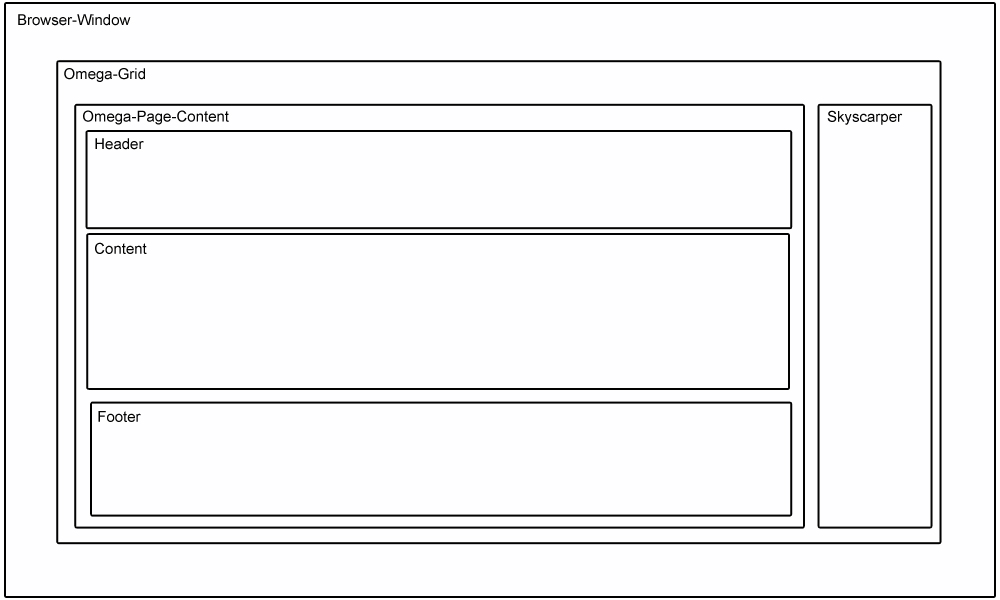
But I want it to be displayed top right inside the omega-grid .
What do I have to change?
How can I change the grid to containing two columns: the first one with the regular omega Content (header, content, footer) and the second one with my skyscraper?
Comment #4.0
smitty commentedTypo