

Closed (fixed)
Project:
Boldy
Version:
6.x-1.1
Component:
User interface
Priority:
Normal
Category:
Bug report
Assigned:
Unassigned
Reporter:
Created:
12 Apr 2012 at 23:23 UTC
Updated:
30 Apr 2012 at 18:50 UTC
Jump to comment: Most recent file




Comments
Comment #1
the_g_bomb commentedI have spotted an issue where the page.tpl.php and front-page.tpl.php files have a different base path and I will update the files asap.
In the meantime I think the issue could be solved by setting the base url set in your settings.php such as:
$base_url = 'http://yoursite.com/siteroot'
By not setting this, the images are trying to load from http://yoursite.com/sites/all/themes/boldy/images/yourimage.png
instead of: http://yoursite.com/siteroot/sites/all/themes/boldy/images/yourimage.png
I will update the code to implement a more complete fix and release a new release of the boldy theme in the next day or two, you should upgrade to the latest version when it is released.
Comment #2
neeraj.jadhav commentedHi,
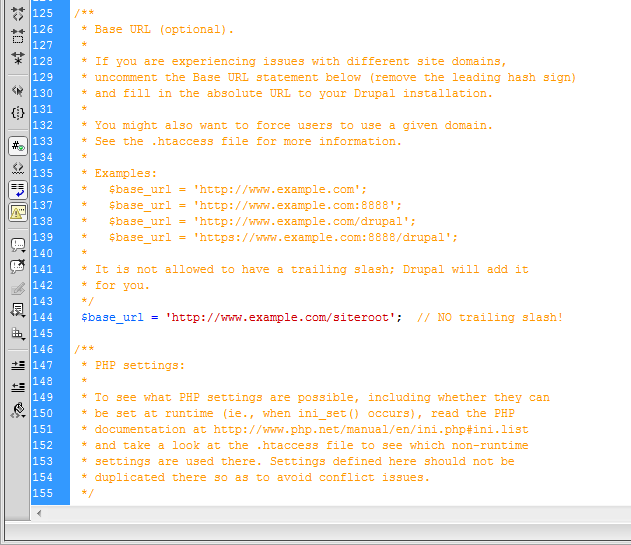
Thanks for the reply. I tried editing the base url in settings.php. Initially everything was commented so I removed the comments and wrote
$base_url = 'http://www.example.com/siteroot';
After saving the file and restarting the xampp server, when I opened the site (localhost/drupal) all my css was gone and the site pretty much looked like Craigslist. I have attached an image of what I did on the settings.php.
Please let me know if I did it right or what I need to do to make it work.
Thanks.
Comment #3
the_g_bomb commentedSorry, I might not have made myself clear enough, the $base_url value should be the actual url of your own site home page, not the example url that I used to highlight the way it should be input.
For example if your home page is: http://www.neerajjadhav.com then the $base_url would be:
$base_url = 'http://www.neerajjadhav.com';
If it is a sub directory of the document root your home page might load when you input something like:
http://www.neerajjadhav.com/drupal
the base url would then be:
$base_url = 'http://www.neerajjadhav.com/drupal';
I have seen issues with the images not loading when the site is in a sub directory which is why I suggested altering the $base_url, as I suspect this might be the case here.
Hope this helps.
Comment #4
the_g_bomb commentedI have just fixed and pushed the changes I mentioned previously, if you update the theme to the latest version (6.x-1.2), you may have a bit more success with this issue.
Comment #5
neeraj.jadhav commentedI am running the site on my localhost and I do not actually have any web server to run this site (www.neerajjadhav.com is my personal site and the one I am working on is for my class project to be run on localhost) . Is there any way to make modifiactions on localhost.
I also wanted to ask that since you have updated the theme, if I replace it with my current boldy theme, then will I loose my content and other stuff.
Comment #6
neeraj.jadhav commentedHey,
I did changed the theme to 1.2 from 1.1 and it shows the missing images (facebook, twitter and linkedin icons) however I am loosing my admin menu behind the Primary links.
Also the search bar does not display text when writing on it (or I guess the text color is black or something).
Comment #7
the_g_bomb commentedOn a localhost, I think you might be able to use:
$base_url = 'http://localhost/drupal_folder';
Sorry about the admin menu, thing. I fixed it in the Drupal 7 version and thought I had backported the fix, but obviously not.
I have updated the development version to fix this.
If you don't want to update the theme again, you could open the style.css file in the css folder and change the second last line to:
#header {z-index: 100 !important;}To fix the search text color, open the jquery.autofill.js in the js folder and change line 8 to:
activeTextColor:"#fff",Comment #8
neeraj.jadhav commentedThank you very much.
Both of the above solutions worked. Thanks for helping me out.