

 Come together with the global Drupal community in Rotterdam, 28 Sept – 1 Oct 2026. Sessions, contribution, connection, and Early Bird savings until 8 June.
Say I have my filefield files in files/uploads. I FTP a file to this directory and then attach it with filefield sources. Filefield sources makes a copy of the file with a trailing "_0" and references the copy.
Desired behaviour: before copying, the module should check if the copy source and destination are the same, and if so, don't copy, just reference the source.
| Comment | File | Size | Author |
|---|---|---|---|
| #12 | 1492374-ffs-attach-file-same-path.patch | 2.11 KB | dave reid |



Comments
Comment #1
poukram commentedSubscribing
Comment #2
kendouglass commentedYes!
Comment #3
quicksketchThis patch provides this functionality, but I'm not sure how I feel about it. While it acts just like other the current attach behavior, there's something a little scary about selecting a file to attach it, then click "Remove" on the file after it's attached, and it gets deleted (if it's not in use by other nodes that is). I suppose this isn't any different, but FileField Sources was not intended to have the source and destination directory be the same thing.
Comment #4
j.somers commentedThere's something wrong with the patch.
The result of the
$destination . $file->filenamewill be something likepublic://foo.exewhile the$file->uristring will be something likefiles/folder/foo.exe. It will therefore always return false in your comparison.Edit: when using relative paths for the attach source, it seems to produce a public:// link, but the target path is not taken into account. Therefore the file is still moved to the root of the files/ directory.
Edit 2: I disabled the
File (Field) PathsandEntity tokensmodule so the path is not generated and now your patch works. The downside is that I'm not able to create clean sub directories based on my taxonomy terms, but that's something I can live with for the time being.Comment #5
quicksketchYeah I've heard lots of reports of FileField Paths breaking things like this. :P Apparently it's still using file *paths* in some places instead of URIs everywhere like a good D7 citizen.
Still not sure how I feel about this patch, so opinions are welcome on how well it works for your users and meets workflow expectations.
Comment #6
j.somers commentedApart from the small issue I bumped into, so far it seems to be working as expected. I did not perform any advanced operations yet though.
Comment #7
hjvedvik commentedI tried
drupal_realpath()to check the paths, and it works good so far :) And I'm using File Lock to prevent deleting of the file. But I'm only using elFinder to browse for uploaded files.$same_file = drupal_realpath($destination . $file->filename) === $file->uri;Comment #8
nravens commentedI'm using this module but have the same issue as the original poster. Why would it need to make a copy of the file. Imagine I have 100 nodes that reference the same file, I'm gonna end up with 100 copies of the same thing which defeats the purpose of what I understood this module to be able to do, i.e. reference a file on the server so that you don't need to upload the same file 100 times...
Am I missing something or should I try another module?
Comment #9
dmjossel commentedSubscribing.
I'll second the comments of nakes above; I really don't want filefield or filefield sources making any changes in the file-attach folder. I only want to reference what is already there. I don't want to copy, delete, move or rename what's there. I just want to put the filepath or URL, whichever works, into a CCK field so I can use it. I'd have thought this would be expected behavior for the word "attach" as opposed to, say, "import".
My file-attach folder is actually a symbolic link inside my files directory that points to another volume. If filefield sources moves or copies the source file, is it copying or renaming within that directory, or moving to the root of the files directory? That would be very bad, given that the reason I've got those files where they are is because there's space on that drive for them (lots of large video files) and not on the volume where drupal is installed.
UPDATE: Looking at the patch and the module (I'm actually using 6.x) it looks like this sort of extreme hands-off behavior would require a change in filefield. It looks like filefield_attach is just calling field_file_save_file to save its work. Since that has to handle uploads as well as attached files, there's no separation between the task of writing the uploaded file and saving the path data to the database. For the attach task, ideally you'd want to do the latter without the former. The problem is that If I just stop filefield_sources from sanitizing the filename or deleting the original, and also prevent it from calling field_file_save_file, then no files get written AND nothing gets written to the database.
Either field_file.inc needs a switch added to field_file_save_file to discriminate between uploading and existing attachment behavior, or we'd need to add just the relevant portions of field_file_save_file to filefield_attach (mime detection, drupal_write_record).
Comment #10
quicksketchReusing the same files is exactly what this module provides. However it doesn't expect the "Attach" directory to be the same as the "Destination" directory. If you use IMCE, Reference Existing (autocomplete), or the patch in #1170928: fielefield_source: views as source, then FileField Source reuses the file. However if you use the Attach or URL options, it makes a new file entry in the database for you.
Comment #11
dave reidConfirmed this is still remaining in the latest dev. I also attempted to use a directory already in the public files system, and did not expect this to copy the file, but just use it. The whole purpose of this attach version is for already uploaded, very large files. If I go through the effort of FTPing the file to the files directory location, why should Drupal make a copy of a 1+ GB file that doesn't need to exist?
Comment #12
dave reidThis is what we needed, rerolled from #3 for 7.x-1.x.
Comment #13
lukewertzVerified. Thanks, Dave. Works perfectly.
Also, a file that has been FTP'ed into the destination directory will not be deleted if its reference is deleted; this is the functionality I would expect. Great fix!
Comment #14
rbennion commentedWhich patch should I be using: #3 or #12? I patched with #12 and I am still getting a _0 copy with the original file still in the directory.
Also, should I be setting the operation as MOVE or COPY?
Thanks...and thank you for working on this...its been a problem for me for some time.
Comment #15
quicksketchI realize this was in my original patch in #3, but I have no idea what kind of comparison this would result in. Seems like a bug in the patch and it should just be:
Comment #16
lukewertzI've re-tested the patch in #12 and it continues to work as described for me. Please see the attached screen shots for my testing output.
In the case of the patch in #12, the example screen shots show that `$reuse_file = ($destination . $file->filename === $file->uri);` is comparing: public://data/dummydata_small.csv to public://data/dummydata_small.csv.
@rbennion: Are you sure you applied the patch correctly? Can you describe in any more detail the behavior that you're seeing versus what you're expecting?
Thanks,
Luke
Comment #17
dave reid@quicksketch: Because $file->filename at that point only contains the basename of the file, and not the folder where it should go, which is why we add in $destination. Possibly that needs to be clarified with a quick inline comment?
Comment #18
rbennion commented@lukewertz: I am applying patch #12 to the 7.x-1.8 version of file fieldfield_sources module.
I am applying the patch by going to the root of the filefield_sources directory, and using the 'patch -p1 < path/file.patch' command (Mac OS X 10.8.4) in terminal.
I get the following confirmation:
1492374-ffs-attach-file-same-path.patch
patching file filefield_sources.module
patching file sources/attach.inc
When I looked at your screen shot, I did not see any DPM commands in the patched module.
A few more data points:
1. I SFTP'd up a dummy file called test.pdf to the directory where I store a files for a 'resources' content type.
2. I use File Attach (drop down) to select test.pdf to the node.
3. The file is attached, but the linked file is test_0.pdf
4. In the file directory, there is now test.pdf AND test_0.pdf.
5. I am using the 'Leave a copy of the file in the attach directory' method in the content type file field settings.
*UPDATE*
6. I also tried 'Move' method and got the same result.
*UPDATE 2*
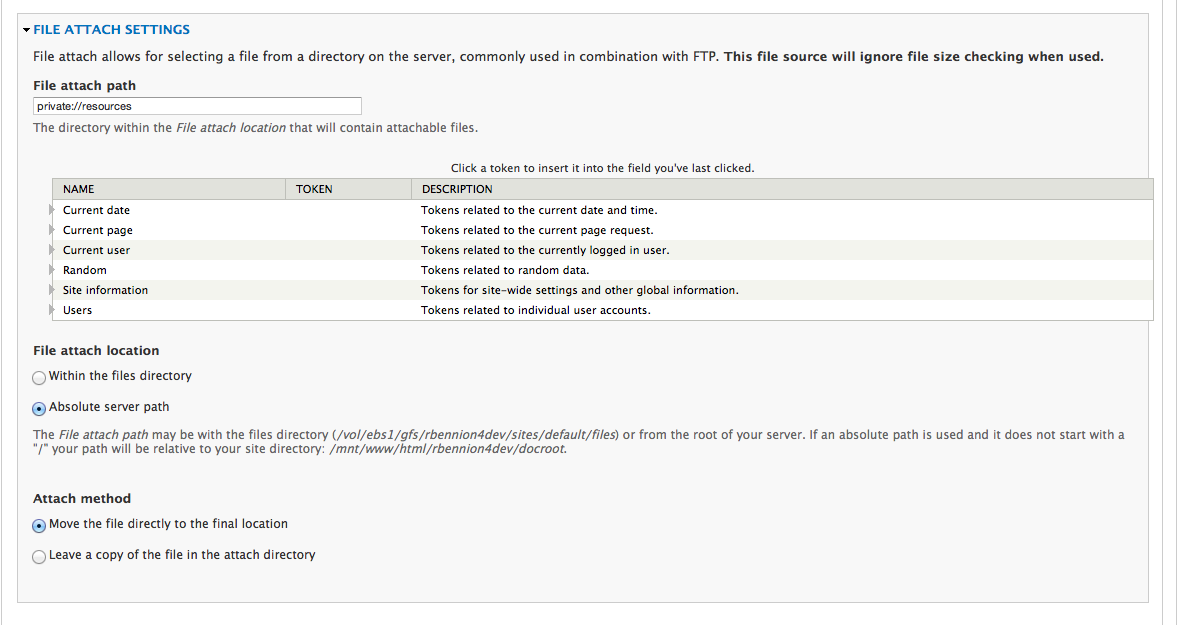
Please see attached screen shot on how I have the file directories setup.
I am wondering if this has something to do with the way Acquia Cloud uses a symbolic directory for user generated files.
Thanks for your help.
Rick
Comment #19
rbennion commentedScreenshot for comment #18
Comment #20
rbennion commentedI think I found my problem using the dpm debug code. I am using private files. the filename does not match the URI.
Please see screen shot...
Any idea on how I might go about solving this?
Thanks,
Rick
Comment #21
rbennion commentedHooray! I figured it out.
For those who might get stuck, I used private:// to make the filename and URI to match resolving my problem.
Screenshots attached.
Rick
Comment #22
Anonymous (not verified) commentedHi,
#12 works fine for me !
Before that every files attached with "file attach" after an FTP upload in a specific sub folder was renamed with a additional "_0" after each attach. So I got errors if the file was attached more than once because of the new _0 filename. With the patch it works perfectly actually.
Thanks !
RB
Comment #23
wolf_22 commented#12 works for me, too.
Excellent work, quicksketch!
Comment #24
zach harkey commentedIs there any way to reuse existing "Remote URL" sources?
I'm using Feeds to import thousands of products from Microsoft Navison 2009. Each product references one or more PDF specification files. All of the source files are hosted on dropbox and referenced via full URL. Dozens of product variations may reference the exact same URL.
For example:
0001, https://dl.dropboxusercontent.com/u/311993/Specification-BPE18.pdf
0002, https://dl.dropboxusercontent.com/u/311993/Specification-BPE18.pdf
0003, https://dl.dropboxusercontent.com/u/311993/Specification-BPE18.pdf
0004, https://dl.dropboxusercontent.com/u/311993/Specification-BPE18.pdf
Unfortunately this ends up creating hundreds of duplicate file like so:
/files/specifications/Specification-BPE18.pdf
/files/specifications/Specification-BPE18_0.pdf
/files/specifications/Specification-BPE18_1.pdf
/files/specifications/Specification-BPE18_2.pdf
/files/specifications/Specification-BPE18_3.pdf
The client won't have FTP access to upload files to an image_attach directory on the web server. And there doesn't seem to be any way to specify a remote File attach location (e.g. https://dl.dropboxusercontent.com/u/311993/)
Does anyone know if there is any way to pull this off with filefield_sources?
Comment #25
tbenice commentedHi, with the patch in 12 and the insights in 21 this seems to work.
Seems like what's missing is a change to instance[widget][settings][filefield_sources][source_attach][absolute] field description to indicate that you can enter a filestream.
Would be great to get it committed!!
Comment #26
nithinkolekar commentedI am using this module to attach pre-existing image(attached to this image field only) of product to new product.
Settings for image fields:
File directory : images/products
File attach path : images/products
As you can see both settings point to same directory and this is because only files which are uploaded before to current field should be available as "File Attach".
Before applying #12 patch, when creating second product if I select first product's image field then it renaming/creating file with "_0" appended to file name and removing old file. This makes first product image field to raise 404 error. After applying this patch, it is now just linking the file and working fine.
Comment #27
dave reidBack to RTBC since the Needs Work demotion was answered in #17.
Comment #28
zmove commented+1 for a commit. Really needed
Comment #29
jnorell commentedTesting patch in #12, it is improved behavior. I see 2 issues, one or both of which may be in elfinder.
1. I have a file field allowing both elfinder and file attach as the sources. If I use the elfinder browser to upload a new file, say file.pdf, then double-click that newly uploaded file in elfinder to select it as the file source, it will copy it to file_0.pdf. (If instead I select an existing file in elfinder it functions correctly.)
2. In a node, editing a longtext field with ckeditor, I add a link and select the elfinder "browse server" button to link to a file on the server. Save the node, all is well. Then editing a term with a file field, I select that same file as the source (using either elfinder or file attach), and save and again it's fine at this point, no file duplication or anything. Then I edit that term again and "Remove" that file, and the file is removed from the server, so the link in my first node is broken.
In that second case, the file I first uploaded using elfinder browser has a path of /sites/default/files/docs/... and my file field "file attache path" is just docs/... (and also tried public://docs/... with same results). I'm guessing the filenames don't compare/match correctly.
Comment #30
damienmckennaComment #32
profak commentedThanks everyone!
Patch from #12 merged into dev.
Comment #34
profak commentedSorry, last one was from #2006436.
Comment #35
profak commentedIn 7.x-1.10.