

Closed (works as designed)
Project:
Commerce Kickstart
Version:
7.x-1.3
Component:
Miscellaneous
Priority:
Normal
Category:
Support request
Assigned:
Unassigned
Reporter:
Created:
12 Feb 2012 at 15:30 UTC
Updated:
5 Apr 2012 at 18:25 UTC
Jump to comment: Most recent file







Comments
Comment #1
samethingbrah commentedI am having the same issues
happpened on XP and Win7 32bit
Comment #2
drupalastic commentedsamethingbrah,
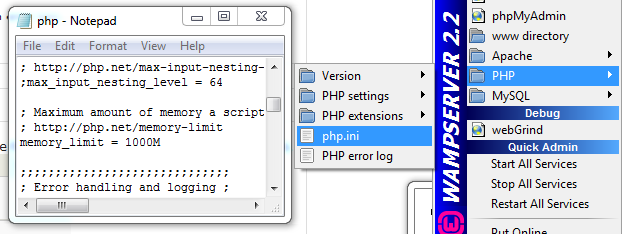
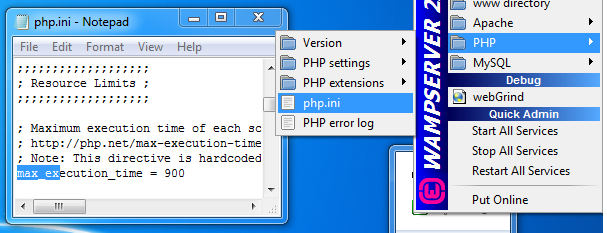
In Our 32Bit Pcs, the error went away after setting
max_execution_time = 900
to server's main php.ini file & Restartiing All Services
can try it.....
But in our 64 Bit Pcs. Nothing seems to work......
a lot of time has been wasted.....
Comment #3
samethingbrah commentedFor some reason, your fix isnt working on my PC. I wonder if this is just isolated between us? I wonder if our only option is to install everything separately.. I had success installing drupal CORE only.. but for some reason kickstart just won't work.
Comment #4
drupalastic commentedIt is so odd to waste 3 days installing a cms. probably it is some error in our configuration.
Is the error thrown/shown is by drupal or by Wamp/Apache/Php?
BTW, we have already Uninstalled / Installed Wamp in 3 different PCs many times in last few days.
Comment #5
drupalastic commentedIt installed in the very first attempt , without any configuration with xampp
thanks gge
Comment #6
kdmport commentedI have this exact problem. Changing memory limits and timeouts had no effect. I get to component 24 and get the Ajax error. Bitnami stack installed fine. Core installed fine.
Is there an earlier version I should try and then just update core or ...?
Win7 32bit. Apache 2.2.
Comment #7
kdmport commentedDowngrading to PHP 5.2.6 from 5.3 fixed my issue. Install successful.
Comment #8
mariohernandez commentedIncreasing max_execution_time to 900 allowed me to install commerce kickstart
Comment #9
Robin Millette commentedComment #10
chrisclark commentedhttp://drupal.org/node/1419854 is where the error is happening Deleting the blank line 2 fixes the issue.
Comment #10.0
chrisclark commentedAssigned to ibelongtoyou by mistake