

 Come together with the global Drupal community in Rotterdam, 28 Sept – 1 Oct 2026. Sessions, contribution, connection, and Early Bird savings until 8 June.
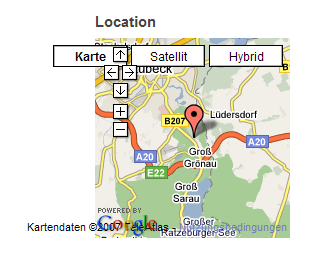
Is there a setting in Gmap macro which disables the buttons?
I attached a screenshot which shows the cosmetic issue.
Keep up the good work. The latest Gmap works great with mousezoom! ;-)
| Comment | File | Size | Author |
|---|---|---|---|
| gmap_block.png | 40.07 KB | rokr |

Comments
Comment #1
TimDavies commentedI've not found a setting, but as I wanted to be able to use the gmap macro in different widths around the site (default width set to 100% so it just fills the space available...) - and as the buttons are needed in some, but get in the way in others, I made a modification to gmap.js in the js/ folder to replace:
map.addControl(new GMapTypeControl());c. line 99, with:
which means that when the map is 250px wide or smaller it won't load the buttons, but when it is wider it will...
Comment #2
JohnG-1 commentedThat sounds like a very helpful and sensible approach ... I assume that the buttons span 250 pixels or so. I'm going to suggest this be considered as a patch to commit. Hope that's OK with everyone ;-)
Comment #3
bdragon commentedNew behavior flag "notype" added.
Is this good enough for now?
Comment #4
bdragon commentedI'm assuming it was good enough.
Comment #5
rokrWorks fine, thank you. ;-)
Comment #6
gregglesCan you clarify how this works? Or maybe it's missing from 6.x?
I manually changed a macro on a view block to be
[gmap |id=nodemap|center=43,-60|zoom=0|width=200px|height=250px|type=notype](with type=notype on the end) and it doesn't seem to remove the hybrid/satellite/etc.Comment #7
gregglesComment #8
msielskiApparently the notype behavior was removed at some point in the 6.x line. Instead use the mtc setting:
[gmap |id=nodemap|center=43,-60|zoom=0|width=200px|height=250px|mtc=none]Your mtc options are none, standard, hier, and menu. I haven't tested these but according to Google's documentation standard is the typical three buttons for map type, hier is the same set of buttons with a dropdown menu added, and menu is just the dropdown menu.
This also works in traditional calls like
theme('gmap', array('#settings' => $settings));, just make sure there's an'mtc' => 'none',entry in the $settings array.Comment #9
msielskiI should probably let greggles or bdragon close this...
Comment #10
gregglesI haven't tried it, but that makes sense to me.
Thanks matteusx!
Comment #11
izmeez commented@MatteusX, thanks answer in #8 works great with Drupal 6.x
Comment #12
gabrielu commentedMany thanks, There is actually no complete DOC about the settings in theme() function calls for Gmap.
I am using:
and your solution worked by puting:
as $map argument.
Comment #13
dman commentedAdding search keywords to this dead issue because I spent 20 minutes searching for this option ...
how to gmap macro remove satellite and legend control overlay
Answer example (as above) :