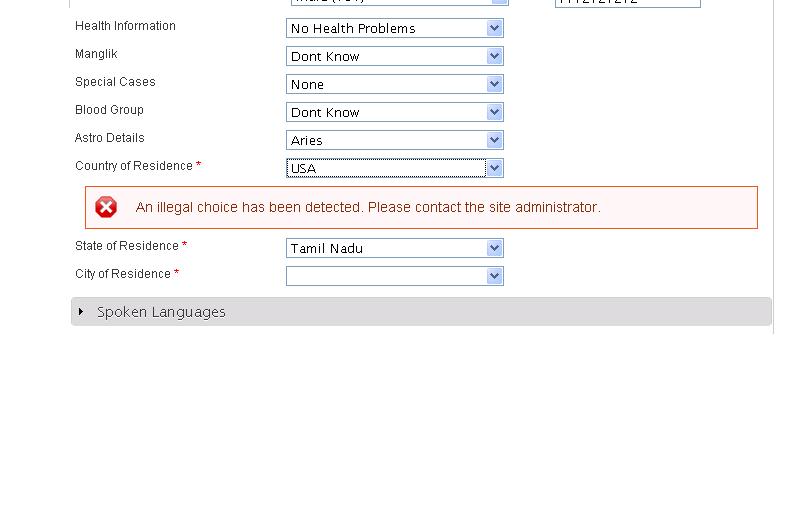
I need Select Dropdown in Ajax for 3 level in drupal 7, For 2 level it is working, but for the 3 level it is not working. I used ajax_example module in examples developers (http:///project/examples)

thanks in advance,

CommentFileSizeAuthor
drupal_7_ajax_error.JPG37.02 KBsenthilmohith

Comments

olafkarsten’s picture

Project: Drupal core » Examples for Developers
Version: 7.7 » 7.x-1.x-dev
Component: ajax system » AJAX Example

Hi senthilkumarmca, you talk about an helper module for developers - it is an example(!). I moved your support request to the issue of the module.

rfay’s picture

Assigned: senthilmohith » Unassigned

If you put your code in a sandbox as a standalone module I'll be willing to take a look at it.

It looks like you're trying to change the options in the select *outside* the form builder function. That's the usual reason to get this sort of problem.

senthilmohith’s picture

thanks for the quick response..
I already tried using three different options function for country,state and city separately. I call this function in our builder function.For 2 level it is working, but for the 3 level it is not working.
if u can give example for three level select dropdown.

rfay’s picture

The dependent dropdown example in the AJAX Example is a complete example. There is nothing different between a two-level dependent dropdown and a three-level dependent dropdown.

senthilmohith’s picture

thank you very much. it works fine..

rfay’s picture

Status: Active » Fixed

Status: Fixed » Closed (fixed)

Automatically closed -- issue fixed for 2 weeks with no activity.

chrisjlock’s picture

Sorry to post to a closed issue but I'm having similar problems. As long as I leave the 2nd select set to None I can change the first with out issue, but once the 2nd one is set changing the first throws error "An illegal choice has been detected. Please contact the site administrator." from form.inc ln 1289

Here is what I have:

function attendance_form_alter(&$form, &$form_state, $form_id) {
  //dpm(get_defined_vars(), 'attendance_form_alter');
  //dpm($GLOBALS);
  switch ($form_id) {
    case 'user_profile_form':
      $form['field_dist_ref'][LANGUAGE_NONE]['#limit_validation_errors'] = array(array('field_dist_ref'));
      $form['field_dist_ref'][LANGUAGE_NONE]['#ajax'] = array(
        'callback' => 'ajax_school_callback',
        'wrapper' => 'replace_field_school_div',
      );

      $form['field_school'][LANGUAGE_NONE]['#options'] = !empty($form['field_dist_ref'][LANGUAGE_NONE]['#default_value'][0]) ? select_options($form['field_dist_ref'][LANGUAGE_NONE]['#default_value'][0]) : array('_none' => t("Select District First"));
      $form['field_school'] += array(
        '#prefix' => '<div id="replace_field_school_div">',
        '#suffix' => '</div>',
        '#element_validate' => array(),
      );
}
function select_options($dist = NULL) {
  $query = db_select('node', 'n')
    ->fields('n', array('title', 'nid'));
  $query->leftJoin('field_data_field_dist_ref', 'd', 'd.entity_id = n.nid');
  $query->fields('d', array('field_dist_ref_nid'));
  $query->where("d.field_dist_ref_nid = :dist", array(':dist' => $dist));
  $result = $query->execute();
  $options = array('_none' => '-None-');
  foreach($result as $key => $value) {
    $options[$value->nid] = t($value->title);
  }
  return $options;
}
function ajax_school_callback($form, $form_state) {
  $options = select_options($form_state['values']['field_dist_ref']['und'][0]['nid']);
  $form['field_school'][LANGUAGE_NONE]['#options'] = $options;
  return $form['field_school'];
}
rfay’s picture

If you were using the AJAX example as an example, you'd know that all form building happens in the form builder function (at least for the vast majority of cases, including yours). You're changing things in the callback, which is why you're having trouble.

Please use the dependent dropdown example as a model and go from there.

chrisjlock’s picture

Thanks for the reply,
I have looked at the example and it is easy to follow for creating a custom form. However what can I do to alter the user_profile_form with out hacking core or overriding the function? Is there a hook I am missing that is called prior to the form build or Is my best bet to write a custom module and define a new field type that codes the allowed values?

rfay’s picture

@clock you would use hook_form_alter() on the user form if doing this directly.

You might want to consider using something like the Addressfield module and attaching an address to the user. I haven't tried that.

chrisjlock’s picture

I'm currently using hook_form_alter(), the code is in #8. I have two node ref fields, the first a district and the 2nd a school. The school also has a District ref, I'm needing to filter the schools by district on the user form. But I receive an error when changing the district after the school has been set. I have set ['#limit_validation_errors'] = array(array('field_dist_ref')); which should only validate field_dist_ref I believe (when i do a dpm of $form_state it is the only value) but the error is on field_school.

rfay’s picture

I think I already explained that you can't change the form in the callback.

senthilmohith’s picture

In three level drop-down country, state and city. You have to check the second drop-down and third drop-down array values aren't empty. If array values empty means the error will occur "An illegal choice has been detected. Please contact the site administrator." from form.inc ln 1289.
Can you try this following code. This code works fine for me.

<?php
function mymodule_country_state_city($form, &$form_state, $no_js_use = FALSE) {
 $options_first = _profile_myprofile_get_first_dropdown_options();
   if(isset($form_state['values']['state_of_residence'])){
       $selected = isset($form_state['values']['country_of_residence']) ? $form_state['values']['country_of_residence'] : key($options_first);
   }
   else if($profile_country_residence_country_id > 0){
       $selected = $profile_country_residence_country_id;   // $profile_country_residence_country_id is the default value 
   }
  // }
  //$options_second = _ajax_example_get_second_dropdown_options($selected);

  $form['country_of_residence'] = array(
    '#type' => 'select',
    '#title' => 'Country of Residence',
    '#options' => $options_first,
    '#default_value' => $selected,
      '#required' => TRUE,
    // Bind an ajax callback to the change event (which is the default for the
    // select form type) of the first dropdown. It will replace the second
    // dropdown when rebuilt
    '#ajax' => array(
      // When 'event' occurs, Drupal will perform an ajax request in the
      // background. Usually the default value is sufficient (eg. change for
      // select elements), but valid values include any jQuery event,
      // most notably 'mousedown', 'blur', and 'submit'.
      // 'event' => 'change',
      'callback' => 'ajax_example_dependent_dropdown_callback',
      'wrapper' => 'dropdown-second-replace',
    ),
  );

if(isset($form_state['values']['state_of_residence'])){
    $selected_state = isset($form_state['values']['state_of_residence']) ? $form_state['values']['state_of_residence'] : key($options);
} else if($profile_country_residence_state_id > 0){
    $selected_state = $profile_country_residence_state_id;
} else {
    $selected_state = 0;  // 0 is default value
}

  $form['state_of_residence'] = array(
    '#type' => 'select',
    '#title' => 'State of Residence',
      '#required' => TRUE,
    // The entire enclosing div created here gets replaced when country_of_residence
    // is changed.
    '#prefix' => '<div id="dropdown-second-replace">',
    '#suffix' => '</div>',
//    // when the form is rebuilt during ajax processing, the $selected variable
//    // will now have the new value and so the options will change
    '#options' => _ajax_example_get_second_dropdown_options($selected),
    '#default_value' => $selected_state,
          '#ajax' => array(
      // When 'event' occurs, Drupal will perform an ajax request in the
      // background. Usually the default value is sufficient (eg. change for
      // select elements), but valid values include any jQuery event,
      // most notably 'mousedown', 'blur', and 'submit'.
      // 'event' => 'change',
      'callback' => 'ajax_example_dependent_dropdown1_callback',
      'wrapper' => 'dropdown-third-replace',
    ),
  );

    $form['city_of_residence'] = array(
    '#type' => 'select',
    '#title' => 'City of Residence',
      '#required' => TRUE,
//    // The entire enclosing div created here gets replaced when country_of_residence
//    // is changed.
    '#prefix' => '<div id="dropdown-third-replace">',
    '#suffix' => '</div>',
//    // when the form is rebuilt during ajax processing, the $selected variable
//    // will now have the new value and so the options will change
    '#options' => _ajax_example_get_third_dropdown_options($selected_state),
    '#default_value' => $profile_country_residence_city_id,
  );
  return $form;
}


function ajax_example_dependent_dropdown_callback($form, $form_state) {
    $commands = array();
    $commands[] = ajax_command_replace("#dropdown-second-replace", render($form['state_of_residence']));
    $commands[] = ajax_command_replace("#dropdown-third-replace", render($form['city_of_residence']));
    return array('#type' => 'ajax', '#commands' => $commands);
  //return $form['state_of_residence'];
}
function ajax_example_dependent_dropdown1_callback($form, $form_state) {

  return $form['city_of_residence'];
 }
/**
 * Helper function to populate the first dropdown. This would normally be
 * pulling data from the database.
 *
 * @return array of options
 */
function _profile_myprofile_get_first_dropdown_options() {

    $country_query_result1 = db_query("SELECT country_id,country_name FROM country ORDER BY country_name ASC");
    $country_array = array();
    foreach($country_query_result1 as $row1){
        $country_array[$row1->country_id] = $row1->country_name;
    }
    //$country_array;

  // drupal_map_assoc() just makes an array('String' => 'String'...).
  //return $country_array;
    return $country_array;
}

/**
 * Helper function to populate the second dropdown. This would normally be
 * pulling data from the database.
 *
 * @param key. This will determine which set of options is returned.
 *
 * @return array of options
 */
function _ajax_example_get_second_dropdown_options($key = '') {

    ///$i = 1;
    $options = array();
    $country_query_result1 = db_query("SELECT country_id FROM country ORDER BY country_id ASC");
    
    foreach($country_query_result1 as $row1){
        $country_id = $row1->country_id;

//    $country_id = $key;

        $state_query_result2 = db_query("SELECT state_id,state_name FROM state WHERE country_id = :country_id", array(':country_id' => $country_id));
        $state_array = array();
        $state_array[0] = '-- Select State --';
        foreach($state_query_result2 as $row2){
            $state_array[$row2->state_id] = $row2->state_name;
        }
        $options[$country_id] = $state_array;
    }
  if (isset($options[$key])) {
    return $options[$key];
  }
  else {
      $options1 = array('0' => '-- Select State --');
    return $options1;
  }
}

function _ajax_example_get_third_dropdown_options($key = '') {
    ///$i = 1;
    $options_second = array();
    $country_query_result1 = db_query("SELECT country_id FROM country ORDER BY country_id ASC");
    $state_array1 = array();
    foreach($country_query_result1 as $row1){
        $country_id = $row1->country_id;

        $state_query_result2 = db_query("SELECT state_id FROM state WHERE country_id = :country_id", array(':country_id' => $country_id));
        $state_array = array();
        foreach($state_query_result2 as $row2){
            $state_id = $row2->state_id;
            $state_query_result3 = db_query("SELECT city_id,city_name FROM city WHERE state_id = :state_id", array(':state_id' => $state_id));
            $state_array3 = array();
            $state_array3[0] = '-- Select City --';
            foreach($state_query_result3 as $row3){
                $state_array3[$row3->city_id] = $row3->city_name;
            }

            $options_second[$state_id] = $state_array3;
        }

    }

  if (isset($options_second[$key])) {
    return $options_second[$key];
  }
  else {
    $options1 = array('0' => '-- Select City --');
    return $options1;
  }
}

?>
fayola’s picture

So I can't have an input element in the callback because it any change to it won't be registered? I'm am a little confused. How else would I be able to generated a customized form, if those generated by the form ajax callbacks won't be registered?

rfay’s picture

If you don't use extreme care, change in the callback (which is after the form has been rebuilt) will cause validation errors. I recommend to everybody to make all functional changes in the form builder function.

nicodv’s picture

Hi there, I replicated your code avoiding some conditionals but the second dropdown gets always empty, any idea why?

/**
 * A form with a dropdown whose options are dependent on a
 * choice made in a previous dropdown.
 *
 * On changing the first dropdown, the options in the second
 * are updated.
 */
function myform_dependent_dropdown($form, &$form_state) {
  //get the list of options to populate the first dropdown
  $options_first = _myform_get_sector_options();
  // If we have a value for the first dropdown from $form_state['values'] we use
  // this both as the default value for the first dropdown and also as a
  // parameter to pass to the function that retrieves the options for the
  // second dropdown.
  $selected = isset($form_state['values']['sector']) ? $form_state['values']['sector'] : key($options_first);
  
  $form['sector'] = array(
	'#type' => 'select',
	'#title' => 'Economic sector',
	'#options' => $options_first,
	'#default_value' => $selected,
	 // Bind an ajax callback to the change event (which is the default for the
	// select form type) of the first dropdown. It will replace the second
	// dropdown when rebuilt
	'#ajax' => array(
	  // When 'event' occurs, Drupal will perform an ajax request in the
	  // background. Usually the default value is sufficient (eg. change for
	  // select elements), but valid values include any jQuery event,
	  // most notably 'mousedown', 'blur', and 'submit'.
	  //'event' => 'change',
	  'callback' => 'myform_activity_callback',
	  'wrapper' => 'activity-replace',
	),
  );
  $form['activity'] = array(
	'#type' => 'select',
	'#title' => t('Economic activities from your chosen sector:'), 
	 // The entire enclosing div created here gets replaced when dropdown_first
	// is changed.
	'#prefix' => '<div id="activity-replace">',
	'#suffix' => '</div>',
	// when the form is rebuilt during ajax processing, the $selected variable
	// will now have the new value and so the options will change
	'#options' => _myform_get_activity_options($selected),
	'#default_value' => isset($form_state['values']['activity']) ? $form_state['values']['activity'] : '',
   );
   return $form;
}
	
/**
 * Selects just the second dropdown to be returned for re-rendering
 *
 * Since the controlling logic for populating the form is in the form builder
 * function, all we do here is select the element and return it to be updated.
 *
 * @return renderable array (the second dropdown)
 */
function myform_activity_callback($form, &$form_state) {
 //  $commands = array();
//   $commands[] = ajax_command_replace("#activity-replace", render($form['activity']));
//   return array('#type' => 'ajax', '#commands' => $commands);

  return $form['activity'];
}

/**
 * Helper function to populate the first dropdown. This was accomplished with drupal_map_assoc, but
 * i'll try with a db query...
 *
 * @return array of options
 */
function _myform_get_sector_options() {
  $sectors = array();
  $sector_result = db_query("SELECT sector_id, sector_name FROM {sectors}");
  foreach ($sector_result as $record) {
	$sectors[$record->sector_id] = $record->sector_name;
  }
  return $sectors;
}

/**
 * Helper function to populate the second dropdown. This was accomplished with drupal_map_assoc, but
 * i'll try with a db query...
 *
 * @param $key
 *   This will determine which set of options is returned.
 *
 * @return array of options
 */
function _myform_get_activity_options($key = '') {
  $options = array();
  $sector_result = db_query("SELECT sector_id FROM {sectors}");
  foreach ($sector_result as $record) {
    $sector_id = $record->sector_id;
  
    // $sector_id = $key;
  
	$activity_result = db_query("SELECT activity_name, activity_id FROM {activity} WHERE sector_id = :sector_id",
	array(':sector_id' => $sector_id));
	$activity = array();
	$activity[0] = '--Pick your activity--';
	foreach ($activity_result as $record_2) {
	  $activity[$record_2->activity_id] = $record_2->activity_name;
	}
	$options[$sector_id] = $activity;
  }
  if (isset($options[$key])) {
    return $options[$key];
  }
  else {
      $options1 = array('0' => '-- Select Activity --');
    return $options1;
  }
}
rfay’s picture

This really isn't a very good forum for support of this type (in a closed/fixed support request). Obviously we barely have enough time to fix problems with Examples, but we definitely don't have time for extra support. I strongly recommend http://drupal.stackexchange.com.

nicodv’s picture

ok, sorry, I will look up there.

Thanks

Tapendra Singh’s picture

Hi ,

I have two dropdowns in a "Template" content type one is node reference and second one is term reference. Node reference content type is Category and this content type is having term reference field. I want that when i will submit the node of Template content type i can choose the Category option based on Term reference field.
I have did some customization and made a module which is having this code. I am also facing the same error like "An illegal choice has been detected. Please contact the site administrator." when i select the first dropdown. The second select option shows this error.

function discount_form_templates_node_form_alter(&$form, &$form_state, $form_id){
	
	
	$options_first =_get_first_dropdown_options();
	
	  $value_dropdown_first = isset($form_state['values']['field_tmm']) ? $form_state['values']['field_tmm'] : key($options_first);


	$form['field_tmm']['und']['#options'] =$options_first;
	
	
	$form['field_tmm']['und']['#default_value']['0']= $value_dropdown_first;

		
	 $form['field_tmm']['und']['#ajax'] = array(
      // When 'event' occurs, Drupal will perform an ajax request in the
      // background. Usually the default value is sufficient (eg. change for
      // select elements), but valid values include any jQuery event,
      // most notably 'mousedown', 'blur', and 'submit'.
       'event' => 'change',
      'callback' => '_dependent_dropdown_callback',
      'wrapper' => 'dropdown-second-replace',
	  'method' =>'replace'
    );

	$form['field_tmc']['und']['#options'] = !empty($form['field_tmm']['und']['#default_value']['0']) ? _get_second_dropdown_options($form['field_tmm']['und']['#default_value']['0']) : array('_none' => t("Select District First"));
	
      $form['field_tmc'] += array(
        '#prefix' => '<div id="dropdown-second-replace">',
        '#suffix' => '</div>',
        '#element_validate' => array(),
      ); 
	  
  return $form;
}


function _get_first_dropdown_options() {
 $materialTerms = taxonomy_get_tree(3);
	$termData =	array();
	foreach($materialTerms as $terms){
		$termData[$terms->tid] = $terms->name;
	} 
  
	return $termData;
}

function _dependent_dropdown_callback($form, $form_state) {

$options = _get_second_dropdown_options($form_state['values']['field_tmm']['und']['0']['tid']);
  $form['field_tmc']['und']['#options'] = $options;
  
  
   // $city = $form['field_tmm']['und']['#default_value'];
	
	// $form['field_tmc']['und']['#options'] = _get_second_dropdown_options($city['0']['und']['0']['tid']);
 
return $form['field_tmc'];
}


function _get_second_dropdown_options($key = '') {
$materialTerms = taxonomy_get_tree(3);
	

$options = array();
	$result = db_query('SELECT n.title,n.nid,ti.tid,td.name FROM `node` as n inner join taxonomy_index as ti on ti.nid=n.nid inner join taxonomy_term_data td on td.tid=ti.tid where n.type = \'monument_category\';');
	
	
		foreach ($result as $data){
			switch($data->tid){
				case $data->tid :
				//$nodeTitle [] = $data->title;
				$options[$data->tid][$data->nid] = t($data->title);	
					break;
				}
		}	


if (isset($options[$key])) {

    return $options[$key];
  }
  else {
  $options = array('0' => '-- Select Activity --');
    return $options;
  }
}

alok.tripathi’s picture

Hi senthilmohith,
I used your code. It is working fine. Thanks.
But let say your all 3 dropdowns are populated and you change the first dropdown the second one gets changed again but the third one keeps the old record until you change the second one as well.
Any solution for that. To make the third one blank on changing the first one.

Also what is the use of $no_js_use = FALSE

sunkathirs’s picture

Hi senthilmohith & everyone,

I am looking same code for country and city dropdown list, But I dont know how to implement your code, Please guide me clearly, because I am new to drupal.

thanks
kathir

Sajjad Zaheer’s picture

Issue summary: View changes

Since Country, state and city dropdown list is a common problem many developers face in implementing it.
I have made a custom form filed that helps you solve exactly the same problem with minimal effort and with high efficiency.

Try using https://www.drupal.org/project/ajax_chain_select and let me know if your problem is solved.

ajay gadhavana’s picture

Issue summary: View changes

Working fine for me thanks

netamity’s picture

You could use http://geodata.solutions, which is a web service that allows you to paste a bit of html into your code and it all just works, with up-to-date, complete dataset and loads of extra options. It's much easier than writing all the code and maintaining the data yourself. It's just another option for people to think about