

Closed (won't fix)
Project:
Node feedback
Version:
6.x-1.x-dev
Component:
User interface
Priority:
Normal
Category:
Support request
Assigned:
Unassigned
Reporter:
Created:
18 Mar 2011 at 06:21 UTC
Updated:
16 Apr 2011 at 00:29 UTC
Jump to comment: Most recent file



Comments
Comment #1
beautifulmindHello,
Thanks for your concern and using the module.
The node feedback link can be available where ever you display the node links. If you are using node as display on the views, select tease display with links.
Let me know if you have any issue with this.
I really appreciate your concern.
Regards.
Comment #2
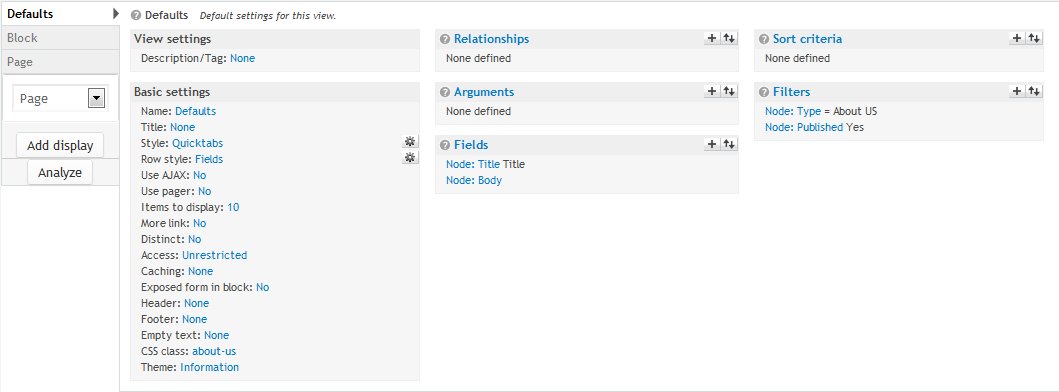
Vc Developer commentedHi, thanks for your help! I seem to not be able to follow your instruction. I attached screen shoots of what my setup looks like and the results I'm getting. Would you explain in detail what I'm missing and how to include what I need? Thanks!
Comment #3
Vc Developer commentedAlso while I have your attention.
1) Displaying the node itself when I'm logged in I still get this message above the "Send Feedback":
"You have to be logged to send a message"
...and I have given anonymous user permission to send feedback and use site wide contact forms. This message shouldn't appear.
2) Could you add the ability to return the user back to the node after sending the feedback?
3) Like adding the return destination variable to the url?
Comment #4
Vc Developer commentedCorrection on 1) I didn't have the "Contact" module installed. But, still need help on the others...
Comment #5
beautifulmindHello,
Thanks for the information.
Let me clarify few things here
1) Node feedback module doesn't check permissions and it doen't implement the message lik that
2) Okay. I will need to alter the contact form and have to add the redirection path. I'm thinking of to implement this on admin page
3) exactly!
I really appreciate your concern.
Regards.
Comment #6
Vc Developer commentedKewl! Thanks! But, I still need help with getting this to show up in my view. Images above shows the results I'm getting.
Comment #7
beautifulmindOkay.
I'll regenerate the issue and will post a fix here.
Regards.
Comment #8
beautifulmindHello,
I have create a view with 'Row style' as node and set teaser with displaying links.
For node feedback link to be appeared on the view, please make sure that the node feedback link is enabled for the node/node type. This works stright away once you have configured this settings.
Regards.
Comment #9
Vc Developer commentedHi, thanks for your help! Quicktabs requires the Row Style to be Fields and I do have my Node enabled for Send Feedback. I'm still having no success in figuring this out. Would you create a view with Quicktabs and see if you can successfully get the link to show up?
Comment #10
Vc Developer commentedWell, I got it working in Panels, but not as a view. I don't want to use Quicktabs in a Panel for this project, because I don't want the Head to display. So I need to get the view version working.
In Panels I had to enable "Include node links for "add comment", "read more" etc." in the Pane Setting. Shouldn't there be something like this in views?
Comment #11
beautifulmindHello,
Yeah, you are right. But currently, views does not provide any field for field row style to display node links. You can ask views maintainers for this in particular. I had tried my self but there is now way to get the node links other than node row style.
Regards.
Comment #12
beautifulmindHere is a reply I received on IRC
Comment #13
Vc Developer commentedHi, I found a alternate solution using Quicktabs as a Block instead of using Views. It does exactly what I wanted: no header titles and the Send Feedback is below the node.
Thanks for your help!
When will you be able to have the feature of returning the user back to the node? That would make my project complete! :)
Comment #14
beautifulmindHello,
I'm glad that your issue has been fixed.
I'll soon publish an updated release with the feature you asked about accommodated it.
Thank you for your concern and using the module. I really appreciate.
Regards.
Comment #15
Vc Developer commentedHi, just checking the progress. Any ETA? And your welcome! This is a major feature to my website and looking forward to the addition.
Comment #16
beautifulmindHi,
Thanks for your concern and using the module and I do understand your requirements. I've already done it but will be able to update on Tuesday or Wednesday, next week.
Regards.
Regards.
Comment #17
Vc Developer commentedKewl! You have made me a happy camper! :)
Comment #18
Vc Developer commentedHi, came by to check on the update?