

Closed (won't fix)
Project:
Drupal.org security advisory coverage applications
Component:
module
Priority:
Normal
Category:
Task
Assigned:
Unassigned
Reporter:
Created:
13 Mar 2011 at 21:31 UTC
Updated:
31 Aug 2018 at 19:46 UTC
Jump to comment: Most recent, Most recent file


Comments
Comment #1
avpadernoHello, Nor4a. You need to create a sandbox project, and provide the link here.
Comment #2
nor4a commentedSorry, it was already created here: http://drupal.org/sandbox/Nor4a/1090980
Comment #3
gregglesA better status.
Comment #4
gregglesOne more thought, since this extends nodeorder it would be great to get one of the nodeorder maintainers to comment here.
Comment #5
rfayReviewing
Comment #6
rfayThere is nothing in the repository but a .info file.
Nothing to review.
Comment #7
nor4a commentedCommitted now.
The SmartGit is a bit confusing after years of using SmartSVN. In the SmartSVN you allways clearly see what is committed and what is not. In the SmartGit it is not clear at all :(.
Comment #8
rfayYou can remove the $Id$, as we no longer use those.
You can remove the version string from the info file. The packaging system is responsible for that.
You should remove the copyright and license information:
I'd like to see all functions documented.
But it basically looks like it will be OK. I didn't try it out.
When you've fixed these things, put it in "needs review"
Comment #9
nor4a commentedIssues fixed. Thanks!
Comment #10
jthorson commentedUpdating priority according to the new project application priority guidelines. The application's priority should be set back to normal once a reviewer responds to your application and the application review process has continued.
Comment #11
ParisLiakos commentedComment #12
rfayI was going to call it good, but was too annoyed by the non-function headers to do so. Please fix some things.
1. Please remove the copyright statement. Please see http://drupal.org/licensing/faq
2. When I asked for function headers I didn't mean useless machine-generated uncommented headers like this
Please see http://drupal.org/node/1354#functions (and read that whole page).
I'll try to pay attention when this gets put back to needs review. Sorry to bounce you back again, but those function headers just need to be done well.
I meant headers that commented what the
Comment #13
jthorson commentedComment #14
misc commentedThe applicant has been contacted to ask if the application is abandoned.
Comment #15
nor4a commentedI've committed the code with fixed comments. Also I've beautified code with the Coder hints.
That is why I like drupal - the code of modules is readable and I agree that it should be in my modules as well!
Comment #16
patrickd commentedGetting started with an automated review:
It appears you are working in the "master" branch in git. You should really be working in a version specific branch. The most direct documentation on this is Moving from a master branch to a version branch. For additional resources please see the documentation about release naming conventions and creating a branch in git.
Review of the master branch:
This automated report was generated with PAReview.sh, your friendly project application review script. You can also use the online version to check your project. Get a review bonus and we will come back to your application sooner.
Comment #17
nor4a commentedFixed all the Code Sniffer issues. Also moved to 6.x-1.x branch.
Comment #18
patrickd commentedIt would be great if your commit messages have more detail then "x" ;-).
(Also see Commit messages - providing history and credit.)
Please take a moment to make your project page follow tips for a great project page.
Also make your README.txt follow the guidelines for in-project documentation.
Dunno about d6 & cck but I think the hook_install(), uninstall(), enable() and desable() stuff should be in a .install file
check_plain(t('Changed order in %term! ', array('%term' => $term->name))) : '')t() already check_plains $term->name by %/@ you don't have to do that twice.
in some places your concatenating the strings of hell, could you put some linebreaks in to get this more structured?
Comment #19
nor4a commentedFixed all issues!
Comment #20
patrickd commented/**remove these single spaces at the beginning to correct indentation$matches[check_plain($r->title) . ' [Nr:' . $r->weight_in_tid . ']'], I'm pretty sure that you don't have to check_plain() the keys of the $matches array. (see user_autocomplete())As I only have a very limited knowledge of d6 and cck I got to stop here, sorry.
regards
Comment #21
nor4a commentedFixed all issues!
Comment #22
patrickd commentedWe do really need more hands in the application queue and highly recommend to get a review bonus so we can come back to your application sooner.
Comment #23
d2ev commentedhi... i have installed this module with nodeorder module. you can see my attachments where in node create page (field_view.png) the field is not formatted according to this module .
let me know if I missed some settings.
Comment #24
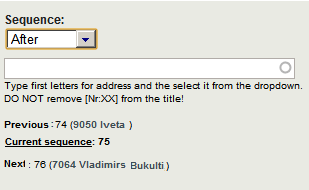
nor4a commentedThe autocomplete option shows when you select one of the options "before" or "After".
Hope it helps...
Comment #25
d2ev commentedeven if i change select options to "before" or "After" the field is not displaying only field help text is showing. "Previous element", "Current sequence" and "Next element" are still showing no value.
Comment #26
nor4a commentedFound one problem. Commited fix.
Comment #27
jleiva commentedHi, I have installed this module with nodeorder module, and following comment #23 and #25,
Comment #28
nor4a commentedHave you added any nodes to the taxonomy term which you try to order there?
Autocomplete takes an term ID as argument and lists just the nodes related to the term within you want to order the nodes.
Comment #29
klausiClosing due to lack of activity. Feel free to reopen if you are still working on this application.
Comment #30
avpaderno