

Closed (fixed)
Project:
Chaos Tool Suite (ctools)
Version:
7.x-1.x-dev
Component:
Miscellaneous
Priority:
Critical
Category:
Bug report
Assigned:
Unassigned
Reporter:
Created:
10 Mar 2011 at 05:48 UTC
Updated:
31 Mar 2012 at 18:30 UTC
Jump to comment: Most recent, Most recent file

Comments
Comment #1
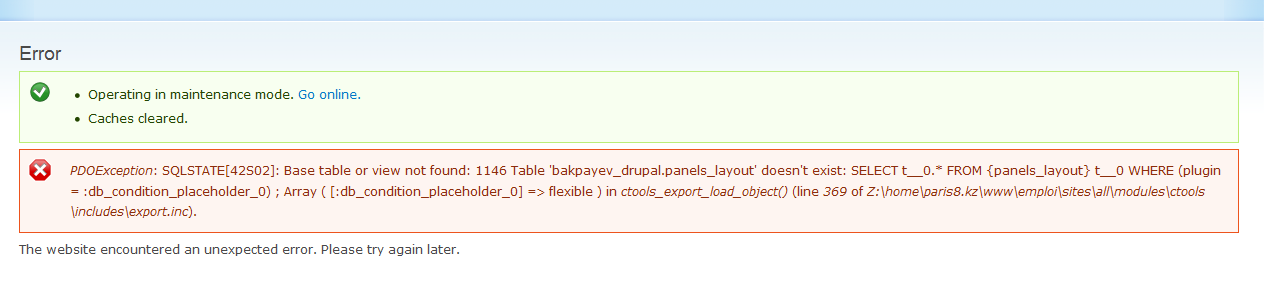
merlinofchaos commentedThat's a bit of a problem. How can the panels_layout table not exist if you've got Panels previously installed from an update? Nothing in that table changes. That kind of suggests something failed in your migration. Check on the status of that table, both pre and post migration?
Comment #2
merlinofchaos commentedNeed to figure out how you got into that situation.
Comment #3
amwlkaw commentedThis happened to me too. I was having some trouble installing the modules, but they eventually went through. I received this error when I tried to configure the Panel in Modules. I would appreciate any advice on how to overcome this error. I should say that the error message is the same but it is looking for a different view. Sorry didn't mean to hijack this issue. Here is the error message now that I have mentioned it in this thread.
PDOException: SQLSTATE[42S02]: Base table or view not found: 1146 Table 'librarie_drup381.dr_ctools_custom_content' doesn't exist: SELECT t__0.* FROM {ctools_custom_content} t__0; Array ( ) in ctools_export_load_object() (line 369 of /home/librarie/public_html/sites/all/modules/ctools/includes/export.inc).
Comment #4
recidive commentedI got this when enabling a feature (from features module) that setup feeds module and add some feed importers.
PDOException: SQLSTATE[42S02]: Base table or view not found: 1146 Table 'dev_xxx.feeds_importer' doesn't exist: SELECT t__0.* FROM {feeds_importer} t__0; Array ( ) em ctools_export_load_object() (linha 427 de /home/recidive/dev.xxx/sites/all/modules/contrib/ctools/includes/export.inc).
I'm trying to fix this in the database. Any clues?
Comment #5
recidive commentedSetting status=0 for feeds and job_scheduler modules manually in the system table solved my immediate problem.
Re-enabling my feature surprisingly works now.
Comment #6
clashar commentedI could not repeat it, as I quit migrating and installed fresh D7 with node importing from D6.
If you still didn't find solution, you could try some actions from similar case of DS:
http://drupal.org/node/1104844#comment-4290780
maybe it would help.
Comment #7
dreamleader commentedHi, I have a similar issue in my testsite. The error reads as follows: PDOException: SQLSTATE[42S02]: Base table or view not found: 1146 Table 'example_drp2.dr_views_view' doesn't exist: SELECT t__0.* FROM {views_view} t__0; Array ( ) in ctools_export_load_object() (line 427 of /home2/example/public_html/test/sites/all/modules/includes/export.inc) after working with the profile2 module. Infact, my site crashed twice while configuring Profile2 module. I did manage a come back from both SOD's. Now I'm just dealing with these error messages. It comes with warning message about "cannot modify header information". Currently I'm still looking through the drupal.org site to see if I can find a solution that will help both you and me.
Comment #8
Polderboy commentedHi,
found that removing the media module solved the issue.
De-activeted all modules and de-installed them. Media did not de-install so removed it from the directory.
After re-activating Ctools, the error didn't show up when clearing cache.
Comment #9
BarryFry commentedThis is error I'm having on new localhost apache/mysql/php install of drupal 7.8 - no idea what's causing it whatsoever but it is not allowing me to access the modules page via admin menu so I'm completely stuck and currently considering starting install all over again without.
Error appeared to begin after I installed and activated ctools & panels modules.
PDOException: SQLSTATE[42S02]: Base table or view not found: 1146 Table 'williamrust.page_manager_pages' doesn't exist: SELECT t__0.* FROM {page_manager_pages} t__0; Array ( ) in ctools_export_load_object() (line 427 of C:\websites\drupal-7.7\sites\all\modules\ctools\includes\export.inc).
Comment #10
BarryFry commented^^^
Ok I updated php.ini with a longer timeout of 60, rebooted and crossed my fingers. Now managed to get back into modules page after several hours of frustration. Busy deactivating every additional module - views, ctools and panels. Will reintroduce and see what happens.
Comment #11
BarryFry commented^^^
Everything now seems to be working fine. Don't think some of the modules installed properly initially. I have tweaked a couple of things on my install as recommended here http://drupal.org/node/348202#comment-1804256 which has speeded the whole process up and incrementally brought modules back online. No repeat of error or long delays since...
Comment #12
dreamleader commentedFixed this by increasing my php.ini and clearing cache.
Comment #13
pete m commentedIn my case the complaint was about PageManager pages missing.
Removing DS did not help,but removing and reinstalling CTools did the trick . .
Comment #14
pete m commentedIn my case the complaint was about PageManager pages missing.
Removing DS did not help,but removing and reinstalling CTools did the trick . .
Comment #15
mrfelton commentedRecently faced this with latest panels -dev code. Issue occurred when enabling the Panels module. To resolve, I had to disable the Panels module, then enable Page Manager, then enable Panels. Should Panels not have a dependency on Page Manager?
Comment #16
swentel commentedThis is always hard to track, but it's usually a contrib module that's doing something to early during installation of a modules. I've been bitten by this kind of strange errors in DS, see #1267050: PDOException: Table ds_view_modes doesn't exist. In that case, it was the uuid module that was calling entity_get_info during its schema_alter hook (more precise also doing a drupal_alter('entity_info'); way before the actual table existed. Maybe there are other situations as well, but I don't know about any others so far.
I could easily reproduce this with Panels as well. Install the uuid module, than try to install the panels module (clean install, so no tables exist yet, I suspect that the original poster never had panels installed before the upgrade, or maybe deinstalled, dunno) and it will crash with a PDO exception when in flexible.inc ctools_export_load_object() is called in panels_flexible_get_sublayouts() and somehow this is too early. Haven't traced that down completely - and it probably happens in other situations (although page manager and views seem fine now).
There's an 'easy' patch for this, however, I'm not sure if this ok. It is 99,9999% a contrib module doing something tricky, however, it's not always easy to trace it down to the right module. Anyway, patch makes panels installation go normal, however, potentially, not all layouts are loaded (haven't tested, but a cache clear would work then of course, or when surfing to the layouts overview page which probably does a reset - I guess).
Comment #17
swentel commentedComment #18
merlinofchaos commentedThe patch seems valid enough. Committed and pushed.
Comment #20
khayam shah commentedhello there i am facing this error while installing open atrium ......
what can i do to fix this error
plz reply me as soon as possible
thnx
Comment #21
khayam shah commentedi am facing this error
SQLSTATE[42S02]: Base table or view not found: 1146 Table 'openatrium.search_api_server' doesn't exist
please guide me about this