

Closed (works as designed)
Project:
CAPTCHA
Version:
6.x-2.4
Component:
Code
Priority:
Normal
Category:
Support request
Assigned:
Unassigned
Reporter:
Created:
11 Feb 2011 at 00:17 UTC
Updated:
23 Dec 2011 at 09:27 UTC
Jump to comment: Most recent, Most recent file


Comments
Comment #1
xaav commentedbtw, pretty sad that I could only find one "fixed" issue.
Comment #2
soxofaan commentedYou didn't upgrade correctly: line 60 of captcha.inc from 6.x-2.4 is
you still have code from 6.x-2.3 and probably didn't overwrite the old module's code correctly.
And please inform yourself better instead of making condescending remarks: fixed issues are closed automatically after two weeks of inactivity: http://drupal.org/project/issues/captcha?text=&status=7&priorities=All&c...
Comment #3
elachlan commented@geoffreyfishing - I suggest that you uninstall the module and then reinstall it. This will allow you to re-add captchas onto your forms.
Note: if you uninstall then you will have to re-setup any settings, such as where to place the captchas.
Comment #4
soxofaan commentedprobably no need to uninstall and reinstall
just replacing the old module's code with the new version should be enough
Comment #5
Stomper commented@#4, I replaced the 2.3 code with latest 2.4 code, by deleting the entire "captcha" file and replacing with the new file. The error still showed.
Comment #6
elachlan commentedOverwrite the whole directory with 6x-2.4. Then run the update.php page.
Comment #7
Stomper commentedSo do what I did but run update.php?
Comment #8
elachlan commentedlogin to drupal and then navigate to /update.php this will give you a prompt to run the code that updates the drupal database in regards to the new modules that you add.
Comment #9
elachlan commentedHere is a good tutorial on it.
http://www.ostraining.com/blog/drupal/update-a-drupal-module/
Comment #10
elachlan commentedmarking as closed due to inactivity.
Comment #11
kenziem commentedWhat was the fix?
The site I'm looking after seems to have similar problem, captcha is no longer appearing on forms.
We have run update.php.
Comment #12
soxofaan commented@kenziem: "no longer": does that mean after upgrade from 6.x-2.3 o 6.x-2.4? Or is it after installation of another module?
What does the CAPTCHA settings page say? Are there still forms specified there?
Comment #13
mustang commented@soxofan - Can't speak to kenziem's site, but on mine the forms do -not- appear on the CAPTCHA configuration page after the upgrade. Because of this and my inability to find documentation on the forms produced by Drupal, I've made several stabs in the dark trying to ensure CAPTCHA/reCaptcha shows on the forms.
Any resolution on this matter?
Comment #14
Anonymous (not verified) commentedRan upgrade & all seems well; would just point out that the warning that pops up just before you commit to the database update caused me some hesitation.
My warning was different, but similar:
Unknown column 'captcha_type' in 'field list' query: SELECT module, captcha_type FROM captcha_points WHERE form_id = 'update_script_selection_form' in /Library/WebServer/Documents/eetdsurveys-drupal-6.20/sites/all/modules/captcha/captcha.inc on line 60.
This isn't a support request, not sure how to categorize it. I only mention it because I did back off from the upgrade because of the warning, but in the end it seemed not to be a problem.
Comment #15
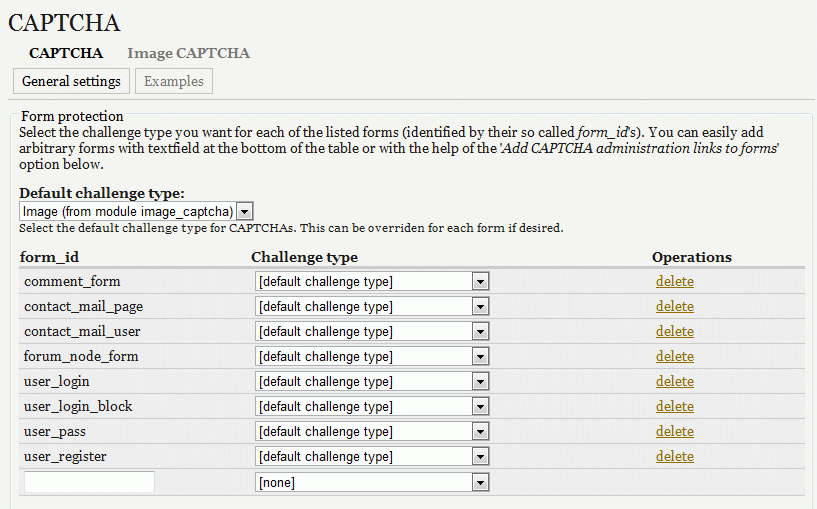
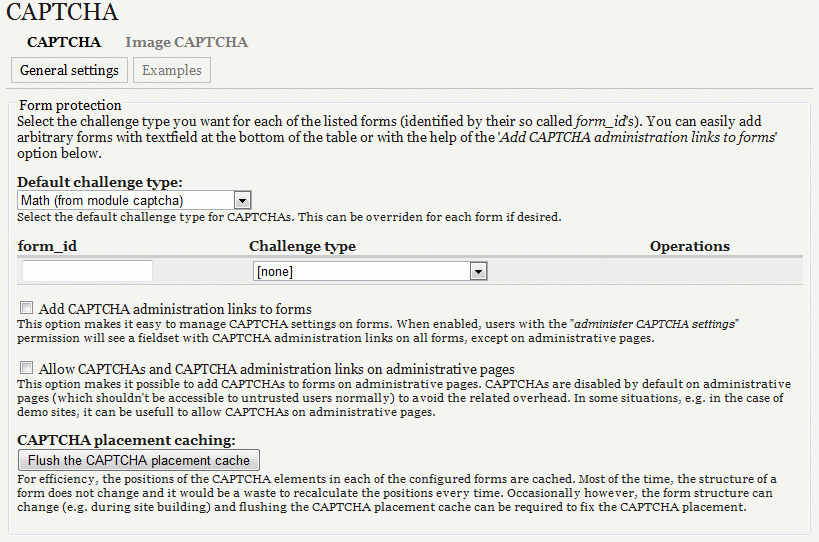
Eduart commentedI have update capcha -not the drupal core- and I found the same issue, capcha form did not appear at any place of the site. Only I have the settings: admin/user/captcha ; But The capcha settings did not show the id (see the image attached)
I follow the instruction of the captcha settings:
then when i fill the texfield with the id, nothing happen
Then, I have re-install captcha 6x-2.4, And When I run update.php.... Drupal show the following message:
Some body have an experience with this issue?
There is hundred of web sites on line showing the same issue.
Comment #16
Eduart commentedI have found the solution (in my case):
1) go to admin/build/modules
2) uncheck 'captcha-image' module and save
3) uncheck 'captcha' module and then save
4) go to admin/build/modules/uninstall and sellect uninstall captcha module.
5) download capcha module from drupal.org, then upload to your host, and then sellect the modules again in admin/bluild/modules and then install again, go to captcha and cofigure again.
Comment #17
soxofaan commentedIf you update modules (and also core for that matter),
you always have to check if you have to run the update.php script (example.com/update.php)
http://drupal.org/upgrade/running-update-php
I think this is the issue here