Hi,
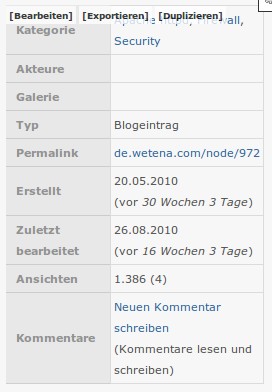
I noticed that records for empty fields are not completely hidden from a table, even if the view is configured with the settings "Hide if empty" and "Count the number 0 as empty": The field label is displayed anyway. This happens as well for taxonomy terms as for CCK fields.
This (probably unwanted) behaviour disturbes the layout and might irritate the user; however, the table display from Views2 behaves identically and comments:
Note that the field label may still be displayed. Check style or row style settings to hide labels for empty fields.
Neither the "Flipped table" display style nor the Views core "Table" display style provide such row style settings to completely hide empty field records.
Since "Flipped table" behaves identical to Views core I'm unsure if this is really a bug; but, whatever this is worth, at least I dislike this behaviour because I'd expect that the "Hide if empty" setting would really hide empty records.
If you don't consider this a bug, feel free to change this issue's category to a feature request.
Thank you!, -asb


Comments
Comment #1
asb commentedScreenshot attached for illustrative purposes. This flipped table includes three rows for taxonomy vocabularies from which two are empty ("Akteure", "Galerie").
Comment #2
infojunkieIf I understand you correctly, you want to hide the whole row if the field values for all results are empty, right?
Comment #3
asb commentedYes, exactly. Imho, if there is no value for a field or a vocabulary, there should be an option to exclude irrelevant elements (like field titles), e.g. a checkbox at the row style settings similar to that one for "HTML list":
Comment #4
asb commentedSounds related: #1011650: Hide if empty isn't working on some of my views, but does on others.
Changing title to a (hopefully) better description.
Comment #5
nitebreedSubscribing
Comment #6
acdtrp commentedIf you use "HTML List" not a Table it hides the empty labels as wishes... but it doesn't work in tables, which sucks very much :)
Comment #7
iprosp commentedI had the same issue and i solved it by doing the following changes to views-flipped-table-tpl.php
(Latest Dev Version)
I changed this:
To this:
Hope it helps!
Comment #8
asb commentedThis is absolutelely amazing, it's exactly the feature I imagined. Also, it's working as well with 6.x-1.0-beta2.
I did some testing, and as far as I can tell there are no side effects. Maybe we could get this in the dev version?
Many thanks, jackpros!
Comment #9
iprosp commentedI don't think that it can be committed, because it will hide an empty line regardless of your choice('hide empty field') and i don't know how to read the field setting correctly and add it to the 'if'.
Comment #10
asb commentedI'm not sure if this is really a problem; the need for a listing with empty rows *and* empty fields appears a bit like an edge-case to me. To *not* display empty fields, I rewrote all empty fields to something like "N/A" or "not yet available" (which, btw, was a lot of fun after updating to Views 3 ;)
But probably It'd be a sound alternative to make an option in the UI available: E.g. a checkbox in the row style settings "Do not show empty rows", similar to what Views provides. This should cover all use cases, and if the checkbox would be unchecked by default, it'd not even modify the behaviour as it is now.
Comment #11
joachim commentedAFAICT this is now working on D7. Changing status as there's no patch for D6 here.
Comment #12
asb commentedThis issue is for D6, and the patch is working well for D6. Probably you mean "no patch for D7"? In this case we should also adjust the 'Views Hacks' version as well.
Comment #13
joachim commentedNo, I mean that AFAICT this is not a problem on D7, where what's described in this issue works correctly.
And I changed the status, because RTBC is the wrong status for this issue: there is no patch here to commit.
Comment #14
naught101 commentedComment #15
naught101 commentedwhoops
Comment #16
naught101 commentedSounds like this was fixed in views itself. Ideally, Views Flipped Table should follow Views' Table as closely as possible, so I would prefer not to include hacks for problems in views. If this is still a problem, and it's not occurring in the standard table view, feel free to re-open.
Comment #17
asb commentedReopening and marking #1479368: hide empty rows as duplicate.
Comment #18
karlshea