

Needs review
Project:
Context
Version:
7.x-3.x-dev
Component:
User interface
Priority:
Major
Category:
Feature request
Assigned:
Unassigned
Reporter:
Created:
10 May 2010 at 17:54 UTC
Updated:
21 Apr 2023 at 07:21 UTC
Jump to comment: Most recent, Most recent file


Comments
Comment #1
mstef commentedDoes it pull the title into the code? Maybe I'm wrong by creating this issue..
Comment #2
yhahn commentedIt does not, and for the time being we won't be supporting this. I think it may be a nice feature down the road.
Comment #3
ajfabb commentedNot sure how my use case is supported with this bug:
- I build a site and get tired of setting manual block visibility, I discover context.
- I enable a context and use it to trigger block visibility.
The problem is, my block titles are ignored. My "Online Store" block is rendered as "Catalog". How am I supposed to fix this, especially when the blocks are provided by other modules and the block admin page is the only way (AFAIK) to assign block titles.
Comment #4
ajfabb commentedI also noticed that block titles are rendered when they should not be. I've specified for my navigation block, but when I let context render blocks, it ignores that and puts an ugly "admin" for the title.
Either I am misunderstanding something, or this should be a critical bug.
Comment #5
jmiccolis commentedTo provide some more background; the normal block admin provides a way to override block titles (and positioning) per theme. Context doesn't attempt to tie settings to themes and so this entire approach is just ignored by Context.
If you need a block's title to change you need to take a look at where that block's title is generated to see what options you have. For block that are generated by Views you can change the title in the view definition, etc.
Hope that's helpful.
Comment #6
xjmTracking. If you choose to disable the core block UI and just use Context, then there's currently no way to tell it to override or omit the darn block titles. Core menu blocks, for example, have no UI like Views does. For now I've just
display:none'd the suckers, but that doesn't work when a block title is actually customized, and the markup is still in the source.Interestingly (and this is an aside), the menu blocks module admin also disappears when I uncheck the core blocks option. (The blocks still exist, though; just the admin UI is gone, probably because it's under
admin/build/block.Comment #7
mrfelton commentedI think that since context provides a way to do away with the normal block admin screen (which is great), it should allow overriding of block titles, since this is a pretty essential feature of working with blocks.
Comment #8
iaminawe commentedAgreed. This is quite a limitation of using context.
Subscribing
Comment #9
daniboy commentedIt would be really great to have this feature.
Subscribing
Comment #10
xjmMoving to -dev as it's a feature request.
It might be useful for context to provide a complete alternative to the core block interface (including the title override, but also including block creation), as a complement to the "hide core block interface" feature and for complete exportable support.
Comment #11
Shadlington commentedSubscribing. I'm running into the same problem, having to use context along with the core block system for the time being - but I'd rather just use context.
Comment #12
jumpfightgo commentedShould the title be configurable per context?
Maybe in one context you may want to show the title, and in another hide it?
Or would that just be confusing for content managers? You change the block title in one context and then have to manually change it in all the others as well...
Comment #13
gmclelland commentedsubscribing - same problem - can't get rid of the block titles
Comment #14
Adam S commentedsubscribing.... I have the same problem with ugly block titles.
I just went ahead and removed lines 362 and 365 from context_reaction_bock.inc. I tested both ways and it seems irrelevant to test if the block system has been disabled.
Comment #15
yareckon commentedAlso ran into this yesterday. Lack of ability for users to set / disable block titles is the only thing keeping the legacy block system turned on on my current project.
Seems like a little per block config widget in the context edit interface should allow the setting of block title configuration in a theme independent way. Or via the context_ui interface, just put a cog symbol up the in the corner.
Comment #16
Adam S commentedThere is a block title from the module that created the block and there is a block title alias that is configured in the block admin page. Modules such as QuickTabs or Nice Menus create blocks with a title that are stored in their respective database table. When the block module is turned off by context the aliased titles are not being used. The condition on 362 from context_reaction_bock.inc should be removed because Context needs to make that query to the database to find the aliased block title regardless of the Block module being disabled or not. What is happening is that when the block module is enabled Context makes the query and finds the aliased title in the Block table. When the Block module is disabled it skips over that step and uses the default title which in the case of something like Nice Menus will be the name of the menu, Primary Menu, for example.
Also there needs to be an admin interface to configure the blocks. The path of least resistance is not to disable the blocks admin pages while turning off the Blocks. Otherwise, create an admin page with a table of blocks and have a form for each block that allows the title to be configured. Also, it should be considered to allow integration with modules that enhance blocks such as http://drupal.org/project/block_class and http://drupal.org/project/links_block.
Comment #17
joshmillerAs a side-step, you can remove the table-drag-n-drop and fix the crazy order of disabled blocks by simply creating your own version of block-admin-display-form.tpl.php
I have attached my (very hacky) version that only lists the "disabled" blocks that I want it to and in the order I choose (first by module, then by $block->block_title).
Just to jumpstart you.
Josh
Comment #18
manuel garcia commentedMost blocks are not an issue to worry about, if they are custom you can just change the title in code, if they are views, change the view.
But for quicktabs, it's a problem, because it uses the title for the admin interface also, so you cant just enter
<none>there. Well, you can, but then you have no way to know what quicktab block is which in the admin interface. Perhaps we shuould fill in a feature request to quicktabs to store both an admin title and a block title to be displayed...Comment #19
corbacho commented+1 to this feature request.
I have a Zen theme that provides a useful "configure" link to administrators so you can jump quickly to modify title/body of custom blocks.
Would be possible that Context overrides these paths, providing an alternative way of configuring body/title?
Then I could put off the Blocks admin page.
Comment #20
KHofmeyer commentedSubscribing....
I find it just a bad user experience to adjust a block title on the block admin page when the block isn't even assigned to a region.
Comment #21
stevenator commented+1 I used the block.tpl.php route since it was only one title I was having a problem with.
Comment #22
BarisW commentedSubscribing. It's rather confusing that this don't work. As understood from #5, the block titles have to be changed from theme-specific to context-specific. Nothing wrong with that. Is it hard to implement?
Comment #23
BarisW commentedBy the way: now it's a feature request, its status should be active again?
Comment #24
doublejosh commentedSorry if this distinction has already been made in the thread...
-- If you alter the block title *from the block settings page* context WILL honor the new block title.
-- If you alter the block title *from hover admin links* context WILL NOT honor the new title.
Imagine this could be due to the destination redirect interrupting the block save process?
Comment #25
jessekanner commentedMenus that go through the Context module are also getting Titles prepended to the output... the title being set as the NAME of the Menu. No way to alter this. Can't have a blank Menu name.
I'm afraid i'm going to have to hide this Title (and the ones shoved through from Views via Blocks) via CSS - which is pretty dorky. But effective. Hopefully we can take it out at the admin and thus via the html level soon?
Comment #26
steveoliver commented(Using 6.x-3.0):
In dealing with this issue, I notice that once I place my [Features coded] block in a region using the traditional (/admin/build/block) method (and then changing its title via Skinr's in-place hover admin links), I can change the Title of the Context-placed/Features-coded block (using the same Skinr hover admin link)... even after removing it from the traditional (/admin/build/block) region placement.
What I understand of this is that, as mentioned above in this thread, block configurations are necessarily associated with themes. But Context block placement has nothing to do with the theme layer (right?). So from here I can understand why changes to Context-positioned blocks, having no explicit association with any theme to begin with, don't know for which theme the block's title should be changed. But I don't understand why the Title change doesn't just apply to every theme.
Comment #27
doublejosh commentedYou don't have to place them, just edit the title via the traditional block UI. See my reply above.
Comment #28
mstef commented@doublejosh: that's not exportable.
Comment #29
doublejosh commentedBummer, read the more complex issue. Haven't bumped into it yet, but noting now.
Comment #30
goron commentedsubscribing.
I'm having a problem, for instance, with Heartbeat blocks. I need to change the block title, but I'm using Context for blocks rather than the block system.
Comment #31
adamgerthel commentedI've never had problems renaming the block titles, but Features aren't exporting the overridden title. For example, I never ever use the default "Primary Links" or "Main menu". I always use "none" for those blocks because I don't want that title there at all. It would be great if context could save the fact that it's been overridden so that Features can export it.
It's easy to forget that you've changed the block title to "none" and then when you deploy your new / updated feature to the live site and empty cache you have a huge H2 there that you weren't expecting. It's uneasing :)
Comment #32
dagomar commentedWill be useful, subscribing.
Comment #33
kolafson commentedThis is an issue for my deployments as well.. subscribing.
Comment #34
reikiman commentedI was going to file this issue and thankfully found it before filing a duplicate.
I disagree that "it may be a nice feature down the road" is the right answer. This is a serious flaw in Context module as several have already noted on this thread. In my case I enabled Context module, checked the box to disable the normal Blocks system, and went about re-implementing my blocks with Context module. The result is rather frustrating and I'm actually contemplating going back to the normal Blocks system. One frustration is the inability to change block ordering (there's another issue on this) the other frustration is documented in this issue, namely being able to edit per-block settings.
This is plainly the wrong user interface. Because Context asks the user to do away with the normal Blocks system, Context module has to implement the same functionality as the normal Blocks system. It doesn't and it leaves users high and dry with no hope.
Okay, I see someone changed the status back to "active" after Young changed it to "postponed" so I should calm down ...
Comment #35
millenniumtreeI agree with reikiman
This sort of thing is absolutely essential, and I do very much want to disable the core blocks system. In its' current configuration, I just can't move away from core blocks.
Also apparently missing is the ability to add new custom blocks like you can through the core blocks admin, but that would be a separate feature request. *shrug*
Comment #36
Adam S commentedI think the consensus for Drupal 7 is that if the blocks module is enabled but there isn't any blocks set in regions using it, there isn't much of a performance hit. There is only one or two extra database queries out of 200-300.
Comment #37
carn1x commentedsubscribe
Comment #38
BarisW commented@carn1x: please use the green 'Follow' button on top of the page. Subscribing is not needed anymore!
Comment #39
carn1x commentedHmm yes sorry need to get used to that.
Off Topic: does pressing follow cause a bump in the thread at all, or is there a way for maintainer to check the number of followers?
Comment #40
xjmIMO "bumping threads" is bad form--if you want to bump an issue, post a productive comment that furthers the issue's progress. ;)
As for seeing the number of followers, this is in a followup issue (#1304550: Display count of issue followers when viewing an issue). See also: http://drupal.org/node/1080494
Comment #41
omahmI'm in the same boat and the work arounds I use are Features Extras and Panels but it would certainly be a nice option to set everything up in Context including block title and visability and have it exportable.
Comment #42
peterpoe commentedHere's a working patch that adds a "Title" field to the block reactions form that overrides both the module provided and the block admin page provided titles. The Javascript part is not done, so the field will only show if you add a block, save the context, then re-edit the context.
Comment #43
peterpoe commentedFixed default value of Title field.
Comment #44
peterpoe commentedFixed PHP error when get_blocks() is called without $context.
Comment #45
druvision commentedI've simply added a new empty text block above the buggy block in order to display the title. The body of the new block should have at least an
, otherwise the title of the new block won't be displayed.Comment #46
peterpoe commentedAdded support for "
<none>" titles.Comment #47
mrfelton commentedI'm going to go out on a limb here, and suggest that any patches should be made against the D7 codebase, and then backpoerted to D6. Bumping the version to reflect that.
Comment #48
john franklin commentedPatch in #46 applies cleanly and works in 6.x-3.1.
This patch is critical to my sanity. Thanks!
Comment #49
iztok commentedWill this be ported to D7?
Comment #50
akalam commentedPatch attached for 7.x-3.x.
Comment #51
akalam commentedThis patch resolves a problem of the previus one: If you leave the title field empty, the title block was empty too insted of show the default title. Now it works.
I have another issue with the patch... The block weight is not being saved throw drag and drop, but is saved throw the weight select boxes.. Any idea?
Comment #52
muffinzap commentedThis patch solves a problem of the previous: change the title of the blocks of all regions
Comment #53
finex commentedHi, even with the weight bug the last patch is a good improvement.
Comment #54
muffinzap commentedForget the #52
This patch solves a problem of the previous: change the title of the blocks of all regions
Comment #55
muffinzap commentedForget the #52
This patch solves a problem of the previous: change the title of the blocks of all regions
Comment #56
muffinzap commented#55 don't works if we apply the patch from a .make file,
now the patch works
Comment #57
q0rban commentedAt a quick glance of this patch, there are all sorts of coding standard issues. I'm going to apply the patch and check it out more in depth, but setting to needs work.
Comment #58
q0rban commentedThis seems to do the trick for me. The previous patch wasn't working, as far as I could tell. Also bumping to major. This is a pretty high priority feature request, IMO.
Comment #59
skwashd commentedI would love to RTBC this, but I think to keep it consistent with core blocks the description for title needs this element:
I would reroll the patch with this change, but then I couldn't RTBC it.
Comment #60
q0rban commentedI tried to add the description, and was not pleased with the results:
http://monosnap.com/image/8zQNQ8fx6KbtmCpk4uu5HMQ0r.png
This is using the Seven theme, viewing the form at 1680px wide. @skwashd found that setting word-wrap: normal; in the CSS improved it somewhat, but it's still makes for a confusing UX, in my opinion. In order to add the description, I feel it would require a bit of refactoring of the theming of the block reaction form. What I propose is to have this go in as is and create a separate issue to fix the UX of the block reaction form.
Comment #61
skwashd commentedAfter discussing the issue with @q0rban I agree with getting this in and fixing the broader UX issues in a separate issue.
I have tested this on 2 sites and it works as expected.
Comment #62
gunesh-1 commentedwhen i try this i can not see right side bar and block position preview in admin block pages.
Is there any solution for this.
Comment #63
skwashd commentedRerolled as it didn't apply cleanly against 7.x-3.0beta6.
Comment #64
hefox commentedShould this really be custom title instead of just title (and does it need the :? shouldn't themeing take care of that? Not actually looking at a patched version of context, so not sure where that is used)? Considering translatable
Other than that, quick review looks good. Can someone test the newest patch and rtbc it?
Comment #65
skwashd commentedRerolled.
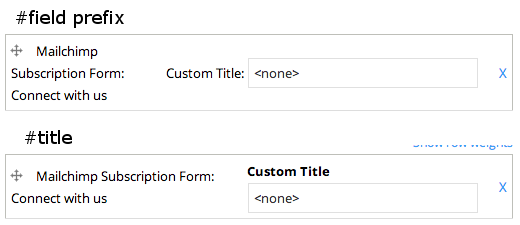
I can see why #field_prefix was used, as it looks better visually, but the markup is more semantic with #title. I've attached a screenshot of using both for comparison.
Comment #66
skwashd commentedFixing status
Comment #67
skwashd commentedThird time lucky with the status :(
Comment #68
osopolarWorks for me. Tested with 7.x-3.0-beta7 both with a real custom title and also with the custom title "" to hide title.
Custom title is IMHO better than just Title, because if the Title field is empty does not mean that there is no block title, but the default will be used instead. Just title may suggest that there is no title. Drupal core blocks uses Title, but there is also a description text. Alternative could be Override Title. But Custom Title seems fine to me.
Comment #69
tekante commentedThe admin/structure/context side of this looks to be functioning correctly but any custom titles are lost as soon as the inline editor is used for block placement.
Comment #70
dafeder#65 works beautifully except that custom blocks - blocks created with the blocks module - never show the title given to them in the add/edit block form. I suppose if the idea is to never use the block.module ui that's not a bug, but it means you need an additional module like Bean to create custom blocks through the UI.
Comment #71
fearlsgroove commentedFrom a UX perspective, having the titles in a different cell makes for some hard to understand layouts. Here's a version that uses separate cells for drag handle, label/title input, and weight.
Comment #72
fearlsgroove commented71 doesn't apply try this ...
Comment #73
jared12 commentedI just tried out the patch in #72 and it works great for me (I want to hide titles on blocks generated by Quick Tabs).
Is this patch on its way to being incorporated into the module? It's exactly what I need, but I'd rather not use it on a production site if the feature is a long way from being officially included.
Drupal 7.26
Context 7.x-3.2
Comment #74
skwashd commentedThe patch at #72 looks good to me. Unfortunately it needs a reroll to apply with hunk offsets on 7.x-3.2.
Comment #75
mr.baileysStraight reroll.
Comment #76
tekante commentedWhen editing the layout of a page using the inline editor any customized block title is lost. To replicate create a context with a block reaction placing a block with a custom title. Go to a page that activates the context and choose "Configure Layout" from the contextual links menu for the block. Choose the context to edit and then move the block to a different region. Stop editing and save changes and the previously customized title of the block will be lost.
Comment #77
torotil commentedThere is another issue with that patch: Block titles can't be translated.
Comment #78
torotil commentedHere is a patch that also makes the titles translateable. It's not a pretty solution because it uses t() on variable input. But it will work until there is a better one.
Comment #79
torotil commentedNever mind the last patch - I've attached the wrong one.
Comment #80
torotil commentedThis patch also cleans up block vs. title handling.
Comment #81
torotil commentedComment #82
osopolarA better solution might be translating the complete block instead of just the title via t-function, see: #1343044: Context and block translation..
Comment #83
fraweg commentedHello torotil,
for me, the patch #81 does not work with translations. #80 does work with translations.
Thanks for your patches!
Frank
Comment #84
sgdev commentedPatch #79 works through the standard Context interface located at "/admin/structure/context". However if attempting to use the Context UI interface through the front end, all block title overrides are cleared on save.
Comment #85
torotil commentedHere is a small fix to avoid translating "<none>" to something else.
Comment #87
torotil commentedUps. That broke translations for empty titles.
Comment #89
acbramley commented#81 works for me
Comment #90
sgdev commentedI can confirm that #87 works correctly even though it shows a failed SimpleTest.
We have been using this patch on a site for the past couple of months with no issues.
Comment #93
alexverb commented#87 works for me too.
Comment #94
sgdev commentedAny closer to getting this patch committed? What are we missing for it?
Have been using #87 on a site for over a year with no issues.
Comment #95
hass commented9 fails, 18 exceptions need work.
Comment #96
sgdev commentedWe've spent a significant amount of time reviewing this patch, and have identified several major issues:
<none>" as a Custom Title to remove existing titles.Please see the attached patch that fixes all of these problems. I look forward to your feedback, thanks.
Comment #97
sgdev commentedAttached is an image that shows the Custom Title functionality in the inline editor, as it exists in Patch #96. Users can type a title in the textfield, and then click the block name to add it to the region.
Comment #98
sgdev commentedAlso should add this other image showing the weights functionality in case anyone from Issue #455908 is reviewing this patch.
Each block has a "Custom Title" field that is added, and a weight selector that can be manually edited, or toggled to be draggable.
Comment #99
dilpreet_singh commentedPatch updated for the security update https://www.drupal.org/sa-contrib-2022-049
Comment #100
circuscowboy commentedLittle issue with the last patch - here is a new one that should work.
Comment #101
code_brown commentedWhen adding a new block to a region using patch-99/100 I get the form element output as text. It is going through the Drupal.checkPlain() function, turning it into encoded html. If we keep Drupal.checkPlain(text) and let title be rendered as-is then we should get the desired effect. The attached patch does this.
Comment #102
xurizaemonAdding interdiff btw 100 & 101