

This project is not covered by Drupal’s security advisory policy.
Sutram gives Drupal modules one standard way to expose what they can do, as commands for AI agents and for people. Each registered command becomes:
- a WebMCP tool, for agents in browsers that support WebMCP;
- a JavaScript call (
Sutram.call()), for headless browsers, tests and browser agents; - a line in a terminal-like console, for people and agents.
You would need an integration module to expose the available tools to webmcp.
This module ships with some demo modules to be used for reference implementation.
- sutram_demo_form
- sutram_demo_nav
- sutram_demo_page
- sutram_demo_user
- sutram_demo_canvas
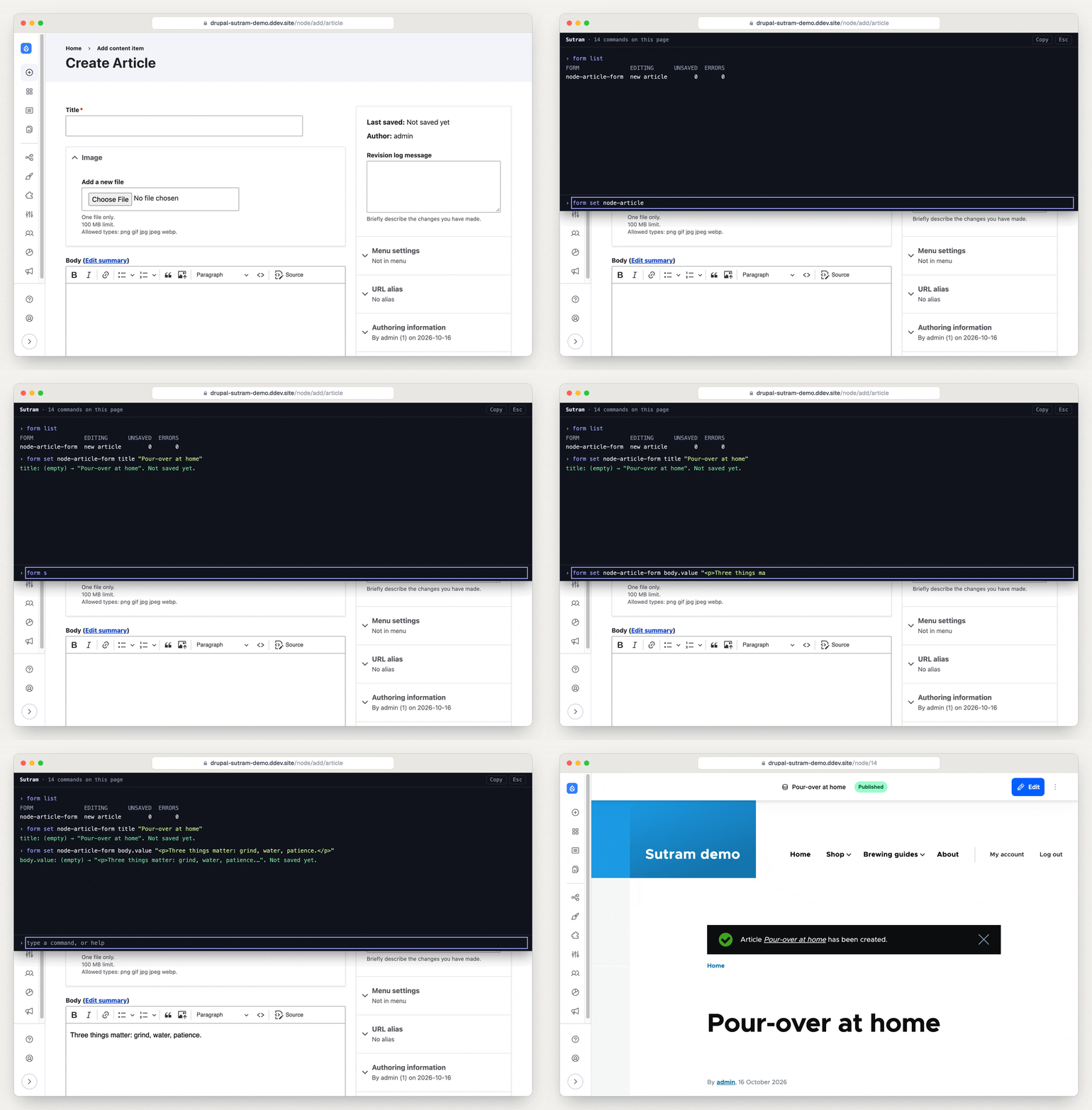
The demo form commands in the console: list the forms on the page, fill two fields, save. Saving asks first.
How it works
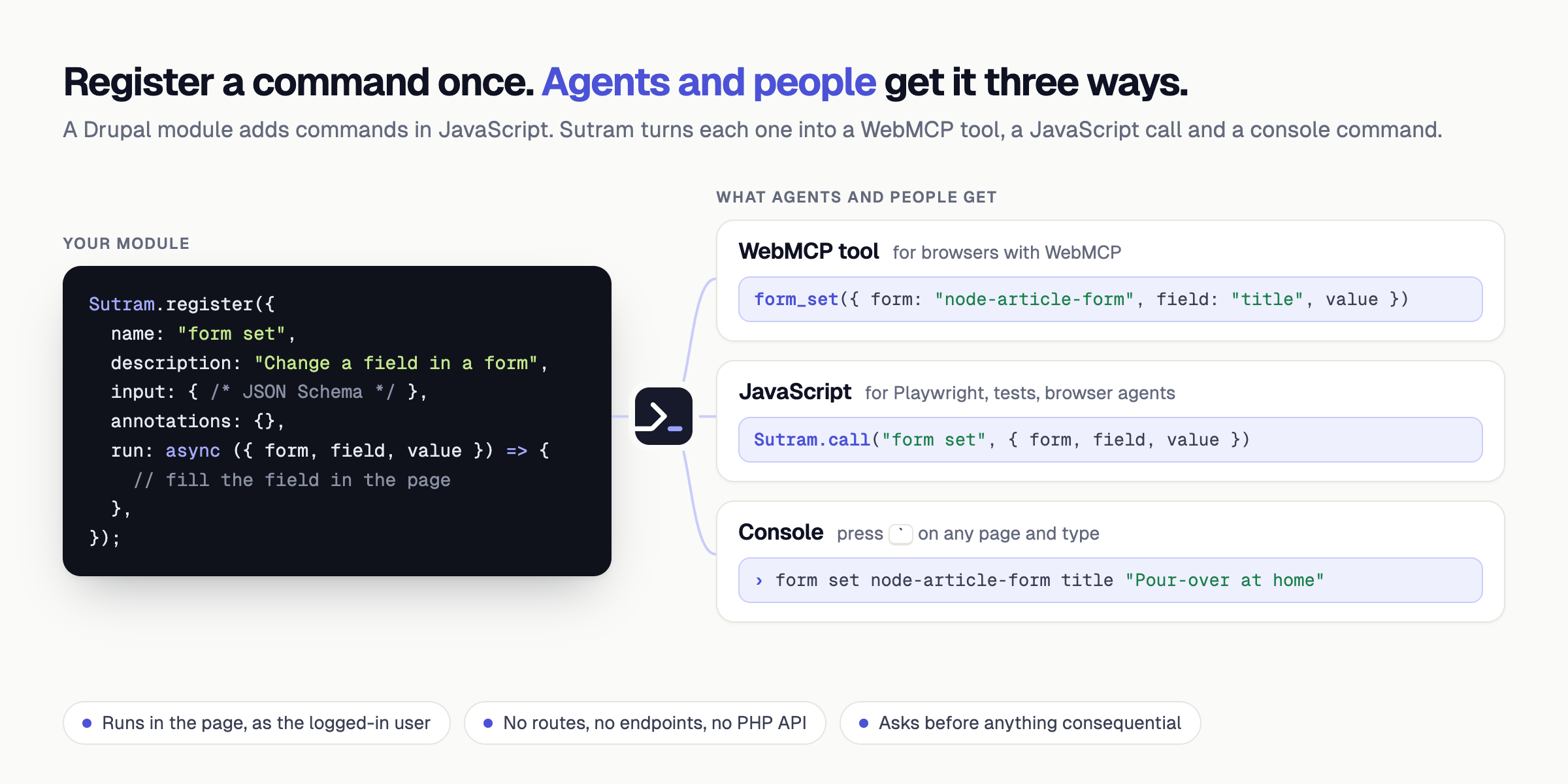
A module registers a command in JavaScript: a name, a JSON Schema for its input, and a function. Sutram does the rest. This module ships the Sutram library and the console; it registers no Drupal commands of its own. Its demo submodules add commands for menus (nav), the current page (page) and content forms (form).
Why not just WebMCP?
WebMCP is how a page hands tools to an agent. It does not say which tools a page has, how they are named, or how a dozen modules share one page. Sutram is that layer, and WebMCP is one of the ways out of it:
- One registry for every module. Modules register commands the same way, with one command grammar, instead of each inventing its own tools.
- People see what agents see. Every tool is also a console command, so you can type exactly what the agent would call.
- Few tools, stable list.
form set <form> …is one tool for every form on the site, not one tool per form. - Works before WebMCP does. Browser agents and tests call the same commands through
Sutram.call()today.
Sutram registers tools through WebMCP's own registerTool() and never reads or changes the page's HTML. It does not replace Playwright or browser agents: they call its commands instead of clicking.
Safe by design
Sutram runs in the page, as the logged-in user. It adds no route, no endpoint and no PHP API, so an agent can do only what the user can already do. Commands that are hard to undo ask first.

Getting started
composer require drupal/sutramanddrush en sutram(and the demo submodules, if you want them).- Give the Use Sutram permission to the roles that should have it.
- On any page, press
`(outside text fields) or Ctrl+Shift+K and typehelp.
No CDN and no build step: the library is shipped in the module.
Documentation
- Module documentation: install, adding commands from your module, data from the server, AJAX content, security.
- Sutram library and docs, and llms.txt for coding agents.
Project information
- Project categories: Developer tools
- Ecosystem: Javascript Tools
- Created by d34dman on , updated
 This project is not covered by the security advisory policy.
Use at your own risk! It may have publicly disclosed vulnerabilities.
Releases
Development version: 1.x-dev updated 25 Oct 2026 at 04:31 UTC




