Problem/Motivation
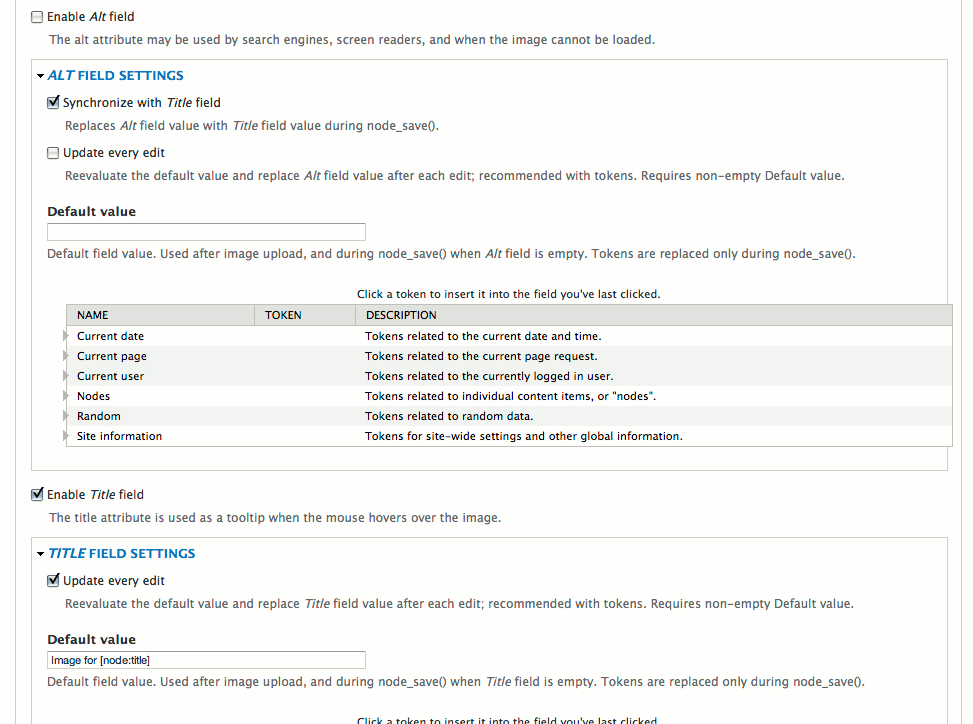
I'm trying to test on a fresh install of Drupal 10.2.6 and I can't find the "Alt field settings" (pictured in the first image on the project page) anywhere.
I added an image field to the Basic Page content type, set both the form widget and field formatter to 'ImageField Tokens', but the alt field 'Default value' field doesn't show up anywhere I can find. I checked the settings for the image field, the formatter and the widget. No luck. (See attached screenshots.)
First time installing, so I don't have previous experience to know if it worked on earlier versions. Is it correct to assume that you should be able set the token-based defaults on the field settings, and they would then be used in the formatter and widget?
What am I missing?


 Show commands
 changes


Comments
Comment #2
justcaldwellI don't see the
function imagefield_tokens_form_field_ui_field_edit_form_alter()from the 7.x-1.x module file implemented anywhere in the later versions (8.x, 3.x, etc.). So there doesn't seem to me anything that adds the imagefield_tokens settings to the overall field settings UI?Comment #3
justcaldwellJust for good measure, here's the node edit form as well. No settings there, either — though I don't know why you'd want site authors choosing tokens, instead of just entering an alt value.
Comment #4
justcaldwellAnd, yes, there's a "Browse available tokens" link, but here's the resulting code with an unprocessed token in the rendered page.
Comment #5
justcaldwellComment #6
justcaldwellComment #7
ysamoylenko commentedHello @justcaldwell,
Are you sure you configured both: Widget and Formatter for the image field for your entity (Display and Form modes)?
Token replacement will work only once you configured a compatible formatter.
There are two formatters available:
Widgets available:
Here are screenshots:
You can also configure a predefined token alt/title values for your image field inside its settings:
Hope you find this explanation useful.
Please reply here if you still experiencing any difficulties.
Comment #8
decipheredComment #11
decipheredWidget-level settings for default alt and title tokens are being added back in PR #4, open for review.
Both widgets now expose
default_altanddefault_titlefields in their settings form, with a token tree picker when Token module is enabled. Defaults are applied at render time only when the stored value is empty, so existing values take precedence.