

 Come together with the global Drupal community in Rotterdam, 28 Sept – 1 Oct 2026. Sessions, contribution, connection, and Early Bird savings until 8 June.
Problem/Motivation
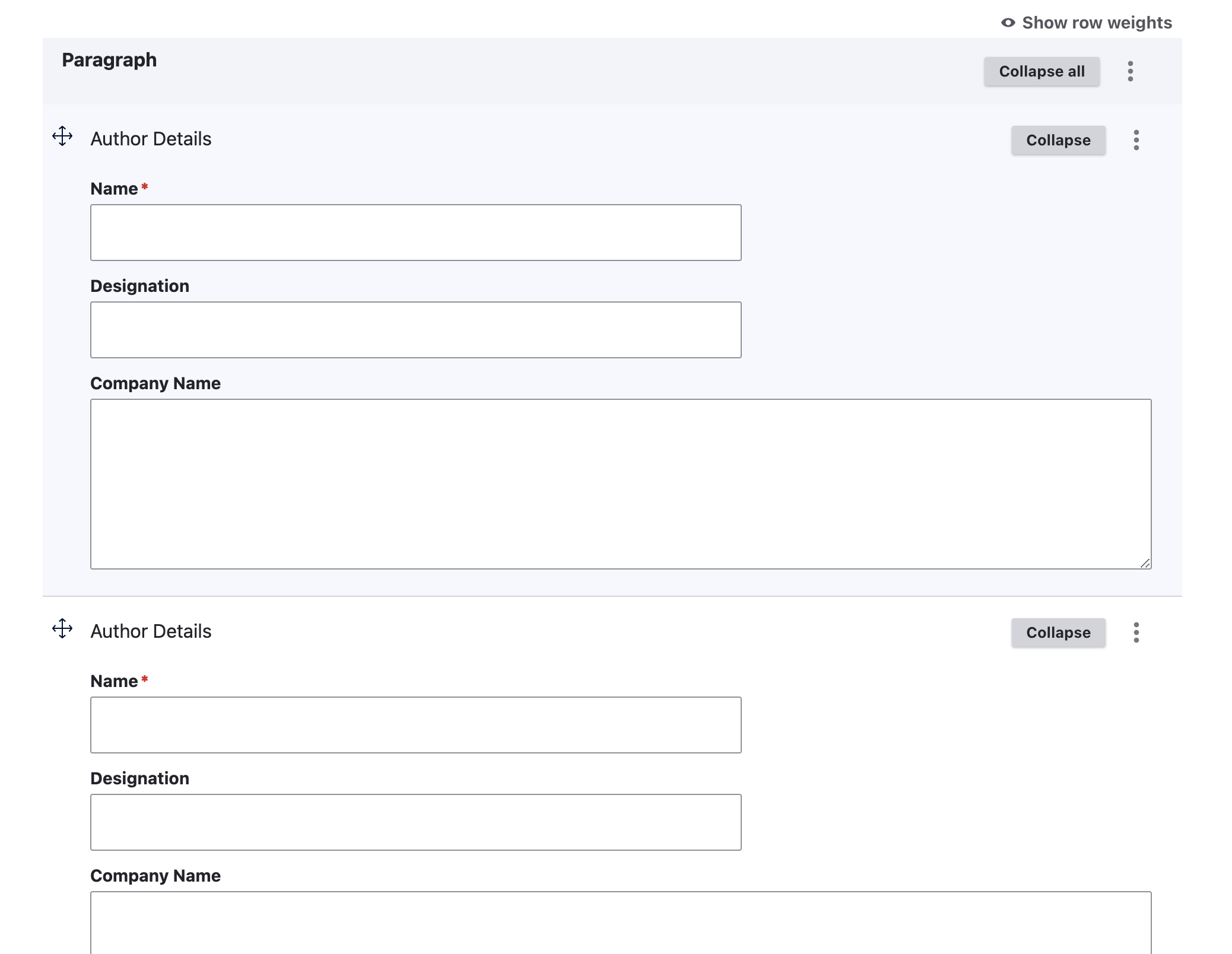
After migrating to Drupal 10, we had to use the Claro administration theme. Unfortunately, we noticed that in our page section types the tabledrag is now positioned in the middle. Large elements are difficult to move. This problem only occurs with Chromium. This behavior does not occur with Firefox. The elements should be easy to move (no matter how high). It would be best if the table drag element is positioned at the beginning.
Steps to reproduce
- Set Claro as your backend theme
- Go to a page and edit or create multiple page section types
- You can now see the central positioning of the tabledrag element (see picture)
Proposed resolution
Change the position of tabledrag to the top from the middle.
.tabledrag-cell-content > * {
  vertical-align: top;
}
.tabledrag-cell-content .tabledrag-handle::after {
  vertical-align: top;
}
Remaining tasks
Review MR
Commit
Merge
User interface changes
Before

After
API changes
NA
Data model changes
NA
Release notes snippet
NA
| Comment | File | Size | Author |
|---|---|---|---|
| #15 | VerticalAlign.png | 77.67 KB | ahsannazir |
| #14 | D10-AfterMR.png | 71.5 KB | kanchan bhogade |
| #14 | D10-BeforeMR.png | 71.01 KB | kanchan bhogade |
| #14 | D11-AfterMR.png | 70.66 KB | kanchan bhogade |
| #14 | D11-BeforeMR.png | 70.79 KB | kanchan bhogade |
Issue fork drupal-3423431
 Show commands
Start within a Git clone of the project using the version control instructions.
Or, if you do not have SSH keys set up on git.drupalcode.org:
 changes





Comments
Comment #2
nod_happens in 11.x
Comment #5
Kiane12 commentedIt sounds like you're experiencing an issue with the table drag element's positioning within the Claro administration theme on Drupal, specifically when using Chromium browsers. This can be particularly problematic for user experience, especially when dealing with large draggable elements.
One possible workaround to consider, until a permanent fix is implemented, could involve custom CSS or JavaScript adjustments to alter the drag handle's positioning or enhance its visibility and accessibility. For instance, you might use CSS to adjust the drag handle's position to the top of the draggable item, ensuring it's consistently accessible regardless of the item's size or the browser in use.
Additionally, exploring JavaScript solutions that dynamically adjust the drag handle's position based on the user's interaction or the viewport size could offer a more responsive and user-friendly approach. This could involve listening for drag events and altering the handle's position to ensure it remains within an easily reachable area of the viewport.
It's also worth checking if there are any open issues or patches submitted by the community addressing this problem. Contributing to such discussions or patches can not only help you find a temporary solution but also assist in speeding up the resolution of the issue for everyone involved.
Remember, when customizing or extending functionality, it's essential to thoroughly test your changes across different browsers and devices to ensure compatibility and maintain a consistent user experience.
Comment #6
maninders commentedBefore


After
Comment #7
maninders commentedComment #8
smustgrave commentedShould be MR and screenshots need to be added to issue summary as well as proposed solution. The missing sections of the issue summary template
Comment #9
xjm@Maninders, it's not helpful to post a patch when an issue already has a merge request, and therefore that doesn't receive issue credit. The screenshots did help me understand the problem, though, so that is creditable.
Also, the merge request needs to be against 11.x.
Comment #10
xjmComment #12
gauravvvv commentedUpdated issue summary
Comment #14
kanchan bhogade commentedHi
I've tested MR 6788 on Drupal 10 and 11
MR is applied cleanly...
Test Result:
The positioning of the table drag element is changed from middle to top but the alignment of the drag icon with element name visually does not look good.
Attaching SS for reference
Moving to "Needs work"
Comment #15
ahsannazir commentedChanging vertical-align to top also changes alignment for small section fields. Check screenshot below
Comment #16
mark_fullmerThis issue will almost certainly need to be revisited, given the changes to Claro's tabledrag implementation introduced in #3332683: Refactor Claro's tabledrag stylesheet