

 Come together with the global Drupal community in Rotterdam, 28 Sept – 1 Oct 2026. Sessions, contribution, connection, and Early Bird savings until 8 June.
Problem/Motivation
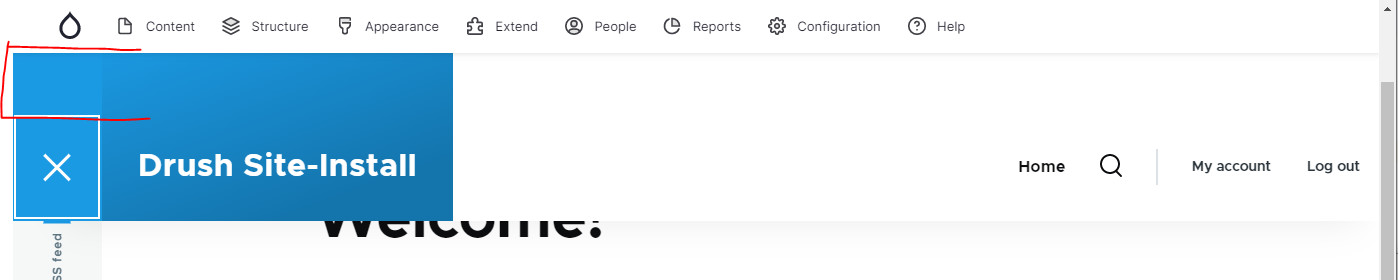
Gins secondary toolbar overlaps Oliveros site-header.
Open site-header:

Closed site-header:

Steps to reproduce
- install Drupal 10 standard
- install Gin as admin theme
- install Gin Toolbar
- navigate to /
- scroll page down
Proposed resolution
Add attribute data-offset-top to <div class="gin-secondary-toolbar gin-secondary-toolbar--frontend"> in toolbar.html.twig
Remaining tasks
User interface changes
API changes
Data model changes
| Comment | File | Size | Author |
|---|---|---|---|
| #6 | olivero-site-header-open-with-data-offset-top-horizontal.PNG | 52.29 KB | luenemann |
| #5 | olivero-site-header-open-with-data-offset-top.PNG | 39.97 KB | luenemann |
| olivero-site-header-open.PNG | 26.9 KB | luenemann | |
| olivero-site-header-closed.PNG | 10.22 KB | luenemann |
Issue fork gin_toolbar-3336972
 Show commands
Start within a Git clone of the project using the version control instructions.
Or, if you do not have SSH keys set up on git.drupalcode.org:
 changes



Comments
Comment #2
luenemannComment #3
luenemannComment #5
luenemannScreenshot of proposed solution:

Comment #6
luenemannIt's not perfect for the horizontal toolbar:

Comment #7
luenemannAdd attribute
data-offset-toponly for the vertical toolbar layout.Comment #8
luenemannI didn't test on Drupal 9, only Drupal 10.
Comment #9
luenemannCannot reproduce on D9.
Relevant changes made in #3277809: Use Drupal.displace()'s new CSS variables to place Olivero's fixed header, maybe #3291729: Refactor Olivero styles to use new --drupal-displace variables and ensure that toolbar/buttons are always visible.
So Olivero D10 changed header positioning to use displace instead of fixed toolbar height values. Maybe worth a CR. But the Drupal toolbar had
data-offset-topattribute before. Maybe gin_toolbar should have used it before.Comment #10
hudriFYI: Gin has a couple of CSS variables, which can be used by frontend themes to offset whatever is sticky in their own theme:
Comment #11
saschaeggiI guess this is outdated as I couldn't reproduce it with Gin RC2.
Comment #12
luenemannI've checked with
Still reproduceable.
In Drupal 9 it's not a problem, only Drupal 10. Didn't check Drupal 10.1.x
Comment #13
luenemannReproduced with Drupal 10.1.x-dev.
@hudri regarding #10: I think this is not about a custom theme. I would like gin_toolbar to play nice with Drupals default theme.
Olivero changed it's behavior in Drupal 10, see Slack message by @mherchel:
Comment #14
saschaeggiComment #16
saschaeggiCorresponding integration in Gin -> #3371767: Update Drupal.displace when vertical toolbar changes
Comment #17
saschaeggi