

 Come together with the global Drupal community in Rotterdam, 28 Sept – 1 Oct 2026. Sessions, contribution, connection, and Early Bird savings until 8 June.
Problem/Motivation
The Olivero mobile nav hamburger animation is less performant than it needs to be. This is most noticeable on Safari, in my testing.
Steps to reproduce
- Enable the Olivero theme
- Open a page on a small screen or mobile browser, where the hamburger nav menu is visibile
- Click/touch to toggle the hamburger menu
Proposed resolution
Change the transition animation property from all to transform. The transform property is the only one animated for the hamburger menu.
| Comment | File | Size | Author |
|---|---|---|---|
| #14 | 3329863-14.patch | 7.97 KB | _utsavsharma |
| #14 | interdiff_12-14.txt | 870 bytes | _utsavsharma |
| #12 | interdiff_9-12.txt | 6.17 KB | andy-blum |
| #12 | 3329863_12.patch | 7.97 KB | andy-blum |
| #11 | interdiff_6-9.txt | 1.34 KB | bronzehedwick |




Comments
Comment #2
bronzehedwickHere's my patch to address.
Comment #3
cilefen commentedThanks for the patch. As part of a triage I am marking this a task because performance bugs imply backing data, which is not shown, and even then, must meet certain benchmarks.
Comment #4
_utsavsharma commentedFixed CCF for #2.
Please review.
Comment #5
andy-blumIf we slow down the animation, we can see that animating only the transform property results in the menu icon jumping up and down.
Looking at the code, we're also changing the inset-block-start property, so we need to either allow the transition to apply to that property as well, or account for the vertical movement in the transformation (which would be more performant).
Comment #6
bronzehedwickThanks @andy-blum, I missed that!
My second pass at the patch does the following:
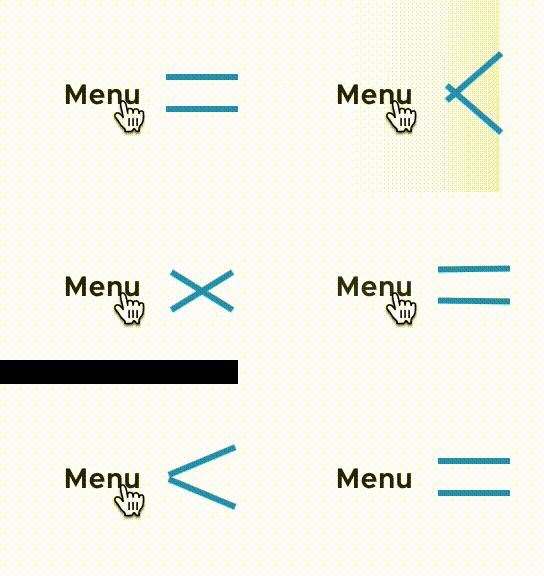
insetfrom the animation, using the performanttransform: translateinstead to position the bars.beforeandafterrules into a single selector, to reduce code and to make it easier to see what the unique properties are forbeforeandafter.beforeandafterto indicate they are pseudo elements, as distinct from pseudo selectors, per the W3C standard. See MDN.I've also attached a GIF showing the slowed-down animation after the above is applied.
Comment #7
andy-blumNot to be super nitpicky, but we still have some jumpiness in here. I think this is from the center bar being toggled between
border-top: 3px solid var(...)andborder-top: 0. We should override just the color of that border so that it doesn't cause layout shift. It might be easier to see if you applyoverflow: hiddento the HTML element to prevent the scrollbar from shifting the right-aligned elements.Comment #8
andy-blumOne other thing I hadn't considered until right now is the hamburger icon in the sticky desktop header. We should make sure that one works as identically as possible.
Comment #9
bronzehedwickThanks @andy-blum!
Good call on removing the layout thrashing. I updated the patch to toggle the mobile menu border color instead of removing it when open.
I also adapted the desktop sticky nav to the same
transformoverinsetapproach as the mobile nav. The main difference now in the animation is that the desktop sticky menu transitionsopacityfor the middle line, where the mobile menu does not, due to it being implemented with pseudo-elements.Comment #10
andy-blumComment #11
bronzehedwickAdding interdiffs. cc @andy-blum.
Comment #12
andy-blumI was still seeing some issues in #9. I think I've addressed them now in this patch.
Comment #13
andy-blumComment #14
_utsavsharma commentedFixed CCF for #12.
Please review.
Comment #15
bronzehedwickReviewed and tested #14 and I find it's working well. Thanks!
Comment #17
andy-blumPatch #14 is passing tests. It may periodically fail unrelated CKEditor5 tests. RTBC per #15.
Comment #18
andy-blumComment #20
bnjmnmTthanks @andy-blum for hopping on a Zoom to walk me through this. This seemed pretty complex but a brief explanation revealed this to be a pretty straghtforward and thoughtful fix.
I'm going to run tests on 10.0.x just in case there are any build tool differences before backporting.