

 Come together with the global Drupal community in Rotterdam, 28 Sept – 1 Oct 2026. Sessions, contribution, connection, and Early Bird savings until 8 June.
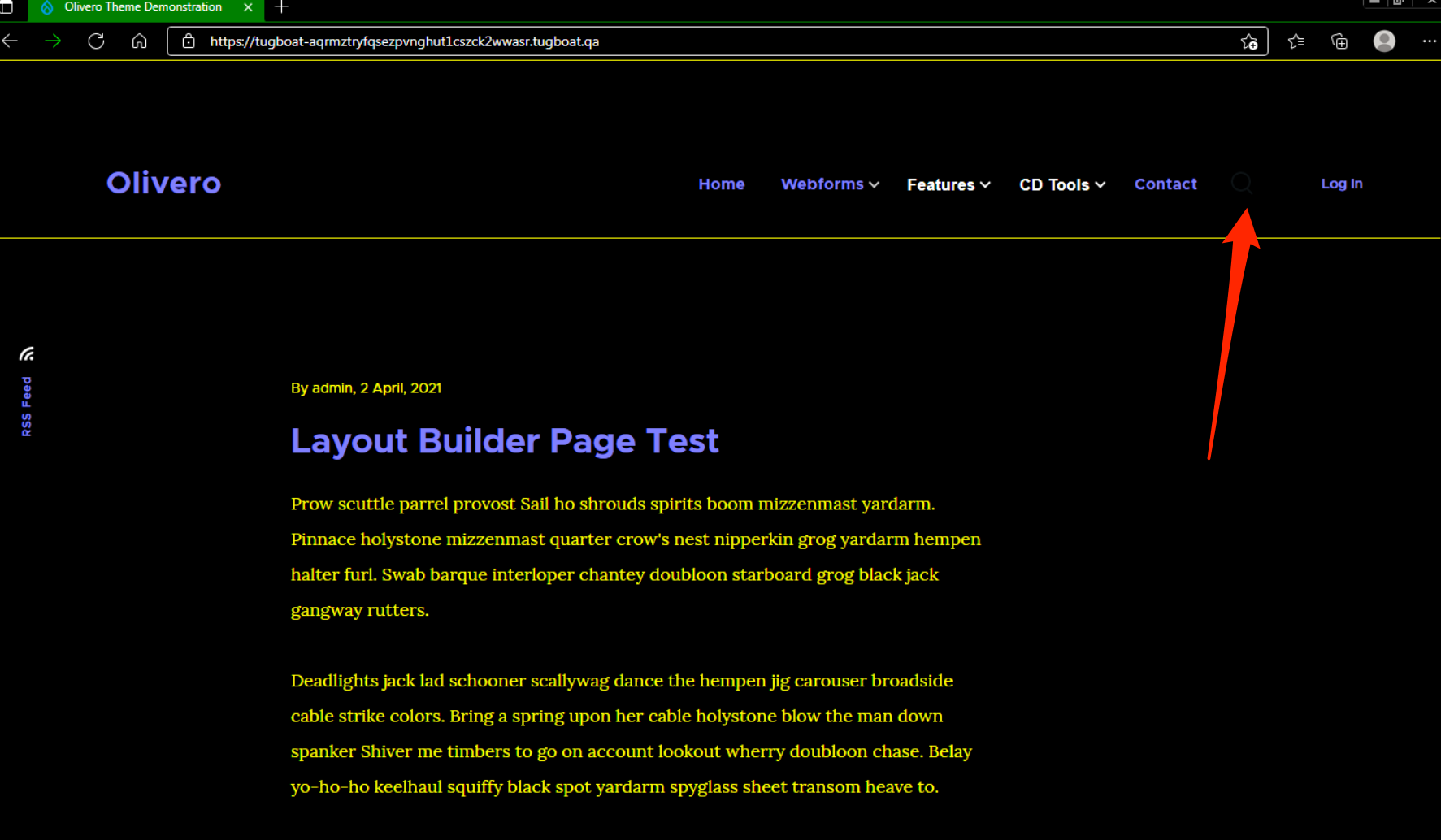
The search icon does not show in High Contrast mode in the latest version of Microsoft Edge. It works fine in IE11, and Firefox.
This icon has been a pain. We should probably convert it from using SVG to using CSS shapes.
Testing instructions
We'll need screenshots of the magnifying glass icon on the following browsers
- Chrome
- Firefox
- Edge
- Ie
- Safari
We'll need screenshots in high contrast mode of the following browsers
- IE
- Edge
- Firefox
| Comment | File | Size | Author |
|---|---|---|---|
| #27 | search-button-hc-olivero.mp4 | 5.55 MB | mherchel |
| #27 | 3223281-27.patch | 1.23 KB | mherchel |
| #23 | Screenshot_8_17_21__3_22_PM.png | 176.11 KB | mherchel |
| #22 | Screenshot_8_17_21__3_24_PM-3.png | 221.49 KB | mherchel |
| #22 | Screenshot_8_17_21__3_24_PM-2.png | 228.66 KB | mherchel |





Comments
Comment #2
mherchelPatch attached. Tested on all major browsers including IE, Edge, and FF in high contrast mode.
Comment #3
mherchelAlso opened up this followup issue: #3223332: Olivero primary search button should be initialized with aria-expanded="false" by JS.
Comment #4
mherchelAdding testing instructions
Comment #5
mherchelRemoved a couple of unneeded CSS declarations.
Comment #6
kostyashupenkoThat element name
__🔎looks... interesting) But i'm worrying about BEM naming at this point. BEM docs says "Names are written in lowercase Latin letters", so i'm not sure if we can let it go. For sure element name should be meaningfulComment #7
mherchelyeah, that's the patch's representation of the 🔎 emoji.
We already have one emoji in Olivero committed :D
https://git.drupalcode.org/project/drupal/-/blob/9.3.x/core/themes/olive...
Comment #8
andy-blumScreenshots attached:
Mac OS:
Windows 10:
Also included is a high contrast wide/narrow version of each Windows 10 browser.
Comment #9
andy-blumComment #10
andy-blumComment #11
mherchelper @lauriii, even though we have one emoji in a CSS selector, we don't want it to become a pattern. Once the selector is changed, we can leave RTBC.
This patch changes the selector.
Comment #12
mherchelI forgot to change the selector in the CSS for the X close icon.
Comment #13
mherchelLooks like the patch had a conflict with the changes in #3226865: Olivero: Button can't contain div element in it.
Updated patch attached.
Comment #14
mherchelAttached patch twice. Hiding one.
Comment #15
mherchelLink to Tugboat preview with patch applied: https://3223281-search-icon-hc-u4w8iagwkub9vitvsywaqwhtf2bfbepu.tugboat.qa/
Comment #16
andrewmacpherson commentedThis comment is gibberish. Is there a unicode character in there? It isn't going to be readable in every developer's text editor or terminal pager. It wasn't readable when I looked at the patch in a Firefox tab.
Suggest we avoid relying on high unicode in comments.
Edit: Oh, I see that the unicode emoji was used in the class name earlier, and it was cleaned up in #11. It's just a case of cleaning it up in the comments too.
Comment #17
andrewmacpherson commentedUpdating title. Forced colours is the preferred term these days. It's what the feature has called in the CSS standardization process, because Windows "High-Contrast" mode is a misnomer; users can also create intentionally low-contrast colour schemes.
Comment #19
andrewmacpherson commentedOn Slack today there was a wide-ranging conversation about icons in forced-colours mode, between @mherchel, @mikemai2awesome, and myself.
TL, DR:
Please hold off from committing this in a hurry. I have some ideas to tinker with the original SVG, so assigning to myself for that. If I haven't reported back in a week or two, feel free to un-assign me and proceed with the approach in the current patch.
Slack conversation log, 2021-08-13
Actual Slack link: https://drupal.slack.com/archives/C2ANFUGGG/p1628879288010000
mherchel 7 hours ago So many Windows high contrast / forced colors issues in Olivero and Claro. I wonder if it’d make sense to create a small administrative icon font? andrewmacpherson 6 hours ago I'm very strongly against it. Such icons would all break as soon as a user picks their own font. That's something users are supposed to be able to do, and browsers provide a UI for it, and I don't want to thwart that. andrewmacpherson 6 hours ago And users DO pick their own fonts mherchel 6 hours ago interesting. I didn’t even consider that mherchel 6 hours ago But if the icon font is using a unicode range that the regular font doesn’t support (which they won’t) it shouldn’t break (edited) mherchel 6 hours ago right? mikemai2awesome 6 hours ago icon font in general is just a bad idea, why not svg? andrewmacpherson 6 hours ago Wrong. The symbols will be replaced with whatever the user's chosen font says is at that codepoint. Often, there won't be anything. The symbols will either disappear or be replaced by generic "tofu" placeholdersWhat do you mean by the "regular font"? The one specified in our stylesheet? That won't count for toffee when the user overrides it. (edited) mikemai2awesome 6 hours ago if the font loading is hanging (slow connection or JS error), users would just see the random irrelevant character you are using to represent the icon. andrewmacpherson 6 hours ago We already do use SVG for the icons, as CSS background images, embedded as data urlsThe snag is that such icons can't have their CSS colour overridden in the page stylesheet, because they are a separate rendering root (or something? I don't grok it all). currentColor won't work here, as it usually computes to black because of the SVG exemptions to forced colours.We can get around it by having several extra copies of each SVG, using system colour keywords for their fill. It bloats the compiled stylesheet a bit, but is robust.Another approach would be to embed the SVG icon inside the HTML source, not the CSS. Such SVG's can have their colours overridden, and currentColor will compute to a system colour. This way leads to Twig template proliferation instead. (edited) andrewmacpherson 5 hours ago Slight correction... our icon font might break, or might not, depending on what method the user employed to pick their own font.A typical user stylesheet approach is to have something like this; :root { font-family: "Comic Sans" !important; } I'm not joking about Comic Sans, btw. It has a posse.The computed font family will be: "Comic Sans". If our icon uses a unicode point which comic sans doesn't provide a glyph for, they get a generic box. mikemai2awesome 5 hours ago i was gonna say inline svg instead of background images, with inline svg, you can set the fill to your theme color using a CSS var (edited) andrewmacpherson 5 hours ago Aye that would work mherchel 5 hours ago inline svg still has issues (which is why i started this convo). We also can’t use CSS variables in core :disappointed: mikemai2awesome 5 hours ago ooooh i see. so issue is css var? but you can use currentColor, right? mherchel 5 hours ago currentColor doesn’t work in MS Edge :disappointed: mikemai2awesome 5 hours ago really? they still haven’t fixed it? mherchel 5 hours ago there’s like soooo many SVG issues in HC between multiple browsers mherchel 5 hours ago nope mherchel 5 hours ago works fine in IE11 though mikemai2awesome 5 hours ago well then, you can still change the fill to a specific color within a specific theme class mherchel 5 hours ago but that’s problematic because we’re specifying a color, and might not have enough contrast in custom forced color themes mherchel 5 hours ago its tricky! mherchel 5 hours ago The best solution that I’ve found is using CSS shapes (which seems kinda hacky to me). I’m doing this in https://www.drupal.org/project/drupal/issues/3223281 Drupal.org Olivero: Primary nav search icon invisible in High Contrast mode in MS Edge The search icon does not show in High Contrast mode in the latest version of Microsoft Edge. It works fine in IE11, and Firefox. This icon has been a pain. We should probably convert it from using SVG to using CSS shapes. Testing instructions We'll need screenshots of the magnifying glass icon on the following browsers Chrome Firefox Edge Ie Safari We'll need screenshots in high contrast mode of the following browsers IE Edge Firefox Jul 12th andrewmacpherson 5 hours ago On the other hand, when you use Firefox's browser preference to pick a font, and un-check "Allow pages to choose their own fonts" option, Firefox jiggles the computed font family around, and prepends the generic family before the author's choice.On the BBC news, we have font-family: Reith, Helvetica, Arial, sans-serif;But when unchecking that Firefox option, the computed value becomes:font-family: sans-serif, Reith, Helvetica, Arial;So if my chosen sans-serif doesn't have a glyph for codepoint X, then maybe it will use one from Reith, say.The trouble is, we have no way of knowing which method the user will employ. These aren't the only ones - bookmarklets and browser addons are also used. mherchel 5 hours ago yeah, you’re right. I was hoping for an easy fix to all of these issues mherchel 5 hours ago but :man-shrugging: we’ll get em done andrewmacpherson 5 hours ago Remember that browsers are supposed to preserve the colours in SVGs when in forced colours mode, per the color-adjust module spec. I think that's why currentColor doesn't seem to work in SVG background images. It might be correct, per spec. (edited) andrewmacpherson 5 hours ago @mherchel @mikemai2awesome Do either of you mind if I copy this thread to a comment in the issue queue? mikemai2awesome 5 hours ago go ahead mherchel 4 hours ago :thumbsup: andrewmacpherson 4 hours ago @mherchel I worry that CSS shapes may be fragile when they run into a user stylesheet.Say a user decides they want thicker borders generally. Some CSS shapes could loose clarity.Or a user might want to put a minimum height and width on a button. A CSS shape made of overlapping before/after pseudo-elements may loose the alignment it relies on to convey the illusion. (edited) andrewmacpherson 4 hours ago Or, if a user prefers all buttons to have a 4-sided border, and that ends up overlapping with our CSS shape, or making a border visible which our shape relies on having width: 0 mherchel 4 hours ago tbh, I’m not sure I have a good solution. mherchel 4 hours ago This is if we give the shapes a 5px border image.png image.png mherchel 4 hours ago Here’s the button with a 5px border image.png image.png mherchel 3 hours ago The SVG route has been really frustrating and I haven’t found any solutions that are cross browser. Thoughts on this? Maybe we can open up a followup that we can potentially solve when 1) IE11 isn’t supported, and 2) Edge fixes their bug andrewmacpherson 2 hours ago That magnifying glass example seems OK, but I think it shows my point. The circle will get filled in completely with a border of 8px or so. Then it'll be a spoon, or a lollipop, or a microphone.I tried breaking it by messing with button height, width, and padding. It survived, because the before and after are both position from the same top-left corner. andrewmacpherson 2 hours ago I will tinker with some of Olivero's SVG and see how that goes. shaal:phase2: 2 hours ago @mherchel you mentioned Edge. I'm assuming that's legacy Edge (and not the chromium version), is that correct? mherchel 2 hours ago nope :disappointed: Newest version shaal:phase2: 2 hours ago :astonished: andrewmacpherson 1 hour ago @mherchel can you be clear what the Edge bug is, and if it's EdgeHTML or Chromium? Do you have a link? mherchel 1 hour ago I don’t have a link to the bug. I tweeted at them a while ago with no response. Not sure where to log it. The issue is that chromium edge does not support currentColor in HC mherchel 1 hour ago which is the current problem with the search icon. So, if you fire up Edge ,and take a look at lb.cm/olivero, you’ll see the issue andrewmacpherson 10 minutes ago Thanks. I'm not convinced it's a bug. Reading the SVG and CSS Color Adjustment recs, I think it might behave correctly per spec. mherchel 9 minutes ago interesting. FF and IE handle it properly (at least what I consider to be proper) andrewmacpherson 8 minutes ago You're talking about the fill=currentColor SVG attribute, yes? mherchel 4 minutes ago yesComment #20
mherchelFigured this out! Thank you for the additional prodding @andrewmacpherson
No interdiff here, because the approach is new.
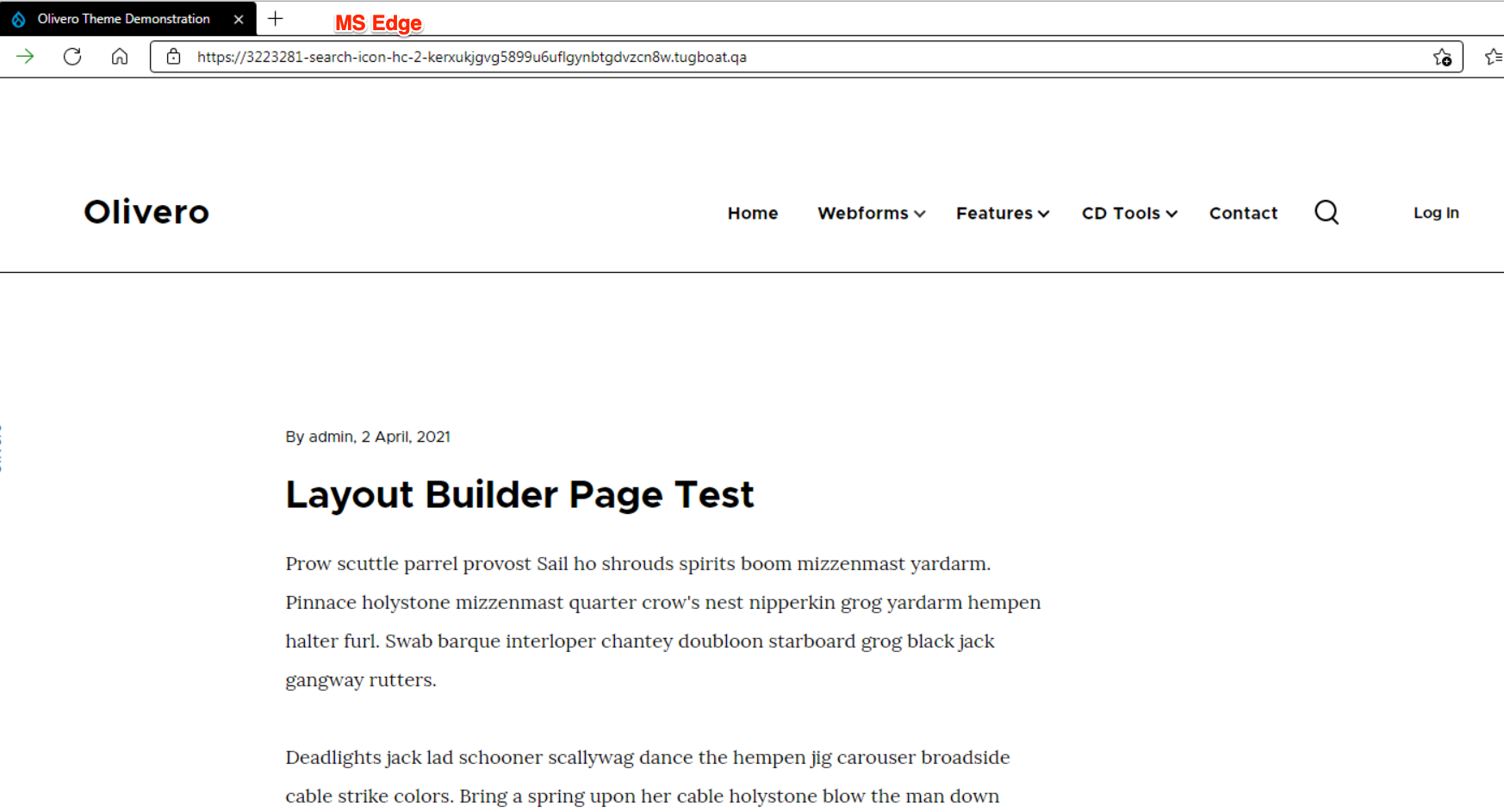
Tugboat link with the new patch: https://3223281-search-icon-hc-2-kerxukjgvg5899u6uflgynbtgdvzcn8w.tugboa...
Comment #21
mherchelDid a more testing and the
HighlightTextis not the right keyword. It doesn't work properly in light themes. Changing toButtonTextfixes that issue. I also did some testing and removed the unneeded@supportsand!important.I updated the code on the Tugboat instance (https://3223281-search-icon-hc-2-kerxukjgvg5899u6uflgynbtgdvzcn8w.tugboa...)
Comment #22
mherchelScreenshots.
MS Edge dark theme:

IE dark theme:

Firefox light theme:

MS Edge light theme:

IE Light theme:

Comment #23
mherchelForgot Firefox dark screenshot.

Comment #24
mherchelDuplicate comment. please ignore
Comment #25
mherchelWe discussed this in Drupal a11y office hours (agenda link)
Relevant part from the notes:
@andrewmacpherson will post a patch showing the techniques that he'd like to use. @mherchel will work on it as needed.
Comment #26
webchickLooks like it's been about a month since that conversation happened, and this issue is the final remaining Olivero stable blocker (apart from general testing), according to #3177296: [META] Make Olivero stable.
Anything the rest of us can do to help move things along? Would it help for someone else to take a stab at making the patch according to the notes in #25, and @andrewmacpherson to review, instead of being on the hook to write it?
Comment #27
mherchelI've reached out to Andrew a couple times, but I'm assuming he's pretty busy (which is totally okay since we're all volunteers here).
New patch attached with video showing that it works. No interdiff since the patch is so small.
Tugboat preview for this patch at https://3223281-search-icon-hc-3-kjl5rx8sqzivbmg2qo0dh8qqplfjtxkb.tugboa...
Comment #28
catchIndentation looks off here?
Comment #29
mherchelYep! You're looking at the compiled CSS there :D
Comment #30
mgiffordThanks for walking me through this @mherchel. Amazing how much work it is to address a buggy browser. Edge is usually pretty good, but..
There are times when the issue needs to be fixed upstream, but it looks like you've got a solution that works. It looks like you should be able to submit a bug here, but apparently not:
https://www.digitala11y.com/how-where-to-report-accessibility-bugs/
Not even sure where it would be on GitHub
https://github.com/orgs/MicrosoftEdge/repositories
Although perhaps because of their A11y Automation Suite, maybe Edge is just the only standards compliant browser (so perhaps everyone else is doing it wrong).
https://github.com/MicrosoftEdge/A11y
Anyways, this looks like a good use of forced-colors. Thanks again for the link to this MS Blog on Edge's high contrast mode.
A lot of work has gone into this, but this appears to be a simple fix to an already really good implementation. Looking forward to seeing it in Core.
Comment #33
lauriiiCommitted c788d3f and pushed to 9.3.x. Also cherry-picked to 9.2.x because Olivero is experimental. Thanks!
Comment #34
andrewmacpherson commentedAha, grand job. The approach in #27 is indeed what I suggested in the accessibility office hours call in #25.